Printers

Brother HL-L3240CDW Colour Laser Printer with WiFi and Mobile Printing

Key features:

  • Print Speed: 26 ppm
  • Print Resolution: 2400x600 DPI
  • Connectivity: Ethernet USB & WiFi
  • Dimensions: 401 x 410 x 444 mm
  • Mobile Printing Capability
See full description
  • Print Color Colored
  • Consumable Toner
  • See all
286 75
287 Coins 287 Coins
Delivery Thu, 23 Jul - Mon, 27 Jul
38,00 € shipping cost
Delivery Fri, 31 Jul - Tue, 04 Aug
32,00 € shipping cost
Do you want it with 33,00 € shipping?
Sent from Greece
From Allaboutoffice 4.7 (42)
What if it breaks?

You're covered by the statutory 2-year warranty. Contact us and we'll handle the entire process with the store, ensuring your issue is resolved with prompt support through a repair, replacement, or refund.

What if I change my mind?

No problem, as long as it's within 14 days. We'll come pick it up or you can choose the Skroutz Point that suits you, completely free for up to 2 times per year, and we'll refund your money. Get Skroutz Plus to enjoy unlimited free returns.

You can select additional services after adding the product to the cart.

Description

Description

The Brother HL-L3240CDW is a print-only device. It uses laser technology and can print both in color and black and white. Through an ethernet cable or WiFi, it can connect to your network, allowing you to print from any computer or mobile device remotely, without the need for a USB cable connection.

Maximum Flexibility

With USB, Ethernet, and Wi-Fi connectivity, the HL-L3240CDW printer is ready to connect to any device or network, offering even greater flexibility. Take advantage of mobile device printing with the Brother HL-L3240CDW.

Silent without compromises

Being quiet no longer means being slow! All models in the series print quietly at full speed with less than 50dB, while you work without interruption.

Consumables

  • Standard Yield Toner TN-248
  • High Yield Toner TN-248XL

Manufacturer

See full description

Specifications

Specifications

Technical Specifications

Type
Laser
Ink Tank
No
Printing Colour
Colored
Exclusively for Photos
No
All in one
No
Consumable
Toner
Memory
256 MB
Paper Size
A4, A5, A6, B5, B6, Legal, Letter
Compatibility
Linux, Mac, Windows
Features
Mobile Printing Capability
Connectivity
Ethernet, USB, Wi-Fi
Colour
White

Printer

Monochrome printing speed
26 ppm
Colour printing speed
26 ppm
Maximum Print Resolution
2400x600 DPI

Dimensions

Height
401 mm
Width
410 mm
Length
444 mm

Important information

Specifications are collected from official manufacturer websites. Please verify the specifications before proceeding with your final purchase. If you notice any problem you can report it here.

See all specifications

Reviews (7)

Reviews

  1. 4
  2. 2
  3. 3 stars
    0
  4. 1
  5. 1 star
    0
Review this product
  • Print Quality
  • Installation process
  • Construction quality
  • Print speed
  • Value for money

Reviews by our members

  • autokini
    2
    2 out of 5 members found this review helpful

    I don't know if I made a mistake in the installation, but it has frustrated me. Many prints get stuck on "data receiving" and to print them, I have to cancel them, both from the printer's keyboard and from the computer, and resend them again. I had a hope that it might be because I had connected it only via wifi. I also connected it with a cable - which was not included in the box - but still the same issues.

    Translated from Greek ·
    Did you find this review helpful?
  • mitsakoss13
    5
    4 out of 4 members found this review helpful

    Verified purchase

    The printer is indeed very good and fast. I connected it very easily with my laptop and mobile. The mobile app helped me a lot. It is very user-friendly and responds immediately.

    Translated from Greek ·
    Did you find this review helpful?
  • octap
    5
    62 out of 62 members found this review helpful

    [05/01/2024] The first laser (and color) printer I buy for personal office use at home. In the few weeks I've had it and with whatever I've tried to print, I am very satisfied (this does not include photos of course, because that's not the specialty of lasers and I didn't get it for that). It's a new model—I think it was introduced in November (2023)—so it hasn't circulated much yet for there to be options in compatible toners, but I imagine they will appear on the market very soon. I don't know if I'll use non-original toners; for now, I honestly enjoy the convenience, immediacy, quality, and of course the speed that a laser printer offers, and if the same experience continues without problems, the transition is truly worth it 100%.
    To add, although this is a matter of taste, its design, this block without unnecessary elements and exaggerations, is just right. Also, it fits more easily and blends perfectly into a bookshelf without looking like something irregular—I don't know how else to explain it.

    UPDATE (4 months after purchase):
    1) Huge convenience with the "deep sleep" mode, where you don't need to turn it on and off, it's on standby and whenever you want to print, it's there to receive the command, do a very short warm-up (10 sec? however long it is, it's not an issue at all) for the first print and then for quite a while it's ready to print immediately. Power consumption in "deep sleep" mode is 0.4W, nothing.
    2) Now compatible toners have appeared, so that's also an option. Personally, I don't know what I'll do when the time comes. The toner level shows about 75% with the original toners, which are for 1000 prints. I still have time....
    3) It's a huge deal not to deal with clogged nozzles/bad prints, as I did for years and years with (expensive) inkjet printers I had until recently. You send a print and you consistently get what you expect, perfect prints for documents....

    UPDATE 27/05/2025 (17 months after purchase)
    About a month ago I had to change the black toner. I finally decided to try my luck with compatibles, and got a set of all colors (about 100 Euros for the 4 toners [instead of 400 Euros for the originals?]). Now, the printer status shows that the black is not original, which means that if I need something (warranty for example) it will probably be recorded in the system that I used a non-original. As for printing, for the first 10-20 pages there was a gray "shadow" almost over the entire surface of the paper besides the print I sent. Disappointing.....BUT fortunately immediately after it disappeared and the prints are just fine, no difference from what I always got.
    Soon it will be time to use the color toners. Then I believe it will be more obvious if there is a significant difference in printing.
    If you are wondering when you should change the toners, Brother says "when you see that the prints are not coming out well," so don't rush as soon as you get a message that a toner is finished.

    UPDATE 19/07/2025 (19 months after purchase)
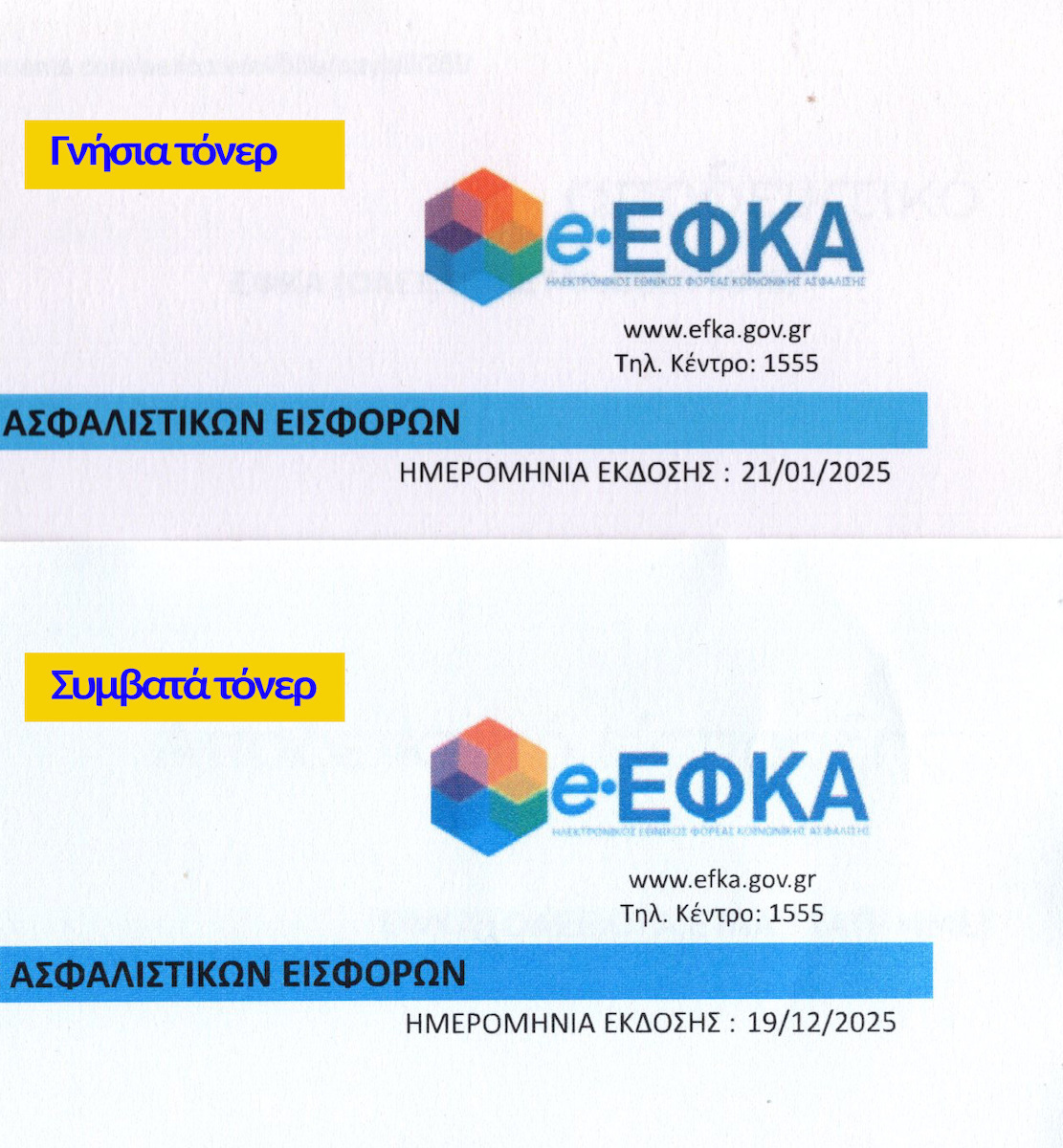
    I decided to replace the color toners as well. As for print fidelity, everything is very good. I notice a deviation in color rendering which is not insignificant BUT, since my prints are not photos, it doesn't affect me much. For example, it's not a big deal if in the ENFIA printout the blue isn't exactly as it appears on the computer screen, while with the originals I hadn't noticed the slightest deviation. Keep that in mind. I imagine most people print documents like I do, so the 300 Euros someone saves compared to the originals is a huge deal. If instead of 100-120 Euros per toner they cost 50, I would consider it, but now, no way. Let them keep the original toners. I've uploaded scans of prints.

    UPDATE 12/10/2025 (21 months after purchase)
    The prints show a slight misalignment in the 3 primary colors and I suspect it's not the non-original toners' fault, but exactly because it has detected and displays them as non-original in the settings, so with what we've seen from HP, I'm stuck on the idea that it deliberately doesn't print perfectly as before. For office prints, it's STILL JUST FINE and more than fine. Especially for 100 Euros instead of 400 Euros for toners... the printing is PERFECT!

    *In the photo I've uploaded, the fact that one paper is somewhat pinkish has nothing to do with the printing, it's just a different brand of paper. If I hadn't put them side by side, I wouldn't have noticed that one of the two is pinkish.

    UPDATE 31/05/2026 (2 years and 5 months after purchase)
    13 months with compatible toners, NO operational problem. The printer works COMPLETELY without issues, it's always in "deep sleep" mode as I've mentioned above, which means you don't have to bother, whenever you want to print something you just press "print" and even if I hadn't printed for quite a while or days (or even a month), it starts up, does a warm-up for a few, very few, seconds and you ALWAYS get what you expect without any fuss, without clogged nozzles, without any headache.

    Translated from Greek ·
    Did you find this review helpful?
  • 5
    0 out of 1 members found this review helpful

    Verified purchase

    So far so good.

    Translated from Greek ·
    Did you find this review helpful?
  • 4
    2 out of 2 members found this review helpful

    Verified purchase

    Very good machine, quite high quality.
    Just each ink costs 130 euros each.

    Translated from Greek ·
    Did you find this review helpful?
  • Verified purchase

  • Verified purchase

    • Print Quality
    • Installation process
    • Construction quality
    • Value for money
    • Print speed
  • I don't know if I made a mistake in the installation, but it has frustrated me. Many prints get stuck on "data receiving" and to print them, I have to cancel them, both from the printer's keyboard and from the computer, and resend them again. I had a hope that it might be because I had connected it only via wifi. I also connected it with a cable - which was not included in the box - but still the same issues.

    Translated from Greek ·
    2
  • The printer is indeed very good and fast. I connected it very easily with my laptop and mobile. The mobile app helped me a lot. It is very user-friendly and responds immediately.

    Translated from Greek ·
    4
  • [05/01/2024] The first laser (and color) printer I buy for personal office use at home. In the few weeks I've had it and with whatever I've tried to print, I am very satisfied (this does not include photos of course, because that's not the specialty of lasers and I didn't get it for that). It's a new model—I think it was introduced in November (2023)—so it hasn't circulated much yet for there to be options in compatible toners, but I imagine they will appear on the market very soon. I don't know if I'll use non-original toners; for now, I honestly enjoy the convenience, immediacy, quality, and of course the speed that a laser printer offers, and if the same experience continues without problems, the transition is truly worth it 100%.
    To add, although this is a matter of taste, its design, this block without unnecessary elements and exaggerations, is just right. Also, it fits more easily and blends perfectly into a bookshelf without looking like something irregular—I don't know how else to explain it.

    UPDATE (4 months after purchase):
    1) Huge convenience with the "deep sleep" mode, where you don't need to turn it on and off, it's on standby and whenever you want to print, it's there to receive the command, do a very short warm-up (10 sec? however long it is, it's not an issue at all) for the first print and then for quite a while it's ready to print immediately. Power consumption in "deep sleep" mode is 0.4W, nothing.
    2) Now compatible toners have appeared, so that's also an option. Personally, I don't know what I'll do when the time comes. The toner level shows about 75% with the original toners, which are for 1000 prints. I still have time....
    3) It's a huge deal not to deal with clogged nozzles/bad prints, as I did for years and years with (expensive) inkjet printers I had until recently. You send a print and you consistently get what you expect, perfect prints for documents....

    UPDATE 27/05/2025 (17 months after purchase)
    About a month ago I had to change the black toner. I finally decided to try my luck with compatibles, and got a set of all colors (about 100 Euros for the 4 toners [instead of 400 Euros for the originals?]). Now, the printer status shows that the black is not original, which means that if I need something (warranty for example) it will probably be recorded in the system that I used a non-original. As for printing, for the first 10-20 pages there was a gray "shadow" almost over the entire surface of the paper besides the print I sent. Disappointing.....BUT fortunately immediately after it disappeared and the prints are just fine, no difference from what I always got.
    Soon it will be time to use the color toners. Then I believe it will be more obvious if there is a significant difference in printing.
    If you are wondering when you should change the toners, Brother says "when you see that the prints are not coming out well," so don't rush as soon as you get a message that a toner is finished.

    UPDATE 19/07/2025 (19 months after purchase)
    I decided to replace the color toners as well. As for print fidelity, everything is very good. I notice a deviation in color rendering which is not insignificant BUT, since my prints are not photos, it doesn't affect me much. For example, it's not a big deal if in the ENFIA printout the blue isn't exactly as it appears on the computer screen, while with the originals I hadn't noticed the slightest deviation. Keep that in mind. I imagine most people print documents like I do, so the 300 Euros someone saves compared to the originals is a huge deal. If instead of 100-120 Euros per toner they cost 50, I would consider it, but now, no way. Let them keep the original toners. I've uploaded scans of prints.

    UPDATE 12/10/2025 (21 months after purchase)
    The prints show a slight misalignment in the 3 primary colors and I suspect it's not the non-original toners' fault, but exactly because it has detected and displays them as non-original in the settings, so with what we've seen from HP, I'm stuck on the idea that it deliberately doesn't print perfectly as before. For office prints, it's STILL JUST FINE and more than fine. Especially for 100 Euros instead of 400 Euros for toners... the printing is PERFECT!

    *In the photo I've uploaded, the fact that one paper is somewhat pinkish has nothing to do with the printing, it's just a different brand of paper. If I hadn't put them side by side, I wouldn't have noticed that one of the two is pinkish.

    UPDATE 31/05/2026 (2 years and 5 months after purchase)
    13 months with compatible toners, NO operational problem. The printer works COMPLETELY without issues, it's always in "deep sleep" mode as I've mentioned above, which means you don't have to bother, whenever you want to print something you just press "print" and even if I hadn't printed for quite a while or days (or even a month), it starts up, does a warm-up for a few, very few, seconds and you ALWAYS get what you expect without any fuss, without clogged nozzles, without any headache.

    Translated from Greek ·
    62
  • So far so good.

    Translated from Greek ·
    0
  • Very good machine, quite high quality.
    Just each ink costs 130 euros each.

    Translated from Greek ·
    2
  • See all
Questions (4)

Questions

102 users have this product and can help you

Ask for the product
synaptic.activity

Διάβασα κριτική για απόκλιση/μη ευθυγράμμιση των διαφορετικών χρωμάτων όταν χρησιμοποιηθεί διαφορετική μαρκα τόνερ. Αυτο δεν διορθώνεται με την αντίστοιχη ρύθμιση για χειροκίνητη ευθυγράμμιση? Ευχαριστώ!

See all questions (4)

Description & Specifications

The Brother HL-L3240CDW is a print-only device. It uses laser technology and can print both in color and black and white. Through an ethernet cable or WiFi, it can connect to your network, allowing you to print from any computer or mobile device remotely, without the need for a USB cable connection.

Maximum Flexibility

With USB, Ethernet, and Wi-Fi connectivity, the HL-L3240CDW printer is ready to connect to any device or network, offering even greater flexibility. Take advantage of mobile device printing with the Brother HL-L3240CDW.

Silent without compromises

Being quiet no longer means being slow! All models in the series print quietly at full speed with less than 50dB, while you work without interruption.

Consumables

  • Standard Yield Toner TN-248
  • High Yield Toner TN-248XL

Manufacturer

Technical Specifications

Type
Laser
Ink Tank
No
Printing Colour
Colored
Exclusively for Photos
No
All in one
No
Consumable
Toner
Memory
256 MB
Paper Size
A4, A5, A6, B5, B6, Legal, Letter
Compatibility
Linux, Mac, Windows
Features
Mobile Printing Capability
Connectivity
Ethernet, USB, Wi-Fi
Colour
White

Printer

Monochrome printing speed
26 ppm
Colour printing speed
26 ppm
Maximum Print Resolution
2400x600 DPI

Dimensions

Height
401 mm
Width
410 mm
Length
444 mm

Important information

Specifications are collected from official manufacturer websites. Please verify the specifications before proceeding with your final purchase. If you notice any problem you can report it here.

Reviews (7)

  1. 4
  2. 2
  3. 3 stars
    0
  4. 1
  5. 1 star
    0
Review this product
  • Print Quality
  • Installation process
  • Construction quality
  • Print speed
  • Value for money

Reviews by our members

  • autokini
    2
    2 out of 5 members found this review helpful

    I don't know if I made a mistake in the installation, but it has frustrated me. Many prints get stuck on "data receiving" and to print them, I have to cancel them, both from the printer's keyboard and from the computer, and resend them again. I had a hope that it might be because I had connected it only via wifi. I also connected it with a cable - which was not included in the box - but still the same issues.

    Translated from Greek ·
    Did you find this review helpful?
  • mitsakoss13
    5
    4 out of 4 members found this review helpful

    Verified purchase

    The printer is indeed very good and fast. I connected it very easily with my laptop and mobile. The mobile app helped me a lot. It is very user-friendly and responds immediately.

    Translated from Greek ·
    Did you find this review helpful?
  • octap
    5
    62 out of 62 members found this review helpful

    [05/01/2024] The first laser (and color) printer I buy for personal office use at home. In the few weeks I've had it and with whatever I've tried to print, I am very satisfied (this does not include photos of course, because that's not the specialty of lasers and I didn't get it for that). It's a new model—I think it was introduced in November (2023)—so it hasn't circulated much yet for there to be options in compatible toners, but I imagine they will appear on the market very soon. I don't know if I'll use non-original toners; for now, I honestly enjoy the convenience, immediacy, quality, and of course the speed that a laser printer offers, and if the same experience continues without problems, the transition is truly worth it 100%.
    To add, although this is a matter of taste, its design, this block without unnecessary elements and exaggerations, is just right. Also, it fits more easily and blends perfectly into a bookshelf without looking like something irregular—I don't know how else to explain it.

    UPDATE (4 months after purchase):
    1) Huge convenience with the "deep sleep" mode, where you don't need to turn it on and off, it's on standby and whenever you want to print, it's there to receive the command, do a very short warm-up (10 sec? however long it is, it's not an issue at all) for the first print and then for quite a while it's ready to print immediately. Power consumption in "deep sleep" mode is 0.4W, nothing.
    2) Now compatible toners have appeared, so that's also an option. Personally, I don't know what I'll do when the time comes. The toner level shows about 75% with the original toners, which are for 1000 prints. I still have time....
    3) It's a huge deal not to deal with clogged nozzles/bad prints, as I did for years and years with (expensive) inkjet printers I had until recently. You send a print and you consistently get what you expect, perfect prints for documents....

    UPDATE 27/05/2025 (17 months after purchase)
    About a month ago I had to change the black toner. I finally decided to try my luck with compatibles, and got a set of all colors (about 100 Euros for the 4 toners [instead of 400 Euros for the originals?]). Now, the printer status shows that the black is not original, which means that if I need something (warranty for example) it will probably be recorded in the system that I used a non-original. As for printing, for the first 10-20 pages there was a gray "shadow" almost over the entire surface of the paper besides the print I sent. Disappointing.....BUT fortunately immediately after it disappeared and the prints are just fine, no difference from what I always got.
    Soon it will be time to use the color toners. Then I believe it will be more obvious if there is a significant difference in printing.
    If you are wondering when you should change the toners, Brother says "when you see that the prints are not coming out well," so don't rush as soon as you get a message that a toner is finished.

    UPDATE 19/07/2025 (19 months after purchase)
    I decided to replace the color toners as well. As for print fidelity, everything is very good. I notice a deviation in color rendering which is not insignificant BUT, since my prints are not photos, it doesn't affect me much. For example, it's not a big deal if in the ENFIA printout the blue isn't exactly as it appears on the computer screen, while with the originals I hadn't noticed the slightest deviation. Keep that in mind. I imagine most people print documents like I do, so the 300 Euros someone saves compared to the originals is a huge deal. If instead of 100-120 Euros per toner they cost 50, I would consider it, but now, no way. Let them keep the original toners. I've uploaded scans of prints.

    UPDATE 12/10/2025 (21 months after purchase)
    The prints show a slight misalignment in the 3 primary colors and I suspect it's not the non-original toners' fault, but exactly because it has detected and displays them as non-original in the settings, so with what we've seen from HP, I'm stuck on the idea that it deliberately doesn't print perfectly as before. For office prints, it's STILL JUST FINE and more than fine. Especially for 100 Euros instead of 400 Euros for toners... the printing is PERFECT!

    *In the photo I've uploaded, the fact that one paper is somewhat pinkish has nothing to do with the printing, it's just a different brand of paper. If I hadn't put them side by side, I wouldn't have noticed that one of the two is pinkish.

    UPDATE 31/05/2026 (2 years and 5 months after purchase)
    13 months with compatible toners, NO operational problem. The printer works COMPLETELY without issues, it's always in "deep sleep" mode as I've mentioned above, which means you don't have to bother, whenever you want to print something you just press "print" and even if I hadn't printed for quite a while or days (or even a month), it starts up, does a warm-up for a few, very few, seconds and you ALWAYS get what you expect without any fuss, without clogged nozzles, without any headache.

    Translated from Greek ·
    Did you find this review helpful?
  • 5
    0 out of 1 members found this review helpful

    Verified purchase

    So far so good.

    Translated from Greek ·
    Did you find this review helpful?
  • 4
    2 out of 2 members found this review helpful

    Verified purchase

    Very good machine, quite high quality.
    Just each ink costs 130 euros each.

    Translated from Greek ·
    Did you find this review helpful?
  • Verified purchase

  • Verified purchase

    • Print Quality
    • Installation process
    • Construction quality
    • Value for money
    • Print speed
  • I don't know if I made a mistake in the installation, but it has frustrated me. Many prints get stuck on "data receiving" and to print them, I have to cancel them, both from the printer's keyboard and from the computer, and resend them again. I had a hope that it might be because I had connected it only via wifi. I also connected it with a cable - which was not included in the box - but still the same issues.

    Translated from Greek ·
    2
  • The printer is indeed very good and fast. I connected it very easily with my laptop and mobile. The mobile app helped me a lot. It is very user-friendly and responds immediately.

    Translated from Greek ·
    4
  • [05/01/2024] The first laser (and color) printer I buy for personal office use at home. In the few weeks I've had it and with whatever I've tried to print, I am very satisfied (this does not include photos of course, because that's not the specialty of lasers and I didn't get it for that). It's a new model—I think it was introduced in November (2023)—so it hasn't circulated much yet for there to be options in compatible toners, but I imagine they will appear on the market very soon. I don't know if I'll use non-original toners; for now, I honestly enjoy the convenience, immediacy, quality, and of course the speed that a laser printer offers, and if the same experience continues without problems, the transition is truly worth it 100%.
    To add, although this is a matter of taste, its design, this block without unnecessary elements and exaggerations, is just right. Also, it fits more easily and blends perfectly into a bookshelf without looking like something irregular—I don't know how else to explain it.

    UPDATE (4 months after purchase):
    1) Huge convenience with the "deep sleep" mode, where you don't need to turn it on and off, it's on standby and whenever you want to print, it's there to receive the command, do a very short warm-up (10 sec? however long it is, it's not an issue at all) for the first print and then for quite a while it's ready to print immediately. Power consumption in "deep sleep" mode is 0.4W, nothing.
    2) Now compatible toners have appeared, so that's also an option. Personally, I don't know what I'll do when the time comes. The toner level shows about 75% with the original toners, which are for 1000 prints. I still have time....
    3) It's a huge deal not to deal with clogged nozzles/bad prints, as I did for years and years with (expensive) inkjet printers I had until recently. You send a print and you consistently get what you expect, perfect prints for documents....

    UPDATE 27/05/2025 (17 months after purchase)
    About a month ago I had to change the black toner. I finally decided to try my luck with compatibles, and got a set of all colors (about 100 Euros for the 4 toners [instead of 400 Euros for the originals?]). Now, the printer status shows that the black is not original, which means that if I need something (warranty for example) it will probably be recorded in the system that I used a non-original. As for printing, for the first 10-20 pages there was a gray "shadow" almost over the entire surface of the paper besides the print I sent. Disappointing.....BUT fortunately immediately after it disappeared and the prints are just fine, no difference from what I always got.
    Soon it will be time to use the color toners. Then I believe it will be more obvious if there is a significant difference in printing.
    If you are wondering when you should change the toners, Brother says "when you see that the prints are not coming out well," so don't rush as soon as you get a message that a toner is finished.

    UPDATE 19/07/2025 (19 months after purchase)
    I decided to replace the color toners as well. As for print fidelity, everything is very good. I notice a deviation in color rendering which is not insignificant BUT, since my prints are not photos, it doesn't affect me much. For example, it's not a big deal if in the ENFIA printout the blue isn't exactly as it appears on the computer screen, while with the originals I hadn't noticed the slightest deviation. Keep that in mind. I imagine most people print documents like I do, so the 300 Euros someone saves compared to the originals is a huge deal. If instead of 100-120 Euros per toner they cost 50, I would consider it, but now, no way. Let them keep the original toners. I've uploaded scans of prints.

    UPDATE 12/10/2025 (21 months after purchase)
    The prints show a slight misalignment in the 3 primary colors and I suspect it's not the non-original toners' fault, but exactly because it has detected and displays them as non-original in the settings, so with what we've seen from HP, I'm stuck on the idea that it deliberately doesn't print perfectly as before. For office prints, it's STILL JUST FINE and more than fine. Especially for 100 Euros instead of 400 Euros for toners... the printing is PERFECT!

    *In the photo I've uploaded, the fact that one paper is somewhat pinkish has nothing to do with the printing, it's just a different brand of paper. If I hadn't put them side by side, I wouldn't have noticed that one of the two is pinkish.

    UPDATE 31/05/2026 (2 years and 5 months after purchase)
    13 months with compatible toners, NO operational problem. The printer works COMPLETELY without issues, it's always in "deep sleep" mode as I've mentioned above, which means you don't have to bother, whenever you want to print something you just press "print" and even if I hadn't printed for quite a while or days (or even a month), it starts up, does a warm-up for a few, very few, seconds and you ALWAYS get what you expect without any fuss, without clogged nozzles, without any headache.

    Translated from Greek ·
    62
  • So far so good.

    Translated from Greek ·
    0
  • Very good machine, quite high quality.
    Just each ink costs 130 euros each.

    Translated from Greek ·
    2
  • See all
286,75 €
38,00 € 43,00 €   shipping cost