
Αν κάνεις αρχικές ρυθμίσεις στο τρόπο λειτουργίας μέσω WiFi , έπειτα χρειάζεται ίντερνετ η μπορεί να λειτουργήσει αυτόνομα?
Με βάση την τοποθεσία παράδοσης υπολογίζονται το κόστος μεταφορικών και η ταχύτητα παράδοσης.

Ο διπολικός διακόπτης ράγας Coolseer, μοντέλο COL-SSW2-63, αποτελεί μια εξαιρετική επιλογή για γενική χρήση, διευκολύνοντας την περάτωση ηλεκτρικών εγκαταστάσεων με ασφάλεια και ευελιξία. Χάρη στη...
Ο διπολικός διακόπτης ράγας Coolseer, μοντέλο COL-SSW2-63, αποτελεί μια εξαιρετική επιλογή για γενική χρήση, διευκολύνοντας την περάτωση ηλεκτρικών εγκαταστάσεων με ασφάλεια και ευελιξία. Χάρη στη δυνατότητα σύνδεσής του μέσω WiFi, σου προσφέρει τη δυνατότητα απομακρυσμένου ελέγχου των ηλεκτρικών συσκευών σου, προσθέτοντας άνεση και καινοτομία στη...
Ο διπολικός διακόπτης ράγας Coolseer, μοντέλο COL-SSW2-63, αποτελεί μια εξαιρετική επιλογή για γενική χρήση, διευκολύνοντας την περάτωση ηλεκτρικών εγκαταστάσεων με ασφάλεια και ευελιξία. Χάρη στη δυνατότητα σύνδεσής του μέσω WiFi, σου προσφέρει τη δυνατότητα απομακρυσμένου ελέγχου των ηλεκτρικών συσκευών σου, προσθέτοντας άνεση και καινοτομία στη καθημερινότητά σου.
Τα δεδομένα αυτά συλλέγονται από τις επίσημες σελίδες των προϊόντων. Επιβεβαίωσε τα στοιχεία πριν προχωρήσεις στην τελική αγορά. Εάν παρατηρήσεις κάποιο πρόβλημα μπορείς να το αναφέρεις εδώ.

Το πήρα για έλεγχο θερμοσίφωνα απο μακριά , προηγούμενως είχα ένα sonoffάκι συνδεδεμένο όμως με ρελέ ισχύος. Αυτό το έβαλα χωρίς ρελέ ισχύος , δεν ξέρω αν έκανα καλά η όχι , η προδιαγραφή του είναι για 63Α και τραβάει 17 άρα θεωρητικα είναι ασφαλές , αν τώρα λαμπαδιάσουμε θα το ακούσετε στις ειδήσεις. Λειτουργεί πάντως μια χαρά και δείχνει ένδειξη και ιστορικό κατανάλωσης ρεύματος. Εξαιρετικά βολικό να κλείνει σε χρόνο που του ορίζεις εσύ από τη στιγμή που το ανοίξεις, έτσι δεν ξεχνάς ανοιχτό το θερμοσίφωνα. Απλά αυτό δεν το επιλέγεις απο τις ρυθμίσεις της συσκευής αλλά το φτιάχνεις σαν σενάριο από το smart life (ή tuya). Επίσης το συνέδεσα παράλληλα για να μπορώ να ανοίγω θερμοσύφωνα και με τον διακόπτη που προϋπήρχε.
το χρησιμοποιώ εδώ και 1 εβδομάδα
Το έχω βάλει στο smartlife app.
Χρειάστηκε ένα reset το ρούτερ για κάποιο λόγο. Κατόπιν, η σύνδεση έγινε πολύ εύκολα στο app.
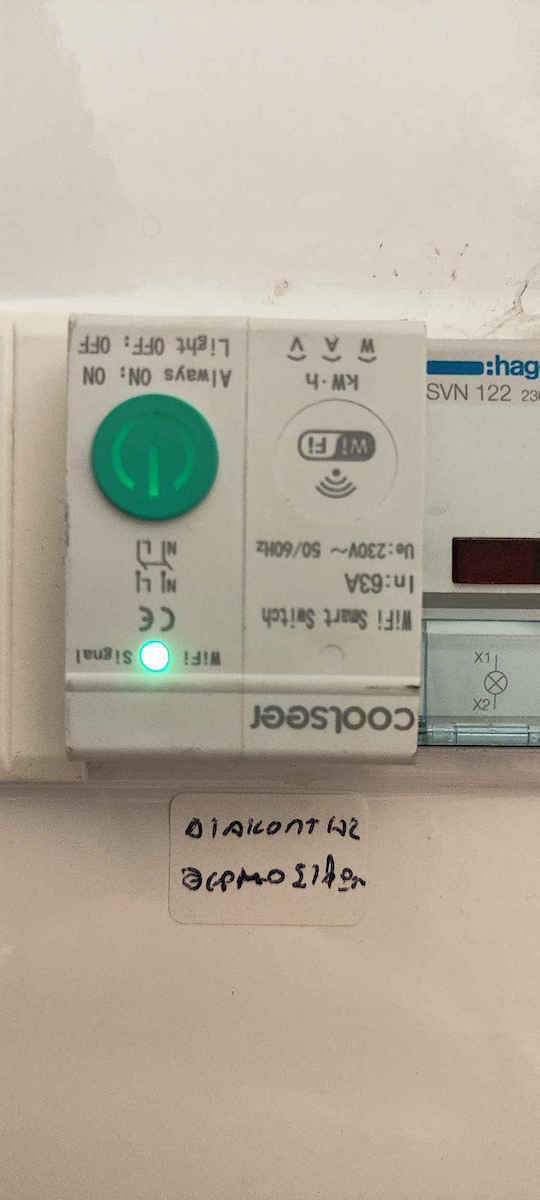
Στη τοποθέτηση έκανα αλλαγή ένα ρελέ της Hager το οποίο έχει το in στην αντίθετη μεριά από τον coolseer. οπότε έπρεπε να βάλω το smart ρελέ ανάποδα στο πίνακα γιατί τα καλώδια δεν έφταναν να τα γυρίσω. μπήκε μια χαρά στη ράγα.
Λειτουργεί πολύ σωστά προς το παρόν και smart αλλά και από το κουμπί του στο πίνακα.
Το τρέχω κυρίως με φωνητική εντολή και σενάριο από την Alexa (Alexa, prepare a bath)
Το σενάριο τον ανάβει για 20 λεπτα, τον σβήνει, και κατόπιν στέλνει push ειδοποίηση στο τηλέφωνο και ειδοποίηση από το echo pop/dot
Έτσι ετοιμάζει νερό χωρίς να είναι πολύ καυτό αλλά ν είναι άνετο για ενα όχι βιαστικό μπάνιο για ένα άτομο.
θα φτιάξω και δεύτερο σενάριο για "καυτό μπάνιο" (Alexa prepare a hot bath) ενός ατόμου, αλλά και ένα ακόμα το οποίο να ετοιμάζει νερό για μπάνιο 2 ατόμων. (alexa, prepare a bath for two)
θεωρώ ότι ανάλογα το μέγεθος του θερμοσίφωνα και τις ανάγκες του καθενός ο χρόνος μπορεί να μεταβάλλεται και θα βοηθήσει πάρα πολύ στην οικονομία ρεύματος.
φεύγω από τη δουλειά διαφορετική ώρα συνήθως οπότε δεν μου είναι χρήσιμος ο προγραμματισμός με ώρα. αλλά με φωνητική εντολή στο τηλέφωνο φεύγοντας απο τη δουλειά της λέω να ζεστάνει το νερό. Είχα συνηθίσει σε σπίτι με αέριο να έχω ανά πάσα στιγμή ζεστό νερό και τώρα με τον ηλεκτρικό θερμοσίφωνα σε άλλο σπίτι μου έλυσε το πρόβλημα να περιμένεις το νερό να ζεστάνει η να ξεχνάς το θερμοσίφωνα ανοιχτό.
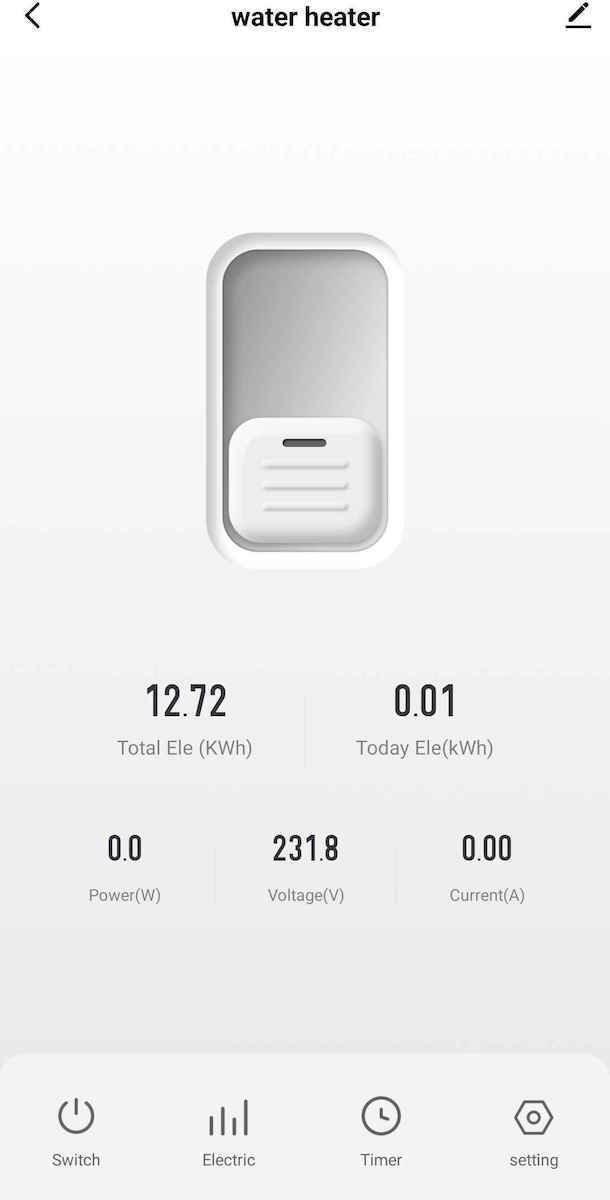
Επίσης έχει στατιστικά και ένδειξη κατανάλωσης.
Είμαι πολύ ικανοποιημένος από την αγορά. φαίνεται πολύ ποιοτικός.
Προτείνω
Θα χρειαστείτε ηλεκτρολόγο για την εγκατάσταση εκτός κι αν είστε γνώστης. Οπότε υπολογίστε κι αυτό το κόστος. Τοποθετήθηκε για έλεγχο θερμοσίφωνα. Οι οδηγίες αν και αγγλικές πιο πολύ μπερδεύουν παρά βοηθάνε. Αρχικά παίζει μόνο με wifi 2.4Ghz προσοχή και με αυτό. Μετά θα πρέπει να βάλετε την εφαρμογή Smart life στο κινητό. Προσοχή το pairing γίνεται αρχικά με αυτή , εγώ νόμιζα ότι πατάω το κουμπί και κάνω pair με το router (WPS). Αντίθετα πρέπει να πάτε το κινητό κοντά να την ανακαλύψει με bluetooth και στη συνέχεια να δώσετε τον κωδικό του wifi που είστε εκείνη την ώρα συνδεδεμένοι με το κινητό. Ετσι θα ενημερωθεί και η ασφάλεια με αυτόν τον κωδικό και θα συνδεθεί στο wifi. Μετά τα πράγματα είναι πιο απλά εμφανίζεται στην εφαρμογή σαν συσκευή (της αλλάζετε το κινέζικο όνομα) και μπορείτε να την ανοιγοκλείνετε από εκεί ή να βάλετε χρονιδιακόπτη να αναβοσβήνει μόνη της με πρόγραμμα , με ανατολή ή δύση του ήλιου (θα θέλει πρόσβαση στην τοποθεσία σας την ώρα της ρύθμισης), η να κάνει on σε άλλη ώρα και off σε άλλη ώρα κ.λπ. Ο χρονοδιακόπτης (δηλαδή να σβήσει σε Χ λεπτά από την ώρα που την ανάβετε κι όχι σε συγκεκριμένη ώρα) είναι για έναν αγνωστο λόγο στις ρυθμίσεις, αντί για το κουμπί timer αλλα τουλάχιστον δουλευει και δείχνει ζωντανά τον υπόλοιπο χρόνο που μένει πριν σβήσει. Οπότε πέτυχα αυτό που ήθελα να μην ξεχνάω τον θερμοσίφωνα ανοικτό και να τον ανάβω από μακριά. Εγώ την πήρα σε προσφορά 28€. -1 αστέρι για τις οδηγίες που μπερδεύουν και γιατί δεν παίζει με wifi 5Ghz. Επίσης αν θέλετε πάνω από μία συσκευή (κινητό) να ενεργοποιεί πρέπει να κάνετε share τη συγκεκριμένη ελεγχόμενη σε άλλο άτομο που έχει την εφαρμογή ή να προσθέσετε σαν δεύτερο λογαριασμό τον άλλο χρήστη , δεν μπορείτε να προσθέσετε απλά με το δεύτερο κινητό την συσκευή στην εφαρμογή, θα ακυρώσει το πρώτο
Επιβεβαιωμένη αγορά
Πάρα πολύ καλό το εγκατέστησα και λειτούργησε με τη μία
Επιβεβαιωμένη αγορά
Το πήρα για έλεγχο θερμοσίφωνα απο μακριά , προηγούμενως είχα ένα sonoffάκι συνδεδεμένο όμως με ρελέ ισχύος. Αυτό το έβαλα χωρίς ρελέ ισχύος , δεν ξέρω αν έκανα καλά η όχι , η προδιαγραφή του είναι για 63Α και τραβάει 17 άρα θεωρητικα είναι ασφαλές , αν τώρα λαμπαδιάσουμε θα το ακούσετε στις ειδήσεις. Λειτουργεί πάντως μια χαρά και δείχνει ένδειξη και ιστορικό κατανάλωσης ρεύματος. Εξαιρετικά βολικό να κλείνει σε χρόνο που του ορίζεις εσύ από τη στιγμή που το ανοίξεις, έτσι δεν ξεχνάς ανοιχτό το θερμοσίφωνα. Απλά αυτό δεν το επιλέγεις απο τις ρυθμίσεις της συσκευής αλλά το φτιάχνεις σαν σενάριο από το smart life (ή tuya). Επίσης το συνέδεσα παράλληλα για να μπορώ να ανοίγω θερμοσύφωνα και με τον διακόπτη που προϋπήρχε.
το χρησιμοποιώ εδώ και 1 εβδομάδα
Το έχω βάλει στο smartlife app.
Χρειάστηκε ένα reset το ρούτερ για κάποιο λόγο. Κατόπιν, η σύνδεση έγινε πολύ εύκολα στο app.
Στη τοποθέτηση έκανα αλλαγή ένα ρελέ της Hager το οποίο έχει το in στην αντίθετη μεριά από τον coolseer. οπότε έπρεπε να βάλω το smart ρελέ ανάποδα στο πίνακα γιατί τα καλώδια δεν έφταναν να τα γυρίσω. μπήκε μια χαρά στη ράγα.
Λειτουργεί πολύ σωστά προς το παρόν και smart αλλά και από το κουμπί του στο πίνακα.
Το τρέχω κυρίως με φωνητική εντολή και σενάριο από την Alexa (Alexa, prepare a bath)
Το σενάριο τον ανάβει για 20 λεπτα, τον σβήνει, και κατόπιν στέλνει push ειδοποίηση στο τηλέφωνο και ειδοποίηση από το echo pop/dot
Έτσι ετοιμάζει νερό χωρίς να είναι πολύ καυτό αλλά ν είναι άνετο για ενα όχι βιαστικό μπάνιο για ένα άτομο.
θα φτιάξω και δεύτερο σενάριο για "καυτό μπάνιο" (Alexa prepare a hot bath) ενός ατόμου, αλλά και ένα ακόμα το οποίο να ετοιμάζει νερό για μπάνιο 2 ατόμων. (alexa, prepare a bath for two)
θεωρώ ότι ανάλογα το μέγεθος του θερμοσίφωνα και τις ανάγκες του καθενός ο χρόνος μπορεί να μεταβάλλεται και θα βοηθήσει πάρα πολύ στην οικονομία ρεύματος.
φεύγω από τη δουλειά διαφορετική ώρα συνήθως οπότε δεν μου είναι χρήσιμος ο προγραμματισμός με ώρα. αλλά με φωνητική εντολή στο τηλέφωνο φεύγοντας απο τη δουλειά της λέω να ζεστάνει το νερό. Είχα συνηθίσει σε σπίτι με αέριο να έχω ανά πάσα στιγμή ζεστό νερό και τώρα με τον ηλεκτρικό θερμοσίφωνα σε άλλο σπίτι μου έλυσε το πρόβλημα να περιμένεις το νερό να ζεστάνει η να ξεχνάς το θερμοσίφωνα ανοιχτό.
Επίσης έχει στατιστικά και ένδειξη κατανάλωσης.
Είμαι πολύ ικανοποιημένος από την αγορά. φαίνεται πολύ ποιοτικός.
Προτείνω
Θα χρειαστείτε ηλεκτρολόγο για την εγκατάσταση εκτός κι αν είστε γνώστης. Οπότε υπολογίστε κι αυτό το κόστος. Τοποθετήθηκε για έλεγχο θερμοσίφωνα. Οι οδηγίες αν και αγγλικές πιο πολύ μπερδεύουν παρά βοηθάνε. Αρχικά παίζει μόνο με wifi 2.4Ghz προσοχή και με αυτό. Μετά θα πρέπει να βάλετε την εφαρμογή Smart life στο κινητό. Προσοχή το pairing γίνεται αρχικά με αυτή , εγώ νόμιζα ότι πατάω το κουμπί και κάνω pair με το router (WPS). Αντίθετα πρέπει να πάτε το κινητό κοντά να την ανακαλύψει με bluetooth και στη συνέχεια να δώσετε τον κωδικό του wifi που είστε εκείνη την ώρα συνδεδεμένοι με το κινητό. Ετσι θα ενημερωθεί και η ασφάλεια με αυτόν τον κωδικό και θα συνδεθεί στο wifi. Μετά τα πράγματα είναι πιο απλά εμφανίζεται στην εφαρμογή σαν συσκευή (της αλλάζετε το κινέζικο όνομα) και μπορείτε να την ανοιγοκλείνετε από εκεί ή να βάλετε χρονιδιακόπτη να αναβοσβήνει μόνη της με πρόγραμμα , με ανατολή ή δύση του ήλιου (θα θέλει πρόσβαση στην τοποθεσία σας την ώρα της ρύθμισης), η να κάνει on σε άλλη ώρα και off σε άλλη ώρα κ.λπ. Ο χρονοδιακόπτης (δηλαδή να σβήσει σε Χ λεπτά από την ώρα που την ανάβετε κι όχι σε συγκεκριμένη ώρα) είναι για έναν αγνωστο λόγο στις ρυθμίσεις, αντί για το κουμπί timer αλλα τουλάχιστον δουλευει και δείχνει ζωντανά τον υπόλοιπο χρόνο που μένει πριν σβήσει. Οπότε πέτυχα αυτό που ήθελα να μην ξεχνάω τον θερμοσίφωνα ανοικτό και να τον ανάβω από μακριά. Εγώ την πήρα σε προσφορά 28€. -1 αστέρι για τις οδηγίες που μπερδεύουν και γιατί δεν παίζει με wifi 5Ghz. Επίσης αν θέλετε πάνω από μία συσκευή (κινητό) να ενεργοποιεί πρέπει να κάνετε share τη συγκεκριμένη ελεγχόμενη σε άλλο άτομο που έχει την εφαρμογή ή να προσθέσετε σαν δεύτερο λογαριασμό τον άλλο χρήστη , δεν μπορείτε να προσθέσετε απλά με το δεύτερο κινητό την συσκευή στην εφαρμογή, θα ακυρώσει το πρώτο
Πάρα πολύ καλό το εγκατέστησα και λειτούργησε με τη μία
27 χρήστες έχουν το προϊόν και μπορούν να σε βοηθήσουν
Ρώτησε για το προϊόν
Αν κάνεις αρχικές ρυθμίσεις στο τρόπο λειτουργίας μέσω WiFi , έπειτα χρειάζεται ίντερνετ η μπορεί να λειτουργήσει αυτόνομα?
Ο διπολικός διακόπτης ράγας Coolseer, μοντέλο COL-SSW2-63, αποτελεί μια εξαιρετική επιλογή για γενική χρήση, διευκολύνοντας την περάτωση ηλεκτρικών εγκαταστάσεων με ασφάλεια και ευελιξία. Χάρη στη δυνατότητα σύνδεσής του μέσω WiFi, σου προσφέρει τη δυνατότητα απομακρυσμένου ελέγχου των ηλεκτρικών συσκευών σου, προσθέτοντας άνεση και καινοτομία στη καθημερινότητά σου.
Τα δεδομένα αυτά συλλέγονται από τις επίσημες σελίδες των προϊόντων. Επιβεβαίωσε τα στοιχεία πριν προχωρήσεις στην τελική αγορά. Εάν παρατηρήσεις κάποιο πρόβλημα μπορείς να το αναφέρεις εδώ.
Το πήρα για έλεγχο θερμοσίφωνα απο μακριά , προηγούμενως είχα ένα sonoffάκι συνδεδεμένο όμως με ρελέ ισχύος. Αυτό το έβαλα χωρίς ρελέ ισχύος , δεν ξέρω αν έκανα καλά η όχι , η προδιαγραφή του είναι για 63Α και τραβάει 17 άρα θεωρητικα είναι ασφαλές , αν τώρα λαμπαδιάσουμε θα το ακούσετε στις ειδήσεις. Λειτουργεί πάντως μια χαρά και δείχνει ένδειξη και ιστορικό κατανάλωσης ρεύματος. Εξαιρετικά βολικό να κλείνει σε χρόνο που του ορίζεις εσύ από τη στιγμή που το ανοίξεις, έτσι δεν ξεχνάς ανοιχτό το θερμοσίφωνα. Απλά αυτό δεν το επιλέγεις απο τις ρυθμίσεις της συσκευής αλλά το φτιάχνεις σαν σενάριο από το smart life (ή tuya). Επίσης το συνέδεσα παράλληλα για να μπορώ να ανοίγω θερμοσύφωνα και με τον διακόπτη που προϋπήρχε.
το χρησιμοποιώ εδώ και 1 εβδομάδα
Το έχω βάλει στο smartlife app.
Χρειάστηκε ένα reset το ρούτερ για κάποιο λόγο. Κατόπιν, η σύνδεση έγινε πολύ εύκολα στο app.
Στη τοποθέτηση έκανα αλλαγή ένα ρελέ της Hager το οποίο έχει το in στην αντίθετη μεριά από τον coolseer. οπότε έπρεπε να βάλω το smart ρελέ ανάποδα στο πίνακα γιατί τα καλώδια δεν έφταναν να τα γυρίσω. μπήκε μια χαρά στη ράγα.
Λειτουργεί πολύ σωστά προς το παρόν και smart αλλά και από το κουμπί του στο πίνακα.
Το τρέχω κυρίως με φωνητική εντολή και σενάριο από την Alexa (Alexa, prepare a bath)
Το σενάριο τον ανάβει για 20 λεπτα, τον σβήνει, και κατόπιν στέλνει push ειδοποίηση στο τηλέφωνο και ειδοποίηση από το echo pop/dot
Έτσι ετοιμάζει νερό χωρίς να είναι πολύ καυτό αλλά ν είναι άνετο για ενα όχι βιαστικό μπάνιο για ένα άτομο.
θα φτιάξω και δεύτερο σενάριο για "καυτό μπάνιο" (Alexa prepare a hot bath) ενός ατόμου, αλλά και ένα ακόμα το οποίο να ετοιμάζει νερό για μπάνιο 2 ατόμων. (alexa, prepare a bath for two)
θεωρώ ότι ανάλογα το μέγεθος του θερμοσίφωνα και τις ανάγκες του καθενός ο χρόνος μπορεί να μεταβάλλεται και θα βοηθήσει πάρα πολύ στην οικονομία ρεύματος.
φεύγω από τη δουλειά διαφορετική ώρα συνήθως οπότε δεν μου είναι χρήσιμος ο προγραμματισμός με ώρα. αλλά με φωνητική εντολή στο τηλέφωνο φεύγοντας απο τη δουλειά της λέω να ζεστάνει το νερό. Είχα συνηθίσει σε σπίτι με αέριο να έχω ανά πάσα στιγμή ζεστό νερό και τώρα με τον ηλεκτρικό θερμοσίφωνα σε άλλο σπίτι μου έλυσε το πρόβλημα να περιμένεις το νερό να ζεστάνει η να ξεχνάς το θερμοσίφωνα ανοιχτό.
Επίσης έχει στατιστικά και ένδειξη κατανάλωσης.
Είμαι πολύ ικανοποιημένος από την αγορά. φαίνεται πολύ ποιοτικός.
Προτείνω
Θα χρειαστείτε ηλεκτρολόγο για την εγκατάσταση εκτός κι αν είστε γνώστης. Οπότε υπολογίστε κι αυτό το κόστος. Τοποθετήθηκε για έλεγχο θερμοσίφωνα. Οι οδηγίες αν και αγγλικές πιο πολύ μπερδεύουν παρά βοηθάνε. Αρχικά παίζει μόνο με wifi 2.4Ghz προσοχή και με αυτό. Μετά θα πρέπει να βάλετε την εφαρμογή Smart life στο κινητό. Προσοχή το pairing γίνεται αρχικά με αυτή , εγώ νόμιζα ότι πατάω το κουμπί και κάνω pair με το router (WPS). Αντίθετα πρέπει να πάτε το κινητό κοντά να την ανακαλύψει με bluetooth και στη συνέχεια να δώσετε τον κωδικό του wifi που είστε εκείνη την ώρα συνδεδεμένοι με το κινητό. Ετσι θα ενημερωθεί και η ασφάλεια με αυτόν τον κωδικό και θα συνδεθεί στο wifi. Μετά τα πράγματα είναι πιο απλά εμφανίζεται στην εφαρμογή σαν συσκευή (της αλλάζετε το κινέζικο όνομα) και μπορείτε να την ανοιγοκλείνετε από εκεί ή να βάλετε χρονιδιακόπτη να αναβοσβήνει μόνη της με πρόγραμμα , με ανατολή ή δύση του ήλιου (θα θέλει πρόσβαση στην τοποθεσία σας την ώρα της ρύθμισης), η να κάνει on σε άλλη ώρα και off σε άλλη ώρα κ.λπ. Ο χρονοδιακόπτης (δηλαδή να σβήσει σε Χ λεπτά από την ώρα που την ανάβετε κι όχι σε συγκεκριμένη ώρα) είναι για έναν αγνωστο λόγο στις ρυθμίσεις, αντί για το κουμπί timer αλλα τουλάχιστον δουλευει και δείχνει ζωντανά τον υπόλοιπο χρόνο που μένει πριν σβήσει. Οπότε πέτυχα αυτό που ήθελα να μην ξεχνάω τον θερμοσίφωνα ανοικτό και να τον ανάβω από μακριά. Εγώ την πήρα σε προσφορά 28€. -1 αστέρι για τις οδηγίες που μπερδεύουν και γιατί δεν παίζει με wifi 5Ghz. Επίσης αν θέλετε πάνω από μία συσκευή (κινητό) να ενεργοποιεί πρέπει να κάνετε share τη συγκεκριμένη ελεγχόμενη σε άλλο άτομο που έχει την εφαρμογή ή να προσθέσετε σαν δεύτερο λογαριασμό τον άλλο χρήστη , δεν μπορείτε να προσθέσετε απλά με το δεύτερο κινητό την συσκευή στην εφαρμογή, θα ακυρώσει το πρώτο
Επιβεβαιωμένη αγορά
Πάρα πολύ καλό το εγκατέστησα και λειτούργησε με τη μία
Επιβεβαιωμένη αγορά
Το πήρα για έλεγχο θερμοσίφωνα απο μακριά , προηγούμενως είχα ένα sonoffάκι συνδεδεμένο όμως με ρελέ ισχύος. Αυτό το έβαλα χωρίς ρελέ ισχύος , δεν ξέρω αν έκανα καλά η όχι , η προδιαγραφή του είναι για 63Α και τραβάει 17 άρα θεωρητικα είναι ασφαλές , αν τώρα λαμπαδιάσουμε θα το ακούσετε στις ειδήσεις. Λειτουργεί πάντως μια χαρά και δείχνει ένδειξη και ιστορικό κατανάλωσης ρεύματος. Εξαιρετικά βολικό να κλείνει σε χρόνο που του ορίζεις εσύ από τη στιγμή που το ανοίξεις, έτσι δεν ξεχνάς ανοιχτό το θερμοσίφωνα. Απλά αυτό δεν το επιλέγεις απο τις ρυθμίσεις της συσκευής αλλά το φτιάχνεις σαν σενάριο από το smart life (ή tuya). Επίσης το συνέδεσα παράλληλα για να μπορώ να ανοίγω θερμοσύφωνα και με τον διακόπτη που προϋπήρχε.
το χρησιμοποιώ εδώ και 1 εβδομάδα
Το έχω βάλει στο smartlife app.
Χρειάστηκε ένα reset το ρούτερ για κάποιο λόγο. Κατόπιν, η σύνδεση έγινε πολύ εύκολα στο app.
Στη τοποθέτηση έκανα αλλαγή ένα ρελέ της Hager το οποίο έχει το in στην αντίθετη μεριά από τον coolseer. οπότε έπρεπε να βάλω το smart ρελέ ανάποδα στο πίνακα γιατί τα καλώδια δεν έφταναν να τα γυρίσω. μπήκε μια χαρά στη ράγα.
Λειτουργεί πολύ σωστά προς το παρόν και smart αλλά και από το κουμπί του στο πίνακα.
Το τρέχω κυρίως με φωνητική εντολή και σενάριο από την Alexa (Alexa, prepare a bath)
Το σενάριο τον ανάβει για 20 λεπτα, τον σβήνει, και κατόπιν στέλνει push ειδοποίηση στο τηλέφωνο και ειδοποίηση από το echo pop/dot
Έτσι ετοιμάζει νερό χωρίς να είναι πολύ καυτό αλλά ν είναι άνετο για ενα όχι βιαστικό μπάνιο για ένα άτομο.
θα φτιάξω και δεύτερο σενάριο για "καυτό μπάνιο" (Alexa prepare a hot bath) ενός ατόμου, αλλά και ένα ακόμα το οποίο να ετοιμάζει νερό για μπάνιο 2 ατόμων. (alexa, prepare a bath for two)
θεωρώ ότι ανάλογα το μέγεθος του θερμοσίφωνα και τις ανάγκες του καθενός ο χρόνος μπορεί να μεταβάλλεται και θα βοηθήσει πάρα πολύ στην οικονομία ρεύματος.
φεύγω από τη δουλειά διαφορετική ώρα συνήθως οπότε δεν μου είναι χρήσιμος ο προγραμματισμός με ώρα. αλλά με φωνητική εντολή στο τηλέφωνο φεύγοντας απο τη δουλειά της λέω να ζεστάνει το νερό. Είχα συνηθίσει σε σπίτι με αέριο να έχω ανά πάσα στιγμή ζεστό νερό και τώρα με τον ηλεκτρικό θερμοσίφωνα σε άλλο σπίτι μου έλυσε το πρόβλημα να περιμένεις το νερό να ζεστάνει η να ξεχνάς το θερμοσίφωνα ανοιχτό.
Επίσης έχει στατιστικά και ένδειξη κατανάλωσης.
Είμαι πολύ ικανοποιημένος από την αγορά. φαίνεται πολύ ποιοτικός.
Προτείνω
Θα χρειαστείτε ηλεκτρολόγο για την εγκατάσταση εκτός κι αν είστε γνώστης. Οπότε υπολογίστε κι αυτό το κόστος. Τοποθετήθηκε για έλεγχο θερμοσίφωνα. Οι οδηγίες αν και αγγλικές πιο πολύ μπερδεύουν παρά βοηθάνε. Αρχικά παίζει μόνο με wifi 2.4Ghz προσοχή και με αυτό. Μετά θα πρέπει να βάλετε την εφαρμογή Smart life στο κινητό. Προσοχή το pairing γίνεται αρχικά με αυτή , εγώ νόμιζα ότι πατάω το κουμπί και κάνω pair με το router (WPS). Αντίθετα πρέπει να πάτε το κινητό κοντά να την ανακαλύψει με bluetooth και στη συνέχεια να δώσετε τον κωδικό του wifi που είστε εκείνη την ώρα συνδεδεμένοι με το κινητό. Ετσι θα ενημερωθεί και η ασφάλεια με αυτόν τον κωδικό και θα συνδεθεί στο wifi. Μετά τα πράγματα είναι πιο απλά εμφανίζεται στην εφαρμογή σαν συσκευή (της αλλάζετε το κινέζικο όνομα) και μπορείτε να την ανοιγοκλείνετε από εκεί ή να βάλετε χρονιδιακόπτη να αναβοσβήνει μόνη της με πρόγραμμα , με ανατολή ή δύση του ήλιου (θα θέλει πρόσβαση στην τοποθεσία σας την ώρα της ρύθμισης), η να κάνει on σε άλλη ώρα και off σε άλλη ώρα κ.λπ. Ο χρονοδιακόπτης (δηλαδή να σβήσει σε Χ λεπτά από την ώρα που την ανάβετε κι όχι σε συγκεκριμένη ώρα) είναι για έναν αγνωστο λόγο στις ρυθμίσεις, αντί για το κουμπί timer αλλα τουλάχιστον δουλευει και δείχνει ζωντανά τον υπόλοιπο χρόνο που μένει πριν σβήσει. Οπότε πέτυχα αυτό που ήθελα να μην ξεχνάω τον θερμοσίφωνα ανοικτό και να τον ανάβω από μακριά. Εγώ την πήρα σε προσφορά 28€. -1 αστέρι για τις οδηγίες που μπερδεύουν και γιατί δεν παίζει με wifi 5Ghz. Επίσης αν θέλετε πάνω από μία συσκευή (κινητό) να ενεργοποιεί πρέπει να κάνετε share τη συγκεκριμένη ελεγχόμενη σε άλλο άτομο που έχει την εφαρμογή ή να προσθέσετε σαν δεύτερο λογαριασμό τον άλλο χρήστη , δεν μπορείτε να προσθέσετε απλά με το δεύτερο κινητό την συσκευή στην εφαρμογή, θα ακυρώσει το πρώτο
Πάρα πολύ καλό το εγκατέστησα και λειτούργησε με τη μία