AIO CPU Liquid Cooling

Arctic Liquid Freezer II 360 A-RGB CPU Water Cooling Triple Fan 120mm for Socket AM4/AM5/1700/1200/115x

Key features:

  • Triple Fan
  • Fan Dimension: 120 mm
  • RGB Lighting
  • Fan Speed: 1800 rpm
  • Air Flow: 48,8 cfm
See full description
  • See all
This product does not exist at Skroutz anymore

Description

Description

Future-Proof Compatibility

At the end of 2022, AMD released the AM5 socket, the successor to its popular AM4 platform. Because all mechanical dimensions remain identical, we can guarantee the compatibility of ARCTIC coolers with AMD's new processors.

Additionally, all coolers shipped by ARCTIC are already compatible with Intel's Alder Lake and Raptor Lake LGA1700 processors. Coolers purchased from resellers, however, may still have been shipped without the corresponding accessories.

Optimised for AMD Ryzen

AMD has been using a new multi-die layout for its high-end AM4 processors for a few generations now. In these processors, the hotspot is not centered by the IHS (Integrated Heat Spreader). 

To still allow for optimal heat dissipation, Arctic Liquid developed a special mounting kit for the Liquid Freezer II that allows the cold plate to be placed directly over the hotspot of the CPU. AMD's upcoming 7000 series AM5 processors also come with multi-die layouts and can therefore benefit from the Liquid Freezer II's unique offset mounting.

Create Your Own Look

The Liquid Freezer II A-RGB combines the Liquid Freezer II series' efficient, proprietary PWM water pump with ARCTIC's new A-RGB fans optimised for static pressure. This allows for perfectly matched, multi-color lighting effects. With the help of the advanced A-RGB Gen.2 technology and customizable LEDs, you can design your system with your very own look.

Manufacturer

See full description

Specifications

Specifications

Main Specifications

Socket
1150/1151/1155/1156, 1200, 2011-3, 2066, 1700, AM4, AM5
Radiator Size
Triple Fan
Fan Dimension
120 mm
Colour
Black
Tube Length
-
Radiator Material
-
Lighting
RGB
Pump Display
-

Technical Specifications

Fan Speed (max)
1800 rpm
Air Flow
48.8 cfm
Thermal Design Power (TDP)
-
Air Pressure
-
Bearing Type
-

Important information

Specifications are collected from official manufacturer websites. Please verify the specifications before proceeding with your final purchase. If you notice any problem you can report it here.

See all specifications

Reviews (9)

Reviews

  1. 8
  2. 4 stars
    0
  3. 1
  4. 2 stars
    0
  5. 1 star
    0
Review this product
  • Effective cooling
  • Value for money
  • Construction quality
  • Silent
  • Installation
  • Refrigerator volume

Reviews photos

Reviews photos
Reviews photos
Reviews photos
Reviews photos
Reviews photos
Reviews photos

Reviews by our members

  • blackben
    5
    1 out of 1 members found this review helpful

    Verified purchase

    It has been installed on Ryzen 9 7900x without OC.
    Main use is davinci resolve with heavy 4K 200mbs+ projects and many loaded effects. In idle, the CPU is at 45 degrees max.
    In workflow/timeline, the temperature goes up to 55-60 max and in rendering it reaches 80-85 max.

    Although it is a big cooler, it fit comfortably in Asus TUF GT502

    Translated from Greek ·
    • Effective cooling
    • Installation
    • Construction quality
    • Value for money
    • Moderate noise
    • Refrigerator volume
    Did you find this review helpful?
  • AlexSrg
    5
    0 out of 1 members found this review helpful

    Verified purchase

    Marginally overkill for the 14600KF, but if you push it and overclock it, it can reach up to 80 degrees after a lot of stress. In the middle of a game, if you open something else, for example, it will spike to 80 and then drop again. When idle, it stays at around 30 degrees. It's a good choice, you can also use it for an i5 with a 240mm

    Translated from Greek ·
    • Effective cooling
    • Construction quality
    • Value for money
    • Installation
    • Moderate noise
    • Refrigerator volume
    Did you find this review helpful?
  • Epidemic Studios
    5
    45 out of 47 members found this review helpful

    Testing on a Ryzen 5600X that I had without OC or Undervolt and with PBO enabled, in a "closed" case and at a room temperature of 26.5-27C and 29C inside the case - tests with 2 thermal sensors.
    Comparison with the same CPU - and with 3 other AIOs that I tested.

    Temperatures:

    Arctic Liquid Freezer II 360 A-RGB (TRIPLE COOLER)
    IDLE: 36.1 min
    PRIME 95 and OCCT Extreme bench (30mins STRESS TEST) MAX: 72C
    WARZONE MAX 67C High Details Setting

    Thermaltake TH360 ARGB (TRIPLE COOLER)
    IDLE: 38 min
    PRIME 95 and OCCT Extreme bench (30mins STRESS TEST) MAX: 76C
    WARZONE MAX 74C High Details Setting

    CoolerMaster Masterliquid ML240L V2 (DOUBLE COOLER)
    IDLE: 39 min
    PRIME 95 and OCCT Extreme bench (30mins STRESS TEST) MAX: 75C
    WARZONE MAX 75C High Details Setting

    RAIJINTEK Orcus 360 Core Edition (TRIPLE COOLER)
    IDLE: 44 min
    PRIME 95 & OCCT Extreme bench (30mins STRESS TEST) MAX: 79C
    WARZONE MAX 83C High Details Setting
    __________________________________________________________________________________

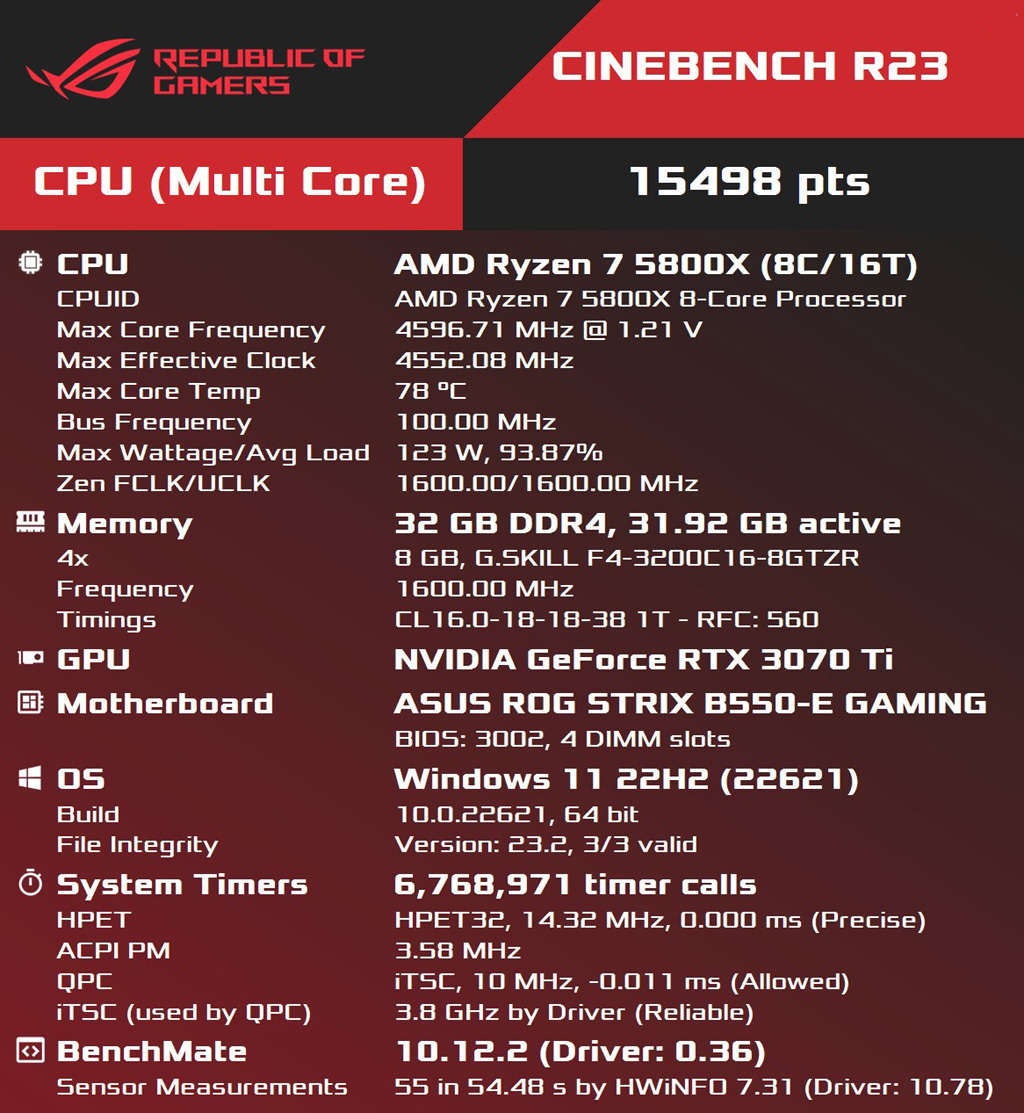
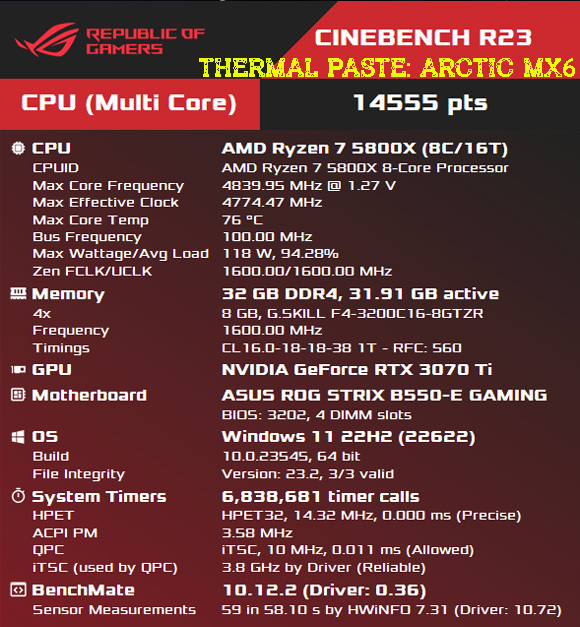
    Now I have it on the 5800x which is a real heater CPU, even more than the 5900x. I have no problem turning off PBO of course and without seeing a noticeable performance drop.
    (Although on the 5800x, Undervolting is a one-way street if you don't want to see 80c-85c).

    I will analyze the quality of this AIO even though it is well known.
    I have written it again - in terms of quality, efficiency, performance, and noise, it is one of the best on the market, in the TOP5. In other areas, it comes first.
    Installation is easy for someone who knows. Be careful with the bracket. Look better on YouTube how they assemble it, do not put the screws in the wrong holes.
    The only downside I found is that the Arctic website does not work many times to see the online manual in pdf format - since it does not exist in print form. But as I mentioned earlier, for someone who knows or has watched some videos, no help is needed and the manual is unnecessary.
    This specific AIO did not need to place the pump outside the cooler as some manufacturers do, which is indeed a correct practice for reasons of vibrations and noise, but since it does not cause any problems, it was not necessary.
    Its fans are, of course, the Arctic P12 PWM PST A-RGB which are incredibly silent. 0db up to 65% of their speed.
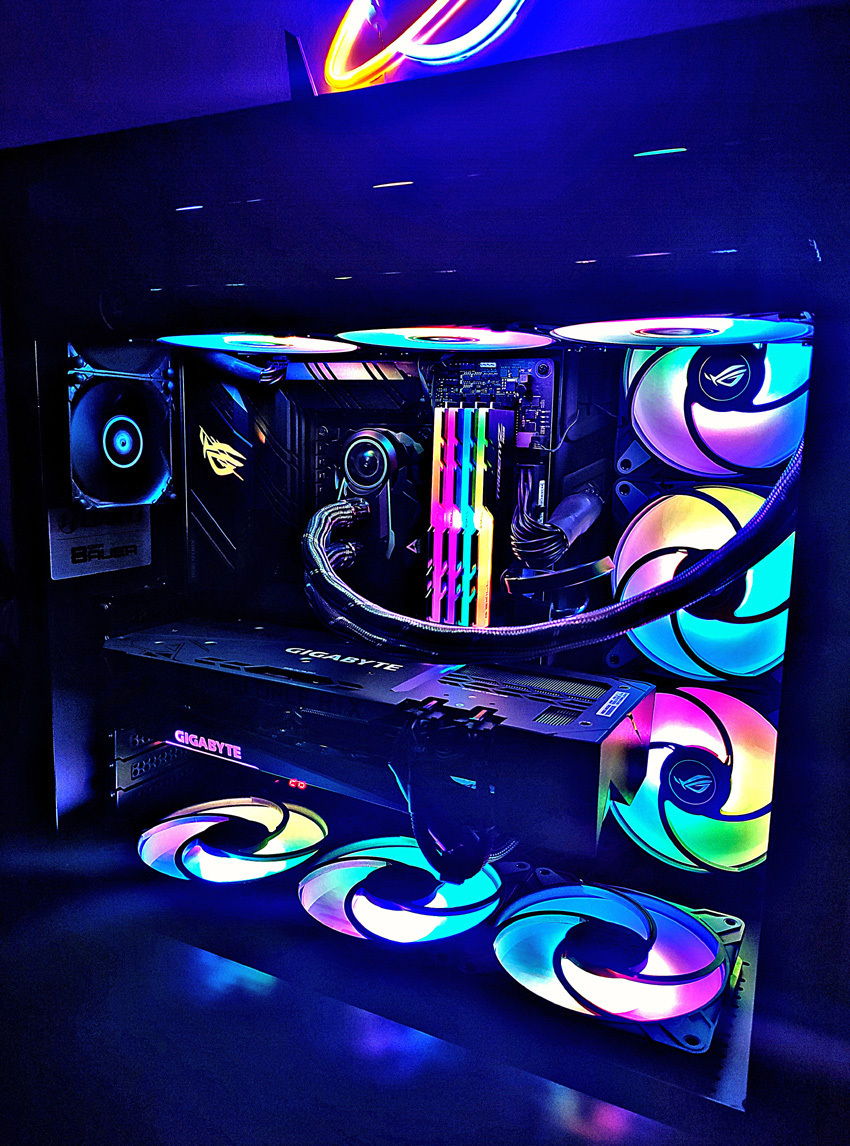
    Personally, in my main build, I use a total of x14 Arctic P12 PWM PST A-RGB 120mm fans and x2 Arctic 80mm P8 to push the hot air faster in a LianLi O11 Dynamic Midi case even though the rear fans are not really needed.
    I have set all the fans so that the case is extremely silent and it really is.
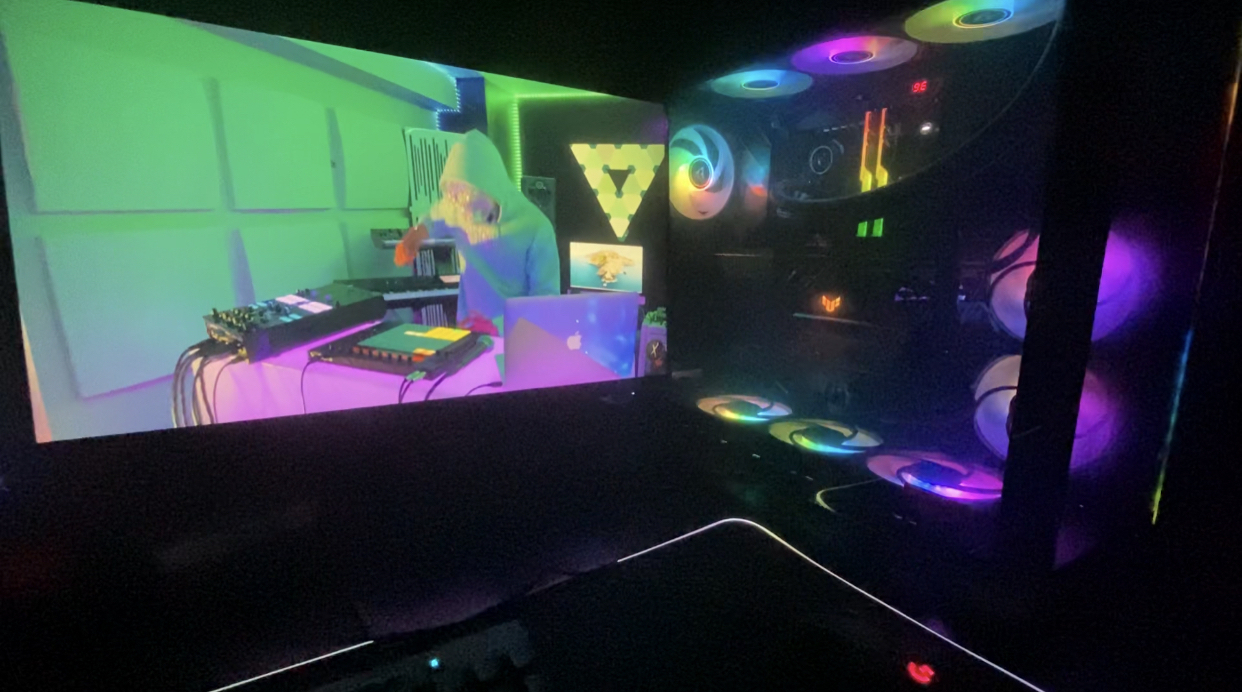
    If you are looking for performance in fans, I would recommend Arctic, unless you are looking so much at the aesthetic part with the side RGB on the fans like LianLi which I love. Nowadays RGB is not a must. It was a trend and it passed. The only beautiful lighting in my opinion is done only in moderation and loops.

    Disconnecting the pump for changing the paste is a piece of cake. For someone who "knows well and has it" it can also be refilled (changing the coolant and cleaning).
    Something important is that it does not have a connection cable for the PUMP to the motherboard because the fans and the PUMP are connected to each other with one cable. The fact that the cooler is huge is a very positive cooling factor if you do not have a problem with its volume. The Arctic Liquid Freezer III officially answered the 3 most serious questions asked on social media and I must mention them to you.

    The questions and answers are as follows:
    -=-=-=-=-=-=-=-=-=-=-=-=-
    1) The unique cable of the Pump along with the fans are all connected together. I know that the pump operates at 100% regardless of the fan speed...

    Yes, the single 4-pin controls the pump, the fans, and the VRM fan together, and yes, the pump operates at 100% as it should after many tests.

    2) Is it bad to adjust the pump speed or operate at very low speeds? I have seen people advising to run the pump at a steady speed lower than 100%, some with a curve, and others at 100%...

    This is not true - people are really confused. Most people use AIO pumps like "THIS" at full speed at 100% because they make very little noise. You probably won't see a huge performance difference. There is no risk regardless of how it operates, unless it is not installed correctly. Also, adjusting the pump speed over time can create problems, the so-called bubbles inside the pump resulting in poor performance and noise (so the curve on the PUMP is wrong).

    3) If I want to control them separately (fans and pump), can I and what kind of cable should I buy? I know I will need some kind of extension.

    Any 4-pin PWM fan splitter is fine. Fans don't draw much current, so any PWM cable on your motherboard should be good and fit well.
    -=-=-=-=-=-=-=-=-=-=-=-=-
    The pump operates at 100% when the AIO fans reach 40%. So the most appropriate curve is to set it at the first stage: 20 or 25C / 40% fan speed so there is no adjustment to the pump. A good fan curve I use for the AIO fans is:
    20C - 40% Normal {} 25C - 40% Silent
    50C - 60% Normal {} 50C - 45% Silent
    70C - 100% Normal {} 73C - 100% Silent
    -=-=-=-=-=-=-=-=-=-=-=-=-

    Continuing...
    The cooler is very large, 1cm to 1.3cm larger than most on the market. Here you need to pay attention to whether it fits in your case. It fit comfortably for me and I have it in a push/pull arrangement with 6 fans on the AIO, giving it even more volume on an ATX motherboard.

    If you find it available for under 100€, get it without hesitation. There are times when it sells out and the price is exploited by some stores when there are limited pieces. Keep in mind that I have 2 other "tricks" sealed.

    With this AIO, you won't see high temperatures and you'll have a 6-year warranty. You'll save and have peace of mind. The package includes MX5 paste for 2 uses. It's best not to use it because it may be a bit dry - depending on the package production.

    The latest Arctic paste, MX6, has been out for a while, which is much easier to apply compared to MX5 and with much better results. Compared to MX4, the MX6 is more resistant to heavy loads but loses 2c in idle compared to MX4.

    Well done again ARCTIC!

    Update: March 2024
    You can now get the new "Liquid Freezer III" for 85€ on site offer!

    Translated from Greek ·
    • Effective cooling
    • Installation
    • Silent
    • Construction quality
    • Value for money
    • Refrigerator volume
    Did you find this review helpful?
  • Mitch Murder
    3
    5 out of 7 members found this review helpful

    It is undeniably VFM and does a very good job. On a 5900X, it works wonders. The reason for the 3 stars is that it has released 4 revisions and you have to be lucky to get a recent one. For some reason, I got revision 1 and the installation is terrible. You need 3 hands, the online installation instructions are terrible and incomplete, and also on my motherboard (Gigabyte Aorus Master X570), the mounting bracket touches capacitors next to the VRM

    Translated from Greek ·
    • Effective cooling
    • Silent
    • Construction quality
    • Value for money
    • Installation
    • Refrigerator volume
    Did you find this review helpful?
  • KOSTAS MAVRIKAKIS
    5
    1 out of 1 members found this review helpful

    Verified purchase

    Guys, I have an i9 10850K in stock that reaches 170W in a stress test on Cinebench 23 with AVX disabled, and it doesn't even notice it. With a slight overclocking to 5 MHz, it reaches a maximum of 75 degrees. In a simple stress test, it stays at 60 degrees or higher. Of course, I have a Lian Li Lancool II Mesh Performance case and an extra fan. The only thing I didn't like is that everything is pre-installed, so I couldn't easily switch the front intake to ARGB, which I wanted. I had to use my own extra splitter because the cable wasn't long enough. Hopefully, they will fix this in the future or it was just an issue with my piece. I didn't have any problems with the fans. I hope I helped

    Translated from Greek ·
    • Effective cooling
    • Installation
    • Silent
    • Value for money
    • Refrigerator volume
    • Construction quality
    Did you find this review helpful?
  • caberaman
    5
    6 out of 6 members found this review helpful

    Verified purchase

    It was installed on a Ryzen 7 5800x. It is considered a hot processor. With a room temperature of around 26 degrees Celsius, the processor is at 41 degrees Celsius with office programs, Firefox, and video conferencing open. The fans are running at the lowest speed.
    In a test I did and pushed them to the max, in less than 5 minutes the CPU temperature went up to 31 degrees.
    The noise was not excessive or annoying, but there is no reason to have it at max speed...
    It has been installed in a Lian Li 011 XL case on the top part, and the case operates with positive pressure.
    Without having experience with other liquid cooling systems, but from what I have seen and from the reviews it receives in stress tests and overclocking by foreign overclockers, I believe that for the money you give, it is one of the best.
    High-quality construction, easy installation, it comes pre-assembled and with cable management (basically, you only have two plugs to connect)
    The addressable RGB is very good.
    If your priority is purely cooling, go for the basic version. It is slightly cheaper and slightly better in cooling due to a different type of fan, but also slightly noisier. I stayed here because I wanted the RGB.
    I will also buy a 240 for an old build I have.

    Translated from Greek ·
    • Effective cooling
    • Installation
    • Silent
    • Construction quality
    • Value for money
    • Refrigerator volume
    Did you find this review helpful?
  • Verified purchase

    • Effective cooling
    • Installation
    • Silent
    • Construction quality
    • Value for money
    • Refrigerator volume
    • Effective cooling
    • Installation
    • Silent
    • Refrigerator volume
    • Construction quality
    • Value for money
  • It has been installed on Ryzen 9 7900x without OC.
    Main use is davinci resolve with heavy 4K 200mbs+ projects and many loaded effects. In idle, the CPU is at 45 degrees max.
    In workflow/timeline, the temperature goes up to 55-60 max and in rendering it reaches 80-85 max.

    Although it is a big cooler, it fit comfortably in Asus TUF GT502

    Translated from Greek ·
    1
  • Marginally overkill for the 14600KF, but if you push it and overclock it, it can reach up to 80 degrees after a lot of stress. In the middle of a game, if you open something else, for example, it will spike to 80 and then drop again. When idle, it stays at around 30 degrees. It's a good choice, you can also use it for an i5 with a 240mm

    Translated from Greek ·
    0
  • Testing on a Ryzen 5600X that I had without OC or Undervolt and with PBO enabled, in a "closed" case and at a room temperature of 26.5-27C and 29C inside the case - tests with 2 thermal sensors.
    Comparison with the same CPU - and with 3 other AIOs that I tested.

    Temperatures:

    Arctic Liquid Freezer II 360 A-RGB (TRIPLE COOLER)
    IDLE: 36.1 min
    PRIME 95 and OCCT Extreme bench (30mins STRESS TEST) MAX: 72C
    WARZONE MAX 67C High Details Setting

    Thermaltake TH360 ARGB (TRIPLE COOLER)
    IDLE: 38 min
    PRIME 95 and OCCT Extreme bench (30mins STRESS TEST) MAX: 76C
    WARZONE MAX 74C High Details Setting

    CoolerMaster Masterliquid ML240L V2 (DOUBLE COOLER)
    IDLE: 39 min
    PRIME 95 and OCCT Extreme bench (30mins STRESS TEST) MAX: 75C
    WARZONE MAX 75C High Details Setting

    RAIJINTEK Orcus 360 Core Edition (TRIPLE COOLER)
    IDLE: 44 min
    PRIME 95 & OCCT Extreme bench (30mins STRESS TEST) MAX: 79C
    WARZONE MAX 83C High Details Setting
    __________________________________________________________________________________

    Now I have it on the 5800x which is a real heater CPU, even more than the 5900x. I have no problem turning off PBO of course and without seeing a noticeable performance drop.
    (Although on the 5800x, Undervolting is a one-way street if you don't want to see 80c-85c).

    I will analyze the quality of this AIO even though it is well known.
    I have written it again - in terms of quality, efficiency, performance, and noise, it is one of the best on the market, in the TOP5. In other areas, it comes first.
    Installation is easy for someone who knows. Be careful with the bracket. Look better on YouTube how they assemble it, do not put the screws in the wrong holes.
    The only downside I found is that the Arctic website does not work many times to see the online manual in pdf format - since it does not exist in print form. But as I mentioned earlier, for someone who knows or has watched some videos, no help is needed and the manual is unnecessary.
    This specific AIO did not need to place the pump outside the cooler as some manufacturers do, which is indeed a correct practice for reasons of vibrations and noise, but since it does not cause any problems, it was not necessary.
    Its fans are, of course, the Arctic P12 PWM PST A-RGB which are incredibly silent. 0db up to 65% of their speed.
    Personally, in my main build, I use a total of x14 Arctic P12 PWM PST A-RGB 120mm fans and x2 Arctic 80mm P8 to push the hot air faster in a LianLi O11 Dynamic Midi case even though the rear fans are not really needed.
    I have set all the fans so that the case is extremely silent and it really is.
    If you are looking for performance in fans, I would recommend Arctic, unless you are looking so much at the aesthetic part with the side RGB on the fans like LianLi which I love. Nowadays RGB is not a must. It was a trend and it passed. The only beautiful lighting in my opinion is done only in moderation and loops.

    Disconnecting the pump for changing the paste is a piece of cake. For someone who "knows well and has it" it can also be refilled (changing the coolant and cleaning).
    Something important is that it does not have a connection cable for the PUMP to the motherboard because the fans and the PUMP are connected to each other with one cable. The fact that the cooler is huge is a very positive cooling factor if you do not have a problem with its volume. The Arctic Liquid Freezer III officially answered the 3 most serious questions asked on social media and I must mention them to you.

    The questions and answers are as follows:
    -=-=-=-=-=-=-=-=-=-=-=-=-
    1) The unique cable of the Pump along with the fans are all connected together. I know that the pump operates at 100% regardless of the fan speed...

    Yes, the single 4-pin controls the pump, the fans, and the VRM fan together, and yes, the pump operates at 100% as it should after many tests.

    2) Is it bad to adjust the pump speed or operate at very low speeds? I have seen people advising to run the pump at a steady speed lower than 100%, some with a curve, and others at 100%...

    This is not true - people are really confused. Most people use AIO pumps like "THIS" at full speed at 100% because they make very little noise. You probably won't see a huge performance difference. There is no risk regardless of how it operates, unless it is not installed correctly. Also, adjusting the pump speed over time can create problems, the so-called bubbles inside the pump resulting in poor performance and noise (so the curve on the PUMP is wrong).

    3) If I want to control them separately (fans and pump), can I and what kind of cable should I buy? I know I will need some kind of extension.

    Any 4-pin PWM fan splitter is fine. Fans don't draw much current, so any PWM cable on your motherboard should be good and fit well.
    -=-=-=-=-=-=-=-=-=-=-=-=-
    The pump operates at 100% when the AIO fans reach 40%. So the most appropriate curve is to set it at the first stage: 20 or 25C / 40% fan speed so there is no adjustment to the pump. A good fan curve I use for the AIO fans is:
    20C - 40% Normal {} 25C - 40% Silent
    50C - 60% Normal {} 50C - 45% Silent
    70C - 100% Normal {} 73C - 100% Silent
    -=-=-=-=-=-=-=-=-=-=-=-=-

    Continuing...
    The cooler is very large, 1cm to 1.3cm larger than most on the market. Here you need to pay attention to whether it fits in your case. It fit comfortably for me and I have it in a push/pull arrangement with 6 fans on the AIO, giving it even more volume on an ATX motherboard.

    If you find it available for under 100€, get it without hesitation. There are times when it sells out and the price is exploited by some stores when there are limited pieces. Keep in mind that I have 2 other "tricks" sealed.

    With this AIO, you won't see high temperatures and you'll have a 6-year warranty. You'll save and have peace of mind. The package includes MX5 paste for 2 uses. It's best not to use it because it may be a bit dry - depending on the package production.

    The latest Arctic paste, MX6, has been out for a while, which is much easier to apply compared to MX5 and with much better results. Compared to MX4, the MX6 is more resistant to heavy loads but loses 2c in idle compared to MX4.

    Well done again ARCTIC!

    Update: March 2024
    You can now get the new "Liquid Freezer III" for 85€ on site offer!

    Translated from Greek ·
    45
  • It is undeniably VFM and does a very good job. On a 5900X, it works wonders. The reason for the 3 stars is that it has released 4 revisions and you have to be lucky to get a recent one. For some reason, I got revision 1 and the installation is terrible. You need 3 hands, the online installation instructions are terrible and incomplete, and also on my motherboard (Gigabyte Aorus Master X570), the mounting bracket touches capacitors next to the VRM

    Translated from Greek ·
    5
  • Guys, I have an i9 10850K in stock that reaches 170W in a stress test on Cinebench 23 with AVX disabled, and it doesn't even notice it. With a slight overclocking to 5 MHz, it reaches a maximum of 75 degrees. In a simple stress test, it stays at 60 degrees or higher. Of course, I have a Lian Li Lancool II Mesh Performance case and an extra fan. The only thing I didn't like is that everything is pre-installed, so I couldn't easily switch the front intake to ARGB, which I wanted. I had to use my own extra splitter because the cable wasn't long enough. Hopefully, they will fix this in the future or it was just an issue with my piece. I didn't have any problems with the fans. I hope I helped

    Translated from Greek ·
    1
  • See all
Questions (5)

Questions

161 users have this product and can help you

Ask for the product
Elias1984

Ναι έχει. Δυο καλώδια συνολικά. Ένα για fan header που τροφοδοτεί ανεμιστήρες, αντλία και ανεμιστηράκι των vrm και ένα για το rgb header και παίζει με το πρόγραμμα της μητρικής σου.

Mitch Murder

Μην κοιτας τα χαρακτηριστικα εδω. Πηγαινε στην σελιδα του κατασκευαστη η οποια λεει ξεκαθαρα Socket Compatibility Intel™ 115X, 2011-3, 2066 *Square ILM
AMD™ AM4

See all questions (5)

Description & Specifications

Future-Proof Compatibility

At the end of 2022, AMD released the AM5 socket, the successor to its popular AM4 platform. Because all mechanical dimensions remain identical, we can guarantee the compatibility of ARCTIC coolers with AMD's new processors.

Additionally, all coolers shipped by ARCTIC are already compatible with Intel's Alder Lake and Raptor Lake LGA1700 processors. Coolers purchased from resellers, however, may still have been shipped without the corresponding accessories.

Optimised for AMD Ryzen

AMD has been using a new multi-die layout for its high-end AM4 processors for a few generations now. In these processors, the hotspot is not centered by the IHS (Integrated Heat Spreader). 

To still allow for optimal heat dissipation, Arctic Liquid developed a special mounting kit for the Liquid Freezer II that allows the cold plate to be placed directly over the hotspot of the CPU. AMD's upcoming 7000 series AM5 processors also come with multi-die layouts and can therefore benefit from the Liquid Freezer II's unique offset mounting.

Create Your Own Look

The Liquid Freezer II A-RGB combines the Liquid Freezer II series' efficient, proprietary PWM water pump with ARCTIC's new A-RGB fans optimised for static pressure. This allows for perfectly matched, multi-color lighting effects. With the help of the advanced A-RGB Gen.2 technology and customizable LEDs, you can design your system with your very own look.

Manufacturer

Main Specifications

Socket
1150/1151/1155/1156, 1200, 2011-3, 2066, 1700, AM4, AM5
Radiator Size
Triple Fan
Fan Dimension
120 mm
Colour
Black
Tube Length
-
Radiator Material
-
Lighting
RGB
Pump Display
-

Technical Specifications

Fan Speed (max)
1800 rpm
Air Flow
48.8 cfm
Thermal Design Power (TDP)
-
Air Pressure
-
Bearing Type
-

Important information

Specifications are collected from official manufacturer websites. Please verify the specifications before proceeding with your final purchase. If you notice any problem you can report it here.

Reviews (9)

  1. 8
  2. 4 stars
    0
  3. 1
  4. 2 stars
    0
  5. 1 star
    0
Review this product
  • Effective cooling
  • Value for money
  • Construction quality
  • Silent
  • Installation
  • Refrigerator volume

Reviews photos

Reviews photos
Reviews photos
Reviews photos
Reviews photos
Reviews photos
Reviews photos

Reviews by our members

  • blackben
    5
    1 out of 1 members found this review helpful

    Verified purchase

    It has been installed on Ryzen 9 7900x without OC.
    Main use is davinci resolve with heavy 4K 200mbs+ projects and many loaded effects. In idle, the CPU is at 45 degrees max.
    In workflow/timeline, the temperature goes up to 55-60 max and in rendering it reaches 80-85 max.

    Although it is a big cooler, it fit comfortably in Asus TUF GT502

    Translated from Greek ·
    • Effective cooling
    • Installation
    • Construction quality
    • Value for money
    • Moderate noise
    • Refrigerator volume
    Did you find this review helpful?
  • AlexSrg
    5
    0 out of 1 members found this review helpful

    Verified purchase

    Marginally overkill for the 14600KF, but if you push it and overclock it, it can reach up to 80 degrees after a lot of stress. In the middle of a game, if you open something else, for example, it will spike to 80 and then drop again. When idle, it stays at around 30 degrees. It's a good choice, you can also use it for an i5 with a 240mm

    Translated from Greek ·
    • Effective cooling
    • Construction quality
    • Value for money
    • Installation
    • Moderate noise
    • Refrigerator volume
    Did you find this review helpful?
  • Epidemic Studios
    5
    45 out of 47 members found this review helpful

    Testing on a Ryzen 5600X that I had without OC or Undervolt and with PBO enabled, in a "closed" case and at a room temperature of 26.5-27C and 29C inside the case - tests with 2 thermal sensors.
    Comparison with the same CPU - and with 3 other AIOs that I tested.

    Temperatures:

    Arctic Liquid Freezer II 360 A-RGB (TRIPLE COOLER)
    IDLE: 36.1 min
    PRIME 95 and OCCT Extreme bench (30mins STRESS TEST) MAX: 72C
    WARZONE MAX 67C High Details Setting

    Thermaltake TH360 ARGB (TRIPLE COOLER)
    IDLE: 38 min
    PRIME 95 and OCCT Extreme bench (30mins STRESS TEST) MAX: 76C
    WARZONE MAX 74C High Details Setting

    CoolerMaster Masterliquid ML240L V2 (DOUBLE COOLER)
    IDLE: 39 min
    PRIME 95 and OCCT Extreme bench (30mins STRESS TEST) MAX: 75C
    WARZONE MAX 75C High Details Setting

    RAIJINTEK Orcus 360 Core Edition (TRIPLE COOLER)
    IDLE: 44 min
    PRIME 95 & OCCT Extreme bench (30mins STRESS TEST) MAX: 79C
    WARZONE MAX 83C High Details Setting
    __________________________________________________________________________________

    Now I have it on the 5800x which is a real heater CPU, even more than the 5900x. I have no problem turning off PBO of course and without seeing a noticeable performance drop.
    (Although on the 5800x, Undervolting is a one-way street if you don't want to see 80c-85c).

    I will analyze the quality of this AIO even though it is well known.
    I have written it again - in terms of quality, efficiency, performance, and noise, it is one of the best on the market, in the TOP5. In other areas, it comes first.
    Installation is easy for someone who knows. Be careful with the bracket. Look better on YouTube how they assemble it, do not put the screws in the wrong holes.
    The only downside I found is that the Arctic website does not work many times to see the online manual in pdf format - since it does not exist in print form. But as I mentioned earlier, for someone who knows or has watched some videos, no help is needed and the manual is unnecessary.
    This specific AIO did not need to place the pump outside the cooler as some manufacturers do, which is indeed a correct practice for reasons of vibrations and noise, but since it does not cause any problems, it was not necessary.
    Its fans are, of course, the Arctic P12 PWM PST A-RGB which are incredibly silent. 0db up to 65% of their speed.
    Personally, in my main build, I use a total of x14 Arctic P12 PWM PST A-RGB 120mm fans and x2 Arctic 80mm P8 to push the hot air faster in a LianLi O11 Dynamic Midi case even though the rear fans are not really needed.
    I have set all the fans so that the case is extremely silent and it really is.
    If you are looking for performance in fans, I would recommend Arctic, unless you are looking so much at the aesthetic part with the side RGB on the fans like LianLi which I love. Nowadays RGB is not a must. It was a trend and it passed. The only beautiful lighting in my opinion is done only in moderation and loops.

    Disconnecting the pump for changing the paste is a piece of cake. For someone who "knows well and has it" it can also be refilled (changing the coolant and cleaning).
    Something important is that it does not have a connection cable for the PUMP to the motherboard because the fans and the PUMP are connected to each other with one cable. The fact that the cooler is huge is a very positive cooling factor if you do not have a problem with its volume. The Arctic Liquid Freezer III officially answered the 3 most serious questions asked on social media and I must mention them to you.

    The questions and answers are as follows:
    -=-=-=-=-=-=-=-=-=-=-=-=-
    1) The unique cable of the Pump along with the fans are all connected together. I know that the pump operates at 100% regardless of the fan speed...

    Yes, the single 4-pin controls the pump, the fans, and the VRM fan together, and yes, the pump operates at 100% as it should after many tests.

    2) Is it bad to adjust the pump speed or operate at very low speeds? I have seen people advising to run the pump at a steady speed lower than 100%, some with a curve, and others at 100%...

    This is not true - people are really confused. Most people use AIO pumps like "THIS" at full speed at 100% because they make very little noise. You probably won't see a huge performance difference. There is no risk regardless of how it operates, unless it is not installed correctly. Also, adjusting the pump speed over time can create problems, the so-called bubbles inside the pump resulting in poor performance and noise (so the curve on the PUMP is wrong).

    3) If I want to control them separately (fans and pump), can I and what kind of cable should I buy? I know I will need some kind of extension.

    Any 4-pin PWM fan splitter is fine. Fans don't draw much current, so any PWM cable on your motherboard should be good and fit well.
    -=-=-=-=-=-=-=-=-=-=-=-=-
    The pump operates at 100% when the AIO fans reach 40%. So the most appropriate curve is to set it at the first stage: 20 or 25C / 40% fan speed so there is no adjustment to the pump. A good fan curve I use for the AIO fans is:
    20C - 40% Normal {} 25C - 40% Silent
    50C - 60% Normal {} 50C - 45% Silent
    70C - 100% Normal {} 73C - 100% Silent
    -=-=-=-=-=-=-=-=-=-=-=-=-

    Continuing...
    The cooler is very large, 1cm to 1.3cm larger than most on the market. Here you need to pay attention to whether it fits in your case. It fit comfortably for me and I have it in a push/pull arrangement with 6 fans on the AIO, giving it even more volume on an ATX motherboard.

    If you find it available for under 100€, get it without hesitation. There are times when it sells out and the price is exploited by some stores when there are limited pieces. Keep in mind that I have 2 other "tricks" sealed.

    With this AIO, you won't see high temperatures and you'll have a 6-year warranty. You'll save and have peace of mind. The package includes MX5 paste for 2 uses. It's best not to use it because it may be a bit dry - depending on the package production.

    The latest Arctic paste, MX6, has been out for a while, which is much easier to apply compared to MX5 and with much better results. Compared to MX4, the MX6 is more resistant to heavy loads but loses 2c in idle compared to MX4.

    Well done again ARCTIC!

    Update: March 2024
    You can now get the new "Liquid Freezer III" for 85€ on site offer!

    Translated from Greek ·
    • Effective cooling
    • Installation
    • Silent
    • Construction quality
    • Value for money
    • Refrigerator volume
    Did you find this review helpful?
  • Mitch Murder
    3
    5 out of 7 members found this review helpful

    It is undeniably VFM and does a very good job. On a 5900X, it works wonders. The reason for the 3 stars is that it has released 4 revisions and you have to be lucky to get a recent one. For some reason, I got revision 1 and the installation is terrible. You need 3 hands, the online installation instructions are terrible and incomplete, and also on my motherboard (Gigabyte Aorus Master X570), the mounting bracket touches capacitors next to the VRM

    Translated from Greek ·
    • Effective cooling
    • Silent
    • Construction quality
    • Value for money
    • Installation
    • Refrigerator volume
    Did you find this review helpful?
  • KOSTAS MAVRIKAKIS
    5
    1 out of 1 members found this review helpful

    Verified purchase

    Guys, I have an i9 10850K in stock that reaches 170W in a stress test on Cinebench 23 with AVX disabled, and it doesn't even notice it. With a slight overclocking to 5 MHz, it reaches a maximum of 75 degrees. In a simple stress test, it stays at 60 degrees or higher. Of course, I have a Lian Li Lancool II Mesh Performance case and an extra fan. The only thing I didn't like is that everything is pre-installed, so I couldn't easily switch the front intake to ARGB, which I wanted. I had to use my own extra splitter because the cable wasn't long enough. Hopefully, they will fix this in the future or it was just an issue with my piece. I didn't have any problems with the fans. I hope I helped

    Translated from Greek ·
    • Effective cooling
    • Installation
    • Silent
    • Value for money
    • Refrigerator volume
    • Construction quality
    Did you find this review helpful?
  • caberaman
    5
    6 out of 6 members found this review helpful

    Verified purchase

    It was installed on a Ryzen 7 5800x. It is considered a hot processor. With a room temperature of around 26 degrees Celsius, the processor is at 41 degrees Celsius with office programs, Firefox, and video conferencing open. The fans are running at the lowest speed.
    In a test I did and pushed them to the max, in less than 5 minutes the CPU temperature went up to 31 degrees.
    The noise was not excessive or annoying, but there is no reason to have it at max speed...
    It has been installed in a Lian Li 011 XL case on the top part, and the case operates with positive pressure.
    Without having experience with other liquid cooling systems, but from what I have seen and from the reviews it receives in stress tests and overclocking by foreign overclockers, I believe that for the money you give, it is one of the best.
    High-quality construction, easy installation, it comes pre-assembled and with cable management (basically, you only have two plugs to connect)
    The addressable RGB is very good.
    If your priority is purely cooling, go for the basic version. It is slightly cheaper and slightly better in cooling due to a different type of fan, but also slightly noisier. I stayed here because I wanted the RGB.
    I will also buy a 240 for an old build I have.

    Translated from Greek ·
    • Effective cooling
    • Installation
    • Silent
    • Construction quality
    • Value for money
    • Refrigerator volume
    Did you find this review helpful?
  • Verified purchase

    • Effective cooling
    • Installation
    • Silent
    • Construction quality
    • Value for money
    • Refrigerator volume
    • Effective cooling
    • Installation
    • Silent
    • Refrigerator volume
    • Construction quality
    • Value for money
  • It has been installed on Ryzen 9 7900x without OC.
    Main use is davinci resolve with heavy 4K 200mbs+ projects and many loaded effects. In idle, the CPU is at 45 degrees max.
    In workflow/timeline, the temperature goes up to 55-60 max and in rendering it reaches 80-85 max.

    Although it is a big cooler, it fit comfortably in Asus TUF GT502

    Translated from Greek ·
    1
  • Marginally overkill for the 14600KF, but if you push it and overclock it, it can reach up to 80 degrees after a lot of stress. In the middle of a game, if you open something else, for example, it will spike to 80 and then drop again. When idle, it stays at around 30 degrees. It's a good choice, you can also use it for an i5 with a 240mm

    Translated from Greek ·
    0
  • Testing on a Ryzen 5600X that I had without OC or Undervolt and with PBO enabled, in a "closed" case and at a room temperature of 26.5-27C and 29C inside the case - tests with 2 thermal sensors.
    Comparison with the same CPU - and with 3 other AIOs that I tested.

    Temperatures:

    Arctic Liquid Freezer II 360 A-RGB (TRIPLE COOLER)
    IDLE: 36.1 min
    PRIME 95 and OCCT Extreme bench (30mins STRESS TEST) MAX: 72C
    WARZONE MAX 67C High Details Setting

    Thermaltake TH360 ARGB (TRIPLE COOLER)
    IDLE: 38 min
    PRIME 95 and OCCT Extreme bench (30mins STRESS TEST) MAX: 76C
    WARZONE MAX 74C High Details Setting

    CoolerMaster Masterliquid ML240L V2 (DOUBLE COOLER)
    IDLE: 39 min
    PRIME 95 and OCCT Extreme bench (30mins STRESS TEST) MAX: 75C
    WARZONE MAX 75C High Details Setting

    RAIJINTEK Orcus 360 Core Edition (TRIPLE COOLER)
    IDLE: 44 min
    PRIME 95 & OCCT Extreme bench (30mins STRESS TEST) MAX: 79C
    WARZONE MAX 83C High Details Setting
    __________________________________________________________________________________

    Now I have it on the 5800x which is a real heater CPU, even more than the 5900x. I have no problem turning off PBO of course and without seeing a noticeable performance drop.
    (Although on the 5800x, Undervolting is a one-way street if you don't want to see 80c-85c).

    I will analyze the quality of this AIO even though it is well known.
    I have written it again - in terms of quality, efficiency, performance, and noise, it is one of the best on the market, in the TOP5. In other areas, it comes first.
    Installation is easy for someone who knows. Be careful with the bracket. Look better on YouTube how they assemble it, do not put the screws in the wrong holes.
    The only downside I found is that the Arctic website does not work many times to see the online manual in pdf format - since it does not exist in print form. But as I mentioned earlier, for someone who knows or has watched some videos, no help is needed and the manual is unnecessary.
    This specific AIO did not need to place the pump outside the cooler as some manufacturers do, which is indeed a correct practice for reasons of vibrations and noise, but since it does not cause any problems, it was not necessary.
    Its fans are, of course, the Arctic P12 PWM PST A-RGB which are incredibly silent. 0db up to 65% of their speed.
    Personally, in my main build, I use a total of x14 Arctic P12 PWM PST A-RGB 120mm fans and x2 Arctic 80mm P8 to push the hot air faster in a LianLi O11 Dynamic Midi case even though the rear fans are not really needed.
    I have set all the fans so that the case is extremely silent and it really is.
    If you are looking for performance in fans, I would recommend Arctic, unless you are looking so much at the aesthetic part with the side RGB on the fans like LianLi which I love. Nowadays RGB is not a must. It was a trend and it passed. The only beautiful lighting in my opinion is done only in moderation and loops.

    Disconnecting the pump for changing the paste is a piece of cake. For someone who "knows well and has it" it can also be refilled (changing the coolant and cleaning).
    Something important is that it does not have a connection cable for the PUMP to the motherboard because the fans and the PUMP are connected to each other with one cable. The fact that the cooler is huge is a very positive cooling factor if you do not have a problem with its volume. The Arctic Liquid Freezer III officially answered the 3 most serious questions asked on social media and I must mention them to you.

    The questions and answers are as follows:
    -=-=-=-=-=-=-=-=-=-=-=-=-
    1) The unique cable of the Pump along with the fans are all connected together. I know that the pump operates at 100% regardless of the fan speed...

    Yes, the single 4-pin controls the pump, the fans, and the VRM fan together, and yes, the pump operates at 100% as it should after many tests.

    2) Is it bad to adjust the pump speed or operate at very low speeds? I have seen people advising to run the pump at a steady speed lower than 100%, some with a curve, and others at 100%...

    This is not true - people are really confused. Most people use AIO pumps like "THIS" at full speed at 100% because they make very little noise. You probably won't see a huge performance difference. There is no risk regardless of how it operates, unless it is not installed correctly. Also, adjusting the pump speed over time can create problems, the so-called bubbles inside the pump resulting in poor performance and noise (so the curve on the PUMP is wrong).

    3) If I want to control them separately (fans and pump), can I and what kind of cable should I buy? I know I will need some kind of extension.

    Any 4-pin PWM fan splitter is fine. Fans don't draw much current, so any PWM cable on your motherboard should be good and fit well.
    -=-=-=-=-=-=-=-=-=-=-=-=-
    The pump operates at 100% when the AIO fans reach 40%. So the most appropriate curve is to set it at the first stage: 20 or 25C / 40% fan speed so there is no adjustment to the pump. A good fan curve I use for the AIO fans is:
    20C - 40% Normal {} 25C - 40% Silent
    50C - 60% Normal {} 50C - 45% Silent
    70C - 100% Normal {} 73C - 100% Silent
    -=-=-=-=-=-=-=-=-=-=-=-=-

    Continuing...
    The cooler is very large, 1cm to 1.3cm larger than most on the market. Here you need to pay attention to whether it fits in your case. It fit comfortably for me and I have it in a push/pull arrangement with 6 fans on the AIO, giving it even more volume on an ATX motherboard.

    If you find it available for under 100€, get it without hesitation. There are times when it sells out and the price is exploited by some stores when there are limited pieces. Keep in mind that I have 2 other "tricks" sealed.

    With this AIO, you won't see high temperatures and you'll have a 6-year warranty. You'll save and have peace of mind. The package includes MX5 paste for 2 uses. It's best not to use it because it may be a bit dry - depending on the package production.

    The latest Arctic paste, MX6, has been out for a while, which is much easier to apply compared to MX5 and with much better results. Compared to MX4, the MX6 is more resistant to heavy loads but loses 2c in idle compared to MX4.

    Well done again ARCTIC!

    Update: March 2024
    You can now get the new "Liquid Freezer III" for 85€ on site offer!

    Translated from Greek ·
    45
  • It is undeniably VFM and does a very good job. On a 5900X, it works wonders. The reason for the 3 stars is that it has released 4 revisions and you have to be lucky to get a recent one. For some reason, I got revision 1 and the installation is terrible. You need 3 hands, the online installation instructions are terrible and incomplete, and also on my motherboard (Gigabyte Aorus Master X570), the mounting bracket touches capacitors next to the VRM

    Translated from Greek ·
    5
  • Guys, I have an i9 10850K in stock that reaches 170W in a stress test on Cinebench 23 with AVX disabled, and it doesn't even notice it. With a slight overclocking to 5 MHz, it reaches a maximum of 75 degrees. In a simple stress test, it stays at 60 degrees or higher. Of course, I have a Lian Li Lancool II Mesh Performance case and an extra fan. The only thing I didn't like is that everything is pre-installed, so I couldn't easily switch the front intake to ARGB, which I wanted. I had to use my own extra splitter because the cable wasn't long enough. Hopefully, they will fix this in the future or it was just an issue with my piece. I didn't have any problems with the fans. I hope I helped

    Translated from Greek ·
    1
  • See all