No problem, as long as it's within 14 days. We'll come pick it up or you can choose the Skroutz Point that suits you, completely free for up to 2 times per year, and we'll refund your money. Get Skroutz Plus to enjoy unlimited free returns.
Specifications are collected from official manufacturer websites. Please verify the specifications before proceeding with your final purchase. If you notice any problem you can report it here.
It just flies!
BUT as another buyer wrote, Windows (10 for me) do not want to cooperate. You will do what "Mammad 11/01/2022" wrote. For me, every time I turned on the PC, Windows would change the driver and install the AC1200. Since this is annoying, do one of the following (the 2nd method is better, because it locks the driver change only for the USB network adapter):
1st Method: Disable Automatic Driver Installation (The quickest solution). This setting tells Windows not to automatically download manufacturer icons and drivers.
1. Press Windows + R, type sysdm.cpl and press Enter.
2. In the window that opens, go to the Hardware tab.
3. Click on the Device Installation Settings button.
4. Select No and click Save changes.
________________________________________
2nd Method: Use the Group Policy Editor (For Windows 10 Pro/Enterprise) to "lock" this specific device so that no driver changes are allowed.
1. Open Device Manager, find the AC1300, right-click -> Properties.
2. In the Details tab, select Hardware Ids from the menu. Copy the first line (e.g. USB\VID_XXXX&PID_XXXX).
3. Press Windows + R, type gpedit.msc and press Enter.
4. Go to:
Computer Configuration > Administrative Templates > System > Device Installation > Device Installation Restrictions.
5. Find Prevent installation of devices that match any of these device IDs, double-click and select Enabled.
6. Click the Show... button and paste the ID you copied before and then OK.
7. Restart to make sure the settings are "locked". Now, in Device Manager, you should find the AC1300 and not the AC1200.
SOS!
Because you have now "locked" this specific port/device, if at some point you want to officially upgrade the driver from the manufacturer's site, you must first go back to Group Policy and set it to "Not Configured", otherwise you won't be able to make changes either!
Απλά πετάει!
ΑΛΛΑ όπως έγραψε και άλλος αγοραστής, τα windows (10 για μένα) δεν θέλουν να συνεργαστούν. Θα κάνετε όσα γράφει ο
"Mammad 11/01/2022 ". Σε εμένα κάθε φορά που άνοιγα το PC, τα windows, άλλαζαν τον driver και έβαζαν τον AC1200. Επειδή αυτό είναι εκνευριστικό κάντε κάτι από τα παρακάτω (ο 2ος τρόπος είναι πιο καλός, γιατί κλειδώνει την αλλαγή του driver μόνο για τονUSB αντάπτορα δικτύου):
1ος Τρόπος: Απενεργοποίηση Αυτόματης Εγκατάστασης Drivers (Η πιο άμεση λύση). Αυτή η ρύθμιση λέει στα Windows να μην κατεβάζουν εικονίδια και drivers κατασκευαστών αυτόματα.
1. Πάτα το πλήκτρο Windows + R, πληκτρολόγησε sysdm.cpl και πάτα Enter.
2. Στο παράθυρο που θα ανοίξει, πήγαινε στην καρτέλα Υλικό (Hardware).
3. Κάνε κλικ στο κουμπί Ρυθμίσεις εγκατάστασης συσκευών (Device Installation Settings).
4. Επίλεξε Όχι (No) και πάτα Αποθήκευση αλλαγών.
________________________________________
2ος Τρόπος: Χρήση του Group Policy Editor (Για Windows 10 Pro/Enterprise)για να "κλειδώσεις" τη συγκεκριμένη συσκευή ώστε να μην επιτρέπεται καμία αλλαγή driver.
1. Άνοιξε τη Διαχείριση Συσκευών (Device Manager), βρες το AC1300, κάνε δεξί κλικ -> Ιδιότητες.
2. Στην καρτέλα Λεπτομέρειες (Details), επίλεξε από το μενού το Αναγνωριστικά υλικού (Hardware Ids). Αντίγραψε την πρώτη γραμμή (π.χ. USB\VID_XXXX&PID_XXXX).
3. Πάτα Windows + R, γράψε gpedit.msc και πάτα Enter.
4. Πήγαινε στη διαδρομή:
Computer Configuration > Administrative Templates > System > Device Installation > Device Installation Restrictions.
5. Βρες το Prevent installation of devices that match any of these device IDs, κάνε διπλό κλικ και επέλεξε Enabled.
6. Πάτα το κουμπί Show... και επικόλλησε το ID που αντέγραψες πριν και μετά ΟΚ.
7. Κάνε μια επανεκκίνηση για να βεβαιωθείς ότι οι ρυθμίσεις "κλείδωσαν". Λογικά πλέον στη Διαχείριση Συσκευών (Device Manager), θα βρες το AC1300 και όχι AC1200.
SOS!
Επειδή τώρα έχεις "κλειδώσει" τη συγκεκριμένη θύρα/συσκευή, αν κάποια στιγμή θελήσεις να αναβαθμίσεις τον driver επίσημα από το site του κατασκευαστή, θα πρέπει πρώτα να πας πάλι στο Group Policy και να το γυρίσεις σε "Not Configured", αλλιώς ούτε εσύ θα μπορείς να κάνεις αλλαγές!
Relatively good range, but on an old PC it will give you trouble until it works properly (it's a good idea to disable the 2.4GHz bands, otherwise it will connect there and you'll wonder why your awesome connection only gets 100Mbps download).
Once it's set up correctly, it flies, but until then you might lose your patience with all the swearing
Καλή σχετικά εμβέλεια, αλλά σε παλιό PC θα σας ταλαιπωρήσει μέχρι να δουλέψει σωστά (καλό είναι να απενεργοποιήσετε τις μπάντες 2,4GHZ, αλλιώς θα συνδέεται εκεί και θα αναρωτιέστε γιατί η συνδεσάρα σας πιάνει μόνο 100Mbps κατέβασμα).
Όταν σεταριστεί σωστά, πετάει, μέχρι τότε μπορεί να ξεβαφτιστείτε από τα μπινελίκια.,
Avoid it in the year 2024-2025! It may have been okay in the past, but it is no longer. This is the second time I have tried to use it, and it falls short not only of my expectations but also of what it claims to be able to do. The first one was defective and never exceeded 10% of the total line. Being old, the drivers are neglected. Luckily, there is a comment below that guides you; otherwise, no one would figure it out. You waste time trying to find the new drivers on the D-Link site, and it still doesn't recognize it as AC1300, which it promises to be, but as AC1200. No matter what you do, it takes Windows drivers and not D-Link's, and struggles to reach 60-70% of the total line, with numerous disconnections at the beginning. There are more reliable options for much less money.
Αποφύγετε το εν έτη 2024-2025! Μπορεί παλιά να ήταν οκ πλέον δεν είναι. Είναι η δεύτερη φορά που προσπαθώ να το χρησιμοποιήσω και πάλι πέφτει short όχι στις προσδοκίες μου μόνο, αλλά στο τι γράφει ότι μπορεί να κάνει. Το πρώτο ήταν ελαττωματικό δεν έπιανε ποτέ πάνω από το 10% του συνόλου της γραμμής. Όντας παλιό οι drivers είναι παρατημένοι. Πάλι καλά υπάρχει ένα σχόλιο παρακάτω και σε καθοδηγεί αλλιώς κάνεις δεν θα έβγαζε άκρη. Τρως ώρα να βρεις τους νέους drivers στο σαιτ της d link και πάλι δεν το αναγνωρίζει σαν Ac1300 που υπόσχεται ότι είναι αλλά ac1200. Ότι και να κάνεις παίρνει drivers windows και οχι dlink και ζορίζεται να πιάσει το 60-70% του συνόλου της γραμμής, με πάμπολλες αποσυνδέσεις στην αρχή. Υπάρχουν πιο αξιόπιστες επιλογές με πολύ λιγότερα χρήματα.
I confirm all the positive comments that convinced me to buy it! It is flawless! Super range, does not disconnect! After a month of use, I am completely satisfied!
Επιβεβαιώνω όλα τα θετικά σχόλια που με έπεισαν να το αγοράσω! Είναι άψογο! Super εμβέλεια, δεν αποσυνδέεται! Μετά από έναν μήνα χρήσης είμαι απόλυτα ικανοποιημένος!
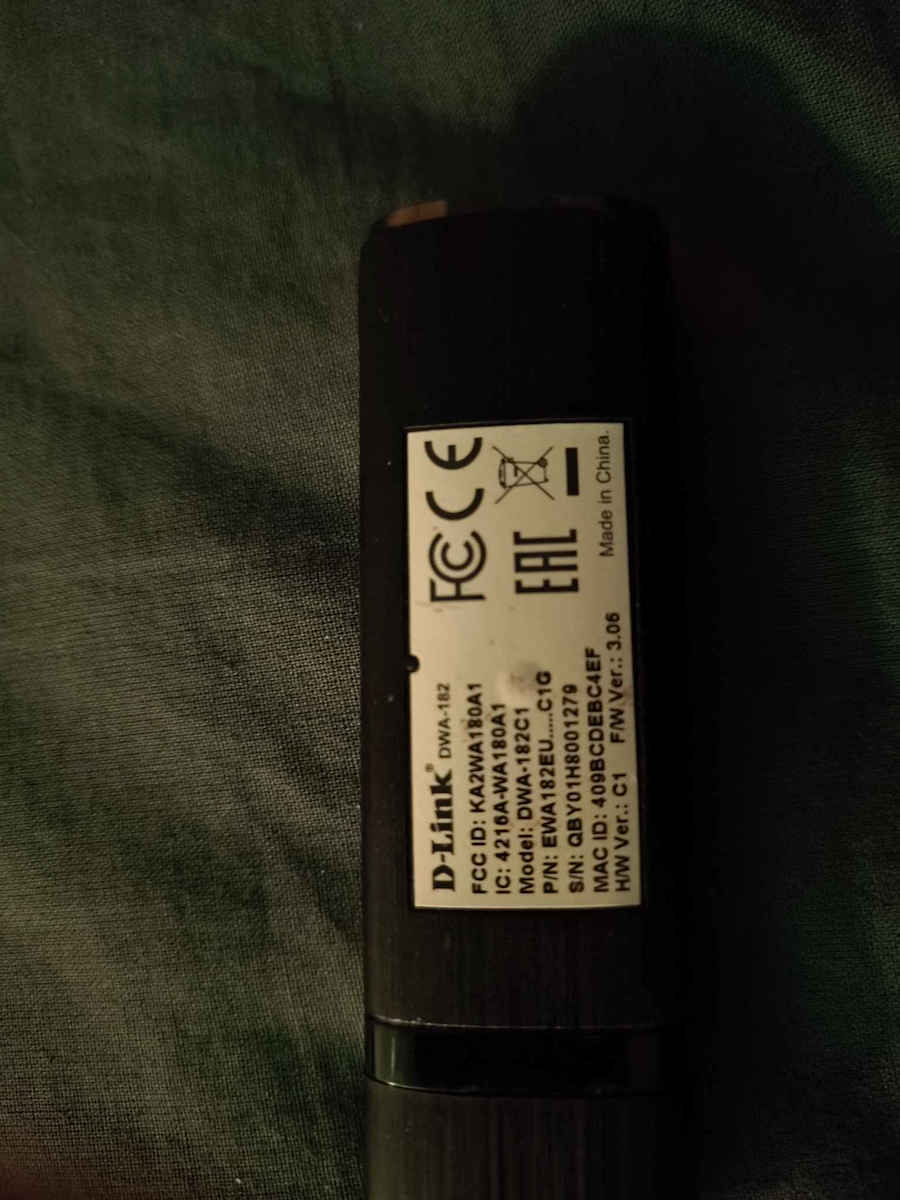
Revision C1, I have had it for many years and it was the best and most stable out of all the ones I had (now I have reached 13-14 wifi dongles. Because I am in a house where technically I couldn't have access to the internet for years, I would get wifi from the house next door with their consent, of course. Two walls away, truly the best and most stable signal compared to much more expensive dongles. Used on multiple Linux distributions + Windows. Now I have my own regular line with a LAN cable, etc., I don't use wifi anymore but I entered the process of commenting in tribute. Amazing dongle also for AP mode for those interested in access point 2.4 and 5 with hostapd on Linux.
Revision C1, το έχω πάρα πολλά χρόνια και ήταν το καλύτερο και σταθερότερο από όλα όσα είχα (πλέον έχω φτάσει τα 13-14 wifi dongles. Επειδή βρίσκομαι σε σπίτι που τεχνικά δεν μπορούσα για χρονια να έχω πρόσβαση στο νετ έπαιρνα wifi από δίπλα σπίτι με την συγκατάθεση τους φυσικά. Δύο τοίχοι μακριά, πραγματικά το καλύτερο και σταθερότερο σήμα από πολύ ακριβότερα dongles. Χρήση σε Linux πολλαπλές διανομες + Windows. Τώρα έχω πλέον κανονικά δική μου γραμμή με Lan καλώδιο κτλ, δεν χρησιμοποιώ wifi αλλά μπήκα σε διαδικασία σχολιασμού τιμητικά. Καταπληκτικό dongle και για AP mode για όσους τους ενδιαφέρει access point 2.4 και 5 με hostapd σε Linux.
Excellent product, at a very good price for a renowned ac-1300 adapter. Very fast, works perfectly on USB3.0, without interruptions and without the need for configuration, but:
There is CONFUSION with the drivers. In a few words (for those who can't figure it out), the different revision means a different chip, and therefore a different driver. The ac-1300 starts from revision D (currently D1).
The confusion is due to the firmware version (4.02), which does NOT correspond to the driver you need to download, and the driver versions on the D-Link website, which (wrongly) follow the same numbering as the firmware (there is exactly driver 4.02 which is for a different revision!!). Also, the driver on the accompanying CD is incorrect, it is for a previous revision (it sees it as ac-1200) and the same happens with the Windows driver!!
For proper installation, download driver 4.05* from the D-Link website, install it (it will ask you to insert the stick, preferably insert it in USB3.0) and make sure that in the driver tab (device manager\network controllers) the "provider" is D-Link and not Microsoft. In my case, even though I installed 4.05 from the beginning, Windows decided to use its own driver. If this happens, uninstall the D-Link driver (control panel\programs and features), DO NOT remove the stick yet, and uninstall the device from the driver tab (device manager\network controllers). It will appear as an ac-1200 device. Then remove the flash drive and reinstall 4.05, and it should work. Confirm that in the driver tab (device manager\network controllers) the "provider" is D-Link and the device is AC-1300 MU MIMO, etc.
*UPDATE: The latest version of the driver is now 5.01 !!!
Άριστο προϊόν, σε πολύ καλή τιμή για επώνυμο ac-1300 προσαρμογέα. Πολύ γρήγορο, δουλεύει άψογα σε USB3.0, χωρίς διακοπές και χωρίς ανάγκη παραμετροποίησης, αλλά:
Υπάρχει ΜΠΕΡΔΕΜΑ με τους drivers. Με λίγα λόγια (για όσους δεν βρίσκουν άκρη), το διαφορετικό revision σημαίνει και διαφορετικό chipάκι, άρα και driver. Το ac-1300 ξεκινά από το revision D (D1 αυτή τη στιγμή).
Το μπέρδεμα οφείλεται στην έκδοση του firmware (4.02), που ΔΕΝ αντιστοιχεί στον driver που πρέπει να κατεβάσεις, και τις εκδόσεις των drivers στη σελίδα της D-Link, που (κακώς) ακολουθούν την ίδια αρίθμηση με το firmware (υπάρχει ακριβώς driver 4.02 που είναι για άλλο revision!!). Επίσης, είναι λάθος ο driver του συνοδευτικού CD, είναι για προηγούμενο revision (το βλέπει σαν ac-1200) και το ίδιο συμβαίνει με τον driver των windows!!
Για σωστή εγκατάσταση, κατεβάστε τον driver 4.05* απο το site της D-Link, εγκαταστήστε (θα ζητήσει να βάλετε το stick, κατά προτίμηση βάλτε το σε USB3.0) και επιβεβαιώστε ότι στην καρτέλα του driver (device manager\network controllers) ο "provider" είναι η D-Link και όχι η microsoft. Σε μένα στην αρχή αν και έβαλα από την αρχή τον 4.05, τα windows αποφάσισαν να χρησιμοποιήσουν τον δικό τους. Αν συμβεί αυτό, κάντε uninstall τον driver της D-Link (control panel\programs and features), ΜΗ βγάλετε ακόμα το στικ, και κάντε uninstall και τη συσκευή από την καρτέλα του driver (device manager\network controllers). Θα το βλέπει σαν ac-1200 συσκευή. Μετά βγάλτε το φλασάκι και ξαναεγκαταστήστε τον 4.05 και λογικά θα τον πάρει. Επιβεβαιώστε ότι στην καρτέλα του driver (device manager\network controllers) ο "provider" είναι η D-Link και η συσκευή είναι AC-1300 MU MIMO κτλ.
*UPDATE: Η τελευταία έκδοση του driver είναι πλέον 5.01 !!!
It just flies!
BUT as another buyer wrote, Windows (10 for me) do not want to cooperate. You will do what "Mammad 11/01/2022" wrote. For me, every time I turned on the PC, Windows would change the driver and install the AC1200. Since this is annoying, do one of the following (the 2nd method is better, because it locks the driver change only for the USB network adapter):
1st Method: Disable Automatic Driver Installation (The quickest solution). This setting tells Windows not to automatically download manufacturer icons and drivers.
1. Press Windows + R, type sysdm.cpl and press Enter.
2. In the window that opens, go to the Hardware tab.
3. Click on the Device Installation Settings button.
4. Select No and click Save changes.
________________________________________
2nd Method: Use the Group Policy Editor (For Windows 10 Pro/Enterprise) to "lock" this specific device so that no driver changes are allowed.
1. Open Device Manager, find the AC1300, right-click -> Properties.
2. In the Details tab, select Hardware Ids from the menu. Copy the first line (e.g. USB\VID_XXXX&PID_XXXX).
3. Press Windows + R, type gpedit.msc and press Enter.
4. Go to:
Computer Configuration > Administrative Templates > System > Device Installation > Device Installation Restrictions.
5. Find Prevent installation of devices that match any of these device IDs, double-click and select Enabled.
6. Click the Show... button and paste the ID you copied before and then OK.
7. Restart to make sure the settings are "locked". Now, in Device Manager, you should find the AC1300 and not the AC1200.
SOS!
Because you have now "locked" this specific port/device, if at some point you want to officially upgrade the driver from the manufacturer's site, you must first go back to Group Policy and set it to "Not Configured", otherwise you won't be able to make changes either!
Απλά πετάει!
ΑΛΛΑ όπως έγραψε και άλλος αγοραστής, τα windows (10 για μένα) δεν θέλουν να συνεργαστούν. Θα κάνετε όσα γράφει ο
"Mammad 11/01/2022 ". Σε εμένα κάθε φορά που άνοιγα το PC, τα windows, άλλαζαν τον driver και έβαζαν τον AC1200. Επειδή αυτό είναι εκνευριστικό κάντε κάτι από τα παρακάτω (ο 2ος τρόπος είναι πιο καλός, γιατί κλειδώνει την αλλαγή του driver μόνο για τονUSB αντάπτορα δικτύου):
1ος Τρόπος: Απενεργοποίηση Αυτόματης Εγκατάστασης Drivers (Η πιο άμεση λύση). Αυτή η ρύθμιση λέει στα Windows να μην κατεβάζουν εικονίδια και drivers κατασκευαστών αυτόματα.
1. Πάτα το πλήκτρο Windows + R, πληκτρολόγησε sysdm.cpl και πάτα Enter.
2. Στο παράθυρο που θα ανοίξει, πήγαινε στην καρτέλα Υλικό (Hardware).
3. Κάνε κλικ στο κουμπί Ρυθμίσεις εγκατάστασης συσκευών (Device Installation Settings).
4. Επίλεξε Όχι (No) και πάτα Αποθήκευση αλλαγών.
________________________________________
2ος Τρόπος: Χρήση του Group Policy Editor (Για Windows 10 Pro/Enterprise)για να "κλειδώσεις" τη συγκεκριμένη συσκευή ώστε να μην επιτρέπεται καμία αλλαγή driver.
1. Άνοιξε τη Διαχείριση Συσκευών (Device Manager), βρες το AC1300, κάνε δεξί κλικ -> Ιδιότητες.
2. Στην καρτέλα Λεπτομέρειες (Details), επίλεξε από το μενού το Αναγνωριστικά υλικού (Hardware Ids). Αντίγραψε την πρώτη γραμμή (π.χ. USB\VID_XXXX&PID_XXXX).
3. Πάτα Windows + R, γράψε gpedit.msc και πάτα Enter.
4. Πήγαινε στη διαδρομή:
Computer Configuration > Administrative Templates > System > Device Installation > Device Installation Restrictions.
5. Βρες το Prevent installation of devices that match any of these device IDs, κάνε διπλό κλικ και επέλεξε Enabled.
6. Πάτα το κουμπί Show... και επικόλλησε το ID που αντέγραψες πριν και μετά ΟΚ.
7. Κάνε μια επανεκκίνηση για να βεβαιωθείς ότι οι ρυθμίσεις "κλείδωσαν". Λογικά πλέον στη Διαχείριση Συσκευών (Device Manager), θα βρες το AC1300 και όχι AC1200.
SOS!
Επειδή τώρα έχεις "κλειδώσει" τη συγκεκριμένη θύρα/συσκευή, αν κάποια στιγμή θελήσεις να αναβαθμίσεις τον driver επίσημα από το site του κατασκευαστή, θα πρέπει πρώτα να πας πάλι στο Group Policy και να το γυρίσεις σε "Not Configured", αλλιώς ούτε εσύ θα μπορείς να κάνεις αλλαγές!
Relatively good range, but on an old PC it will give you trouble until it works properly (it's a good idea to disable the 2.4GHz bands, otherwise it will connect there and you'll wonder why your awesome connection only gets 100Mbps download).
Once it's set up correctly, it flies, but until then you might lose your patience with all the swearing
Καλή σχετικά εμβέλεια, αλλά σε παλιό PC θα σας ταλαιπωρήσει μέχρι να δουλέψει σωστά (καλό είναι να απενεργοποιήσετε τις μπάντες 2,4GHZ, αλλιώς θα συνδέεται εκεί και θα αναρωτιέστε γιατί η συνδεσάρα σας πιάνει μόνο 100Mbps κατέβασμα).
Όταν σεταριστεί σωστά, πετάει, μέχρι τότε μπορεί να ξεβαφτιστείτε από τα μπινελίκια.,
Avoid it in the year 2024-2025! It may have been okay in the past, but it is no longer. This is the second time I have tried to use it, and it falls short not only of my expectations but also of what it claims to be able to do. The first one was defective and never exceeded 10% of the total line. Being old, the drivers are neglected. Luckily, there is a comment below that guides you; otherwise, no one would figure it out. You waste time trying to find the new drivers on the D-Link site, and it still doesn't recognize it as AC1300, which it promises to be, but as AC1200. No matter what you do, it takes Windows drivers and not D-Link's, and struggles to reach 60-70% of the total line, with numerous disconnections at the beginning. There are more reliable options for much less money.
Αποφύγετε το εν έτη 2024-2025! Μπορεί παλιά να ήταν οκ πλέον δεν είναι. Είναι η δεύτερη φορά που προσπαθώ να το χρησιμοποιήσω και πάλι πέφτει short όχι στις προσδοκίες μου μόνο, αλλά στο τι γράφει ότι μπορεί να κάνει. Το πρώτο ήταν ελαττωματικό δεν έπιανε ποτέ πάνω από το 10% του συνόλου της γραμμής. Όντας παλιό οι drivers είναι παρατημένοι. Πάλι καλά υπάρχει ένα σχόλιο παρακάτω και σε καθοδηγεί αλλιώς κάνεις δεν θα έβγαζε άκρη. Τρως ώρα να βρεις τους νέους drivers στο σαιτ της d link και πάλι δεν το αναγνωρίζει σαν Ac1300 που υπόσχεται ότι είναι αλλά ac1200. Ότι και να κάνεις παίρνει drivers windows και οχι dlink και ζορίζεται να πιάσει το 60-70% του συνόλου της γραμμής, με πάμπολλες αποσυνδέσεις στην αρχή. Υπάρχουν πιο αξιόπιστες επιλογές με πολύ λιγότερα χρήματα.
I confirm all the positive comments that convinced me to buy it! It is flawless! Super range, does not disconnect! After a month of use, I am completely satisfied!
Επιβεβαιώνω όλα τα θετικά σχόλια που με έπεισαν να το αγοράσω! Είναι άψογο! Super εμβέλεια, δεν αποσυνδέεται! Μετά από έναν μήνα χρήσης είμαι απόλυτα ικανοποιημένος!
Revision C1, I have had it for many years and it was the best and most stable out of all the ones I had (now I have reached 13-14 wifi dongles. Because I am in a house where technically I couldn't have access to the internet for years, I would get wifi from the house next door with their consent, of course. Two walls away, truly the best and most stable signal compared to much more expensive dongles. Used on multiple Linux distributions + Windows. Now I have my own regular line with a LAN cable, etc., I don't use wifi anymore but I entered the process of commenting in tribute. Amazing dongle also for AP mode for those interested in access point 2.4 and 5 with hostapd on Linux.
Revision C1, το έχω πάρα πολλά χρόνια και ήταν το καλύτερο και σταθερότερο από όλα όσα είχα (πλέον έχω φτάσει τα 13-14 wifi dongles. Επειδή βρίσκομαι σε σπίτι που τεχνικά δεν μπορούσα για χρονια να έχω πρόσβαση στο νετ έπαιρνα wifi από δίπλα σπίτι με την συγκατάθεση τους φυσικά. Δύο τοίχοι μακριά, πραγματικά το καλύτερο και σταθερότερο σήμα από πολύ ακριβότερα dongles. Χρήση σε Linux πολλαπλές διανομες + Windows. Τώρα έχω πλέον κανονικά δική μου γραμμή με Lan καλώδιο κτλ, δεν χρησιμοποιώ wifi αλλά μπήκα σε διαδικασία σχολιασμού τιμητικά. Καταπληκτικό dongle και για AP mode για όσους τους ενδιαφέρει access point 2.4 και 5 με hostapd σε Linux.
Specifications are collected from official manufacturer websites. Please verify the specifications before proceeding with your final purchase. If you notice any problem you can report it here.
It just flies!
BUT as another buyer wrote, Windows (10 for me) do not want to cooperate. You will do what "Mammad 11/01/2022" wrote. For me, every time I turned on the PC, Windows would change the driver and install the AC1200. Since this is annoying, do one of the following (the 2nd method is better, because it locks the driver change only for the USB network adapter):
1st Method: Disable Automatic Driver Installation (The quickest solution). This setting tells Windows not to automatically download manufacturer icons and drivers.
1. Press Windows + R, type sysdm.cpl and press Enter.
2. In the window that opens, go to the Hardware tab.
3. Click on the Device Installation Settings button.
4. Select No and click Save changes.
________________________________________
2nd Method: Use the Group Policy Editor (For Windows 10 Pro/Enterprise) to "lock" this specific device so that no driver changes are allowed.
1. Open Device Manager, find the AC1300, right-click -> Properties.
2. In the Details tab, select Hardware Ids from the menu. Copy the first line (e.g. USB\VID_XXXX&PID_XXXX).
3. Press Windows + R, type gpedit.msc and press Enter.
4. Go to:
Computer Configuration > Administrative Templates > System > Device Installation > Device Installation Restrictions.
5. Find Prevent installation of devices that match any of these device IDs, double-click and select Enabled.
6. Click the Show... button and paste the ID you copied before and then OK.
7. Restart to make sure the settings are "locked". Now, in Device Manager, you should find the AC1300 and not the AC1200.
SOS!
Because you have now "locked" this specific port/device, if at some point you want to officially upgrade the driver from the manufacturer's site, you must first go back to Group Policy and set it to "Not Configured", otherwise you won't be able to make changes either!
Απλά πετάει!
ΑΛΛΑ όπως έγραψε και άλλος αγοραστής, τα windows (10 για μένα) δεν θέλουν να συνεργαστούν. Θα κάνετε όσα γράφει ο
"Mammad 11/01/2022 ". Σε εμένα κάθε φορά που άνοιγα το PC, τα windows, άλλαζαν τον driver και έβαζαν τον AC1200. Επειδή αυτό είναι εκνευριστικό κάντε κάτι από τα παρακάτω (ο 2ος τρόπος είναι πιο καλός, γιατί κλειδώνει την αλλαγή του driver μόνο για τονUSB αντάπτορα δικτύου):
1ος Τρόπος: Απενεργοποίηση Αυτόματης Εγκατάστασης Drivers (Η πιο άμεση λύση). Αυτή η ρύθμιση λέει στα Windows να μην κατεβάζουν εικονίδια και drivers κατασκευαστών αυτόματα.
1. Πάτα το πλήκτρο Windows + R, πληκτρολόγησε sysdm.cpl και πάτα Enter.
2. Στο παράθυρο που θα ανοίξει, πήγαινε στην καρτέλα Υλικό (Hardware).
3. Κάνε κλικ στο κουμπί Ρυθμίσεις εγκατάστασης συσκευών (Device Installation Settings).
4. Επίλεξε Όχι (No) και πάτα Αποθήκευση αλλαγών.
________________________________________
2ος Τρόπος: Χρήση του Group Policy Editor (Για Windows 10 Pro/Enterprise)για να "κλειδώσεις" τη συγκεκριμένη συσκευή ώστε να μην επιτρέπεται καμία αλλαγή driver.
1. Άνοιξε τη Διαχείριση Συσκευών (Device Manager), βρες το AC1300, κάνε δεξί κλικ -> Ιδιότητες.
2. Στην καρτέλα Λεπτομέρειες (Details), επίλεξε από το μενού το Αναγνωριστικά υλικού (Hardware Ids). Αντίγραψε την πρώτη γραμμή (π.χ. USB\VID_XXXX&PID_XXXX).
3. Πάτα Windows + R, γράψε gpedit.msc και πάτα Enter.
4. Πήγαινε στη διαδρομή:
Computer Configuration > Administrative Templates > System > Device Installation > Device Installation Restrictions.
5. Βρες το Prevent installation of devices that match any of these device IDs, κάνε διπλό κλικ και επέλεξε Enabled.
6. Πάτα το κουμπί Show... και επικόλλησε το ID που αντέγραψες πριν και μετά ΟΚ.
7. Κάνε μια επανεκκίνηση για να βεβαιωθείς ότι οι ρυθμίσεις "κλείδωσαν". Λογικά πλέον στη Διαχείριση Συσκευών (Device Manager), θα βρες το AC1300 και όχι AC1200.
SOS!
Επειδή τώρα έχεις "κλειδώσει" τη συγκεκριμένη θύρα/συσκευή, αν κάποια στιγμή θελήσεις να αναβαθμίσεις τον driver επίσημα από το site του κατασκευαστή, θα πρέπει πρώτα να πας πάλι στο Group Policy και να το γυρίσεις σε "Not Configured", αλλιώς ούτε εσύ θα μπορείς να κάνεις αλλαγές!
Relatively good range, but on an old PC it will give you trouble until it works properly (it's a good idea to disable the 2.4GHz bands, otherwise it will connect there and you'll wonder why your awesome connection only gets 100Mbps download).
Once it's set up correctly, it flies, but until then you might lose your patience with all the swearing
Καλή σχετικά εμβέλεια, αλλά σε παλιό PC θα σας ταλαιπωρήσει μέχρι να δουλέψει σωστά (καλό είναι να απενεργοποιήσετε τις μπάντες 2,4GHZ, αλλιώς θα συνδέεται εκεί και θα αναρωτιέστε γιατί η συνδεσάρα σας πιάνει μόνο 100Mbps κατέβασμα).
Όταν σεταριστεί σωστά, πετάει, μέχρι τότε μπορεί να ξεβαφτιστείτε από τα μπινελίκια.,
Avoid it in the year 2024-2025! It may have been okay in the past, but it is no longer. This is the second time I have tried to use it, and it falls short not only of my expectations but also of what it claims to be able to do. The first one was defective and never exceeded 10% of the total line. Being old, the drivers are neglected. Luckily, there is a comment below that guides you; otherwise, no one would figure it out. You waste time trying to find the new drivers on the D-Link site, and it still doesn't recognize it as AC1300, which it promises to be, but as AC1200. No matter what you do, it takes Windows drivers and not D-Link's, and struggles to reach 60-70% of the total line, with numerous disconnections at the beginning. There are more reliable options for much less money.
Αποφύγετε το εν έτη 2024-2025! Μπορεί παλιά να ήταν οκ πλέον δεν είναι. Είναι η δεύτερη φορά που προσπαθώ να το χρησιμοποιήσω και πάλι πέφτει short όχι στις προσδοκίες μου μόνο, αλλά στο τι γράφει ότι μπορεί να κάνει. Το πρώτο ήταν ελαττωματικό δεν έπιανε ποτέ πάνω από το 10% του συνόλου της γραμμής. Όντας παλιό οι drivers είναι παρατημένοι. Πάλι καλά υπάρχει ένα σχόλιο παρακάτω και σε καθοδηγεί αλλιώς κάνεις δεν θα έβγαζε άκρη. Τρως ώρα να βρεις τους νέους drivers στο σαιτ της d link και πάλι δεν το αναγνωρίζει σαν Ac1300 που υπόσχεται ότι είναι αλλά ac1200. Ότι και να κάνεις παίρνει drivers windows και οχι dlink και ζορίζεται να πιάσει το 60-70% του συνόλου της γραμμής, με πάμπολλες αποσυνδέσεις στην αρχή. Υπάρχουν πιο αξιόπιστες επιλογές με πολύ λιγότερα χρήματα.
I confirm all the positive comments that convinced me to buy it! It is flawless! Super range, does not disconnect! After a month of use, I am completely satisfied!
Επιβεβαιώνω όλα τα θετικά σχόλια που με έπεισαν να το αγοράσω! Είναι άψογο! Super εμβέλεια, δεν αποσυνδέεται! Μετά από έναν μήνα χρήσης είμαι απόλυτα ικανοποιημένος!
Revision C1, I have had it for many years and it was the best and most stable out of all the ones I had (now I have reached 13-14 wifi dongles. Because I am in a house where technically I couldn't have access to the internet for years, I would get wifi from the house next door with their consent, of course. Two walls away, truly the best and most stable signal compared to much more expensive dongles. Used on multiple Linux distributions + Windows. Now I have my own regular line with a LAN cable, etc., I don't use wifi anymore but I entered the process of commenting in tribute. Amazing dongle also for AP mode for those interested in access point 2.4 and 5 with hostapd on Linux.
Revision C1, το έχω πάρα πολλά χρόνια και ήταν το καλύτερο και σταθερότερο από όλα όσα είχα (πλέον έχω φτάσει τα 13-14 wifi dongles. Επειδή βρίσκομαι σε σπίτι που τεχνικά δεν μπορούσα για χρονια να έχω πρόσβαση στο νετ έπαιρνα wifi από δίπλα σπίτι με την συγκατάθεση τους φυσικά. Δύο τοίχοι μακριά, πραγματικά το καλύτερο και σταθερότερο σήμα από πολύ ακριβότερα dongles. Χρήση σε Linux πολλαπλές διανομες + Windows. Τώρα έχω πλέον κανονικά δική μου γραμμή με Lan καλώδιο κτλ, δεν χρησιμοποιώ wifi αλλά μπήκα σε διαδικασία σχολιασμού τιμητικά. Καταπληκτικό dongle και για AP mode για όσους τους ενδιαφέρει access point 2.4 και 5 με hostapd σε Linux.
Excellent product, at a very good price for a renowned ac-1300 adapter. Very fast, works perfectly on USB3.0, without interruptions and without the need for configuration, but:
There is CONFUSION with the drivers. In a few words (for those who can't figure it out), the different revision means a different chip, and therefore a different driver. The ac-1300 starts from revision D (currently D1).
The confusion is due to the firmware version (4.02), which does NOT correspond to the driver you need to download, and the driver versions on the D-Link website, which (wrongly) follow the same numbering as the firmware (there is exactly driver 4.02 which is for a different revision!!). Also, the driver on the accompanying CD is incorrect, it is for a previous revision (it sees it as ac-1200) and the same happens with the Windows driver!!
For proper installation, download driver 4.05* from the D-Link website, install it (it will ask you to insert the stick, preferably insert it in USB3.0) and make sure that in the driver tab (device manager\network controllers) the "provider" is D-Link and not Microsoft. In my case, even though I installed 4.05 from the beginning, Windows decided to use its own driver. If this happens, uninstall the D-Link driver (control panel\programs and features), DO NOT remove the stick yet, and uninstall the device from the driver tab (device manager\network controllers). It will appear as an ac-1200 device. Then remove the flash drive and reinstall 4.05, and it should work. Confirm that in the driver tab (device manager\network controllers) the "provider" is D-Link and the device is AC-1300 MU MIMO, etc.
*UPDATE: The latest version of the driver is now 5.01 !!!
Άριστο προϊόν, σε πολύ καλή τιμή για επώνυμο ac-1300 προσαρμογέα. Πολύ γρήγορο, δουλεύει άψογα σε USB3.0, χωρίς διακοπές και χωρίς ανάγκη παραμετροποίησης, αλλά:
Υπάρχει ΜΠΕΡΔΕΜΑ με τους drivers. Με λίγα λόγια (για όσους δεν βρίσκουν άκρη), το διαφορετικό revision σημαίνει και διαφορετικό chipάκι, άρα και driver. Το ac-1300 ξεκινά από το revision D (D1 αυτή τη στιγμή).
Το μπέρδεμα οφείλεται στην έκδοση του firmware (4.02), που ΔΕΝ αντιστοιχεί στον driver που πρέπει να κατεβάσεις, και τις εκδόσεις των drivers στη σελίδα της D-Link, που (κακώς) ακολουθούν την ίδια αρίθμηση με το firmware (υπάρχει ακριβώς driver 4.02 που είναι για άλλο revision!!). Επίσης, είναι λάθος ο driver του συνοδευτικού CD, είναι για προηγούμενο revision (το βλέπει σαν ac-1200) και το ίδιο συμβαίνει με τον driver των windows!!
Για σωστή εγκατάσταση, κατεβάστε τον driver 4.05* απο το site της D-Link, εγκαταστήστε (θα ζητήσει να βάλετε το stick, κατά προτίμηση βάλτε το σε USB3.0) και επιβεβαιώστε ότι στην καρτέλα του driver (device manager\network controllers) ο "provider" είναι η D-Link και όχι η microsoft. Σε μένα στην αρχή αν και έβαλα από την αρχή τον 4.05, τα windows αποφάσισαν να χρησιμοποιήσουν τον δικό τους. Αν συμβεί αυτό, κάντε uninstall τον driver της D-Link (control panel\programs and features), ΜΗ βγάλετε ακόμα το στικ, και κάντε uninstall και τη συσκευή από την καρτέλα του driver (device manager\network controllers). Θα το βλέπει σαν ac-1200 συσκευή. Μετά βγάλτε το φλασάκι και ξαναεγκαταστήστε τον 4.05 και λογικά θα τον πάρει. Επιβεβαιώστε ότι στην καρτέλα του driver (device manager\network controllers) ο "provider" είναι η D-Link και η συσκευή είναι AC-1300 MU MIMO κτλ.
*UPDATE: Η τελευταία έκδοση του driver είναι πλέον 5.01 !!!
It just flies!
BUT as another buyer wrote, Windows (10 for me) do not want to cooperate. You will do what "Mammad 11/01/2022" wrote. For me, every time I turned on the PC, Windows would change the driver and install the AC1200. Since this is annoying, do one of the following (the 2nd method is better, because it locks the driver change only for the USB network adapter):
1st Method: Disable Automatic Driver Installation (The quickest solution). This setting tells Windows not to automatically download manufacturer icons and drivers.
1. Press Windows + R, type sysdm.cpl and press Enter.
2. In the window that opens, go to the Hardware tab.
3. Click on the Device Installation Settings button.
4. Select No and click Save changes.
________________________________________
2nd Method: Use the Group Policy Editor (For Windows 10 Pro/Enterprise) to "lock" this specific device so that no driver changes are allowed.
1. Open Device Manager, find the AC1300, right-click -> Properties.
2. In the Details tab, select Hardware Ids from the menu. Copy the first line (e.g. USB\VID_XXXX&PID_XXXX).
3. Press Windows + R, type gpedit.msc and press Enter.
4. Go to:
Computer Configuration > Administrative Templates > System > Device Installation > Device Installation Restrictions.
5. Find Prevent installation of devices that match any of these device IDs, double-click and select Enabled.
6. Click the Show... button and paste the ID you copied before and then OK.
7. Restart to make sure the settings are "locked". Now, in Device Manager, you should find the AC1300 and not the AC1200.
SOS!
Because you have now "locked" this specific port/device, if at some point you want to officially upgrade the driver from the manufacturer's site, you must first go back to Group Policy and set it to "Not Configured", otherwise you won't be able to make changes either!
Απλά πετάει!
ΑΛΛΑ όπως έγραψε και άλλος αγοραστής, τα windows (10 για μένα) δεν θέλουν να συνεργαστούν. Θα κάνετε όσα γράφει ο
"Mammad 11/01/2022 ". Σε εμένα κάθε φορά που άνοιγα το PC, τα windows, άλλαζαν τον driver και έβαζαν τον AC1200. Επειδή αυτό είναι εκνευριστικό κάντε κάτι από τα παρακάτω (ο 2ος τρόπος είναι πιο καλός, γιατί κλειδώνει την αλλαγή του driver μόνο για τονUSB αντάπτορα δικτύου):
1ος Τρόπος: Απενεργοποίηση Αυτόματης Εγκατάστασης Drivers (Η πιο άμεση λύση). Αυτή η ρύθμιση λέει στα Windows να μην κατεβάζουν εικονίδια και drivers κατασκευαστών αυτόματα.
1. Πάτα το πλήκτρο Windows + R, πληκτρολόγησε sysdm.cpl και πάτα Enter.
2. Στο παράθυρο που θα ανοίξει, πήγαινε στην καρτέλα Υλικό (Hardware).
3. Κάνε κλικ στο κουμπί Ρυθμίσεις εγκατάστασης συσκευών (Device Installation Settings).
4. Επίλεξε Όχι (No) και πάτα Αποθήκευση αλλαγών.
________________________________________
2ος Τρόπος: Χρήση του Group Policy Editor (Για Windows 10 Pro/Enterprise)για να "κλειδώσεις" τη συγκεκριμένη συσκευή ώστε να μην επιτρέπεται καμία αλλαγή driver.
1. Άνοιξε τη Διαχείριση Συσκευών (Device Manager), βρες το AC1300, κάνε δεξί κλικ -> Ιδιότητες.
2. Στην καρτέλα Λεπτομέρειες (Details), επίλεξε από το μενού το Αναγνωριστικά υλικού (Hardware Ids). Αντίγραψε την πρώτη γραμμή (π.χ. USB\VID_XXXX&PID_XXXX).
3. Πάτα Windows + R, γράψε gpedit.msc και πάτα Enter.
4. Πήγαινε στη διαδρομή:
Computer Configuration > Administrative Templates > System > Device Installation > Device Installation Restrictions.
5. Βρες το Prevent installation of devices that match any of these device IDs, κάνε διπλό κλικ και επέλεξε Enabled.
6. Πάτα το κουμπί Show... και επικόλλησε το ID που αντέγραψες πριν και μετά ΟΚ.
7. Κάνε μια επανεκκίνηση για να βεβαιωθείς ότι οι ρυθμίσεις "κλείδωσαν". Λογικά πλέον στη Διαχείριση Συσκευών (Device Manager), θα βρες το AC1300 και όχι AC1200.
SOS!
Επειδή τώρα έχεις "κλειδώσει" τη συγκεκριμένη θύρα/συσκευή, αν κάποια στιγμή θελήσεις να αναβαθμίσεις τον driver επίσημα από το site του κατασκευαστή, θα πρέπει πρώτα να πας πάλι στο Group Policy και να το γυρίσεις σε "Not Configured", αλλιώς ούτε εσύ θα μπορείς να κάνεις αλλαγές!
Relatively good range, but on an old PC it will give you trouble until it works properly (it's a good idea to disable the 2.4GHz bands, otherwise it will connect there and you'll wonder why your awesome connection only gets 100Mbps download).
Once it's set up correctly, it flies, but until then you might lose your patience with all the swearing
Καλή σχετικά εμβέλεια, αλλά σε παλιό PC θα σας ταλαιπωρήσει μέχρι να δουλέψει σωστά (καλό είναι να απενεργοποιήσετε τις μπάντες 2,4GHZ, αλλιώς θα συνδέεται εκεί και θα αναρωτιέστε γιατί η συνδεσάρα σας πιάνει μόνο 100Mbps κατέβασμα).
Όταν σεταριστεί σωστά, πετάει, μέχρι τότε μπορεί να ξεβαφτιστείτε από τα μπινελίκια.,
Avoid it in the year 2024-2025! It may have been okay in the past, but it is no longer. This is the second time I have tried to use it, and it falls short not only of my expectations but also of what it claims to be able to do. The first one was defective and never exceeded 10% of the total line. Being old, the drivers are neglected. Luckily, there is a comment below that guides you; otherwise, no one would figure it out. You waste time trying to find the new drivers on the D-Link site, and it still doesn't recognize it as AC1300, which it promises to be, but as AC1200. No matter what you do, it takes Windows drivers and not D-Link's, and struggles to reach 60-70% of the total line, with numerous disconnections at the beginning. There are more reliable options for much less money.
Αποφύγετε το εν έτη 2024-2025! Μπορεί παλιά να ήταν οκ πλέον δεν είναι. Είναι η δεύτερη φορά που προσπαθώ να το χρησιμοποιήσω και πάλι πέφτει short όχι στις προσδοκίες μου μόνο, αλλά στο τι γράφει ότι μπορεί να κάνει. Το πρώτο ήταν ελαττωματικό δεν έπιανε ποτέ πάνω από το 10% του συνόλου της γραμμής. Όντας παλιό οι drivers είναι παρατημένοι. Πάλι καλά υπάρχει ένα σχόλιο παρακάτω και σε καθοδηγεί αλλιώς κάνεις δεν θα έβγαζε άκρη. Τρως ώρα να βρεις τους νέους drivers στο σαιτ της d link και πάλι δεν το αναγνωρίζει σαν Ac1300 που υπόσχεται ότι είναι αλλά ac1200. Ότι και να κάνεις παίρνει drivers windows και οχι dlink και ζορίζεται να πιάσει το 60-70% του συνόλου της γραμμής, με πάμπολλες αποσυνδέσεις στην αρχή. Υπάρχουν πιο αξιόπιστες επιλογές με πολύ λιγότερα χρήματα.
I confirm all the positive comments that convinced me to buy it! It is flawless! Super range, does not disconnect! After a month of use, I am completely satisfied!
Επιβεβαιώνω όλα τα θετικά σχόλια που με έπεισαν να το αγοράσω! Είναι άψογο! Super εμβέλεια, δεν αποσυνδέεται! Μετά από έναν μήνα χρήσης είμαι απόλυτα ικανοποιημένος!
Revision C1, I have had it for many years and it was the best and most stable out of all the ones I had (now I have reached 13-14 wifi dongles. Because I am in a house where technically I couldn't have access to the internet for years, I would get wifi from the house next door with their consent, of course. Two walls away, truly the best and most stable signal compared to much more expensive dongles. Used on multiple Linux distributions + Windows. Now I have my own regular line with a LAN cable, etc., I don't use wifi anymore but I entered the process of commenting in tribute. Amazing dongle also for AP mode for those interested in access point 2.4 and 5 with hostapd on Linux.
Revision C1, το έχω πάρα πολλά χρόνια και ήταν το καλύτερο και σταθερότερο από όλα όσα είχα (πλέον έχω φτάσει τα 13-14 wifi dongles. Επειδή βρίσκομαι σε σπίτι που τεχνικά δεν μπορούσα για χρονια να έχω πρόσβαση στο νετ έπαιρνα wifi από δίπλα σπίτι με την συγκατάθεση τους φυσικά. Δύο τοίχοι μακριά, πραγματικά το καλύτερο και σταθερότερο σήμα από πολύ ακριβότερα dongles. Χρήση σε Linux πολλαπλές διανομες + Windows. Τώρα έχω πλέον κανονικά δική μου γραμμή με Lan καλώδιο κτλ, δεν χρησιμοποιώ wifi αλλά μπήκα σε διαδικασία σχολιασμού τιμητικά. Καταπληκτικό dongle και για AP mode για όσους τους ενδιαφέρει access point 2.4 και 5 με hostapd σε Linux.