The P34A60 is an affordable storage solution that doesn't skimp on performance. It is designed for novice users, DIY system builders, and simply for those who want to upgrade their computer.
You're covered by the statutory 2-year warranty. Contact us and we'll handle the entire process with the store, ensuring your issue is resolved with prompt support through a repair, replacement, or refund. Learn more
What if I change my mind?
No problem, as long as it's within 14 days. We'll come pick it up or you can choose the Skroutz Point that suits you, completely free for up to 2 times per year, and we'll refund your money. Get Skroutz Plus to enjoy unlimited free returns.
The P34A60 is an affordable storage solution that doesn't skimp on performance. It is designed for novice users, DIY system builders, and simply for those who want to upgrade their computer.
NVMe 1.3 + HMB = Optimal Performance
The P34A60 supports NVMe 1.3, including scalable bandwidth, increased IOPS, and low latency. Additionally, the HMB (Host Memory Buffer) architecture, which allows the host driver to allocate system memory (RAM) for exclusive use by the SSD, results in higher performance. This teamwork is what provides optimal performance.
Your data in good hands
The P34A60 is designed with LDPC (Low-Density Parity-Check) coding, a powerful error correction code (ECC) algorithm, to keep data safe. Additionally, End-To-End (E2E) data protection ensures proper access and retrieval of data from start to finish, and a RAID engine provides an acceptable level of fault tolerance, working to improve data integrity for greater reliability and stability.
A system upgrade with room for more
With an M.2 2280 (80 mm) form factor, the compact size of the P34A60 allows for easy installation in laptops, small form factor computer systems, and certain ultrabooks. And with a vast selection of capacities up to 2 TB, it is an easy upgrade that can significantly expand your system's storage capabilities while saving space for other components.
Free Download of SSD Health Monitor - SP Toolbox
Easily monitor the health of your new SSD with the free downloadable software – SP Toolbox. Perform performance tests on the P34A60, get an overall operation evaluation, or check detailed information about your device, including used space, device temperature, total bytes written, and much more.
Specifications are collected from official manufacturer websites. Please verify the specifications before proceeding with your final purchase. If you notice any problem you can report it here.
Overall, reviews are positive, with users particularly appreciating its speed and good value for money. It’s said to launch programs quickly and handle everyday tasks well. However, some users report instability, the device disappearing from the system, or early failure, and there are also concerns about its durability and real-world speeds.
I use it in a system that is open 24/7.
So far, I haven't had any issues. It is very fast in read/write.
I will come back later if anything changes
τον χρησιμοποιώ σε ένα σύστημα που είναι 24/7 ανοιχτό.
Μέχρι στιγμής δεν έχω κανένα θέμα. είναι πολύ γρήγορος στο read/ write
Θα επανέλθω αργότερα αν αλλάξει κάτι
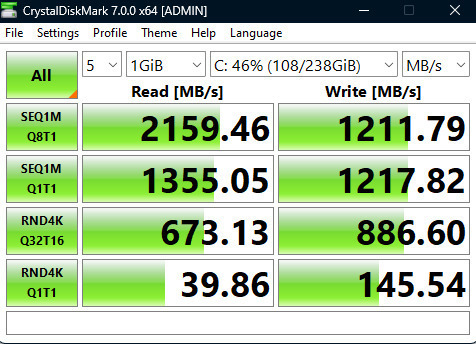
How Greek is this!!! It says 2,600 speed inside. I bought it, installed it, and have been using it for 5 months, and I finally decided to test the drive. Of course, it doesn’t reach those speeds—not on either of my motherboard’s two ports. And the funniest thing is that I went to the official website and this model is designed to run at 1,600... No verification, as usual and repeatedly, from Skroutz. Stay far, far away!
πόσο Ελλάδα ρε!!! μέσα λέει 2 600 ταχύτητα αγόρασα τον έβαλα τον χρησιμοποιώ εδώ και 5 μήνες και είπα να μπω στη διαδικασία να κάνω τεστ τον δίσκο εννοείται πως δεν πιάνει αυτές τις ταχύτητες! σε καμία από την δύο θύρες τις μητρικής μου και το πιο αστείο είναι ότι μπήκα στην επίσημη σελίδα και αυτό το μοντέλο είναι κατασκευασμένο για να λειτουργεί με 1600.. καμία επαλήθευση κλασικά και επανειλημμένα από το Σκρουτζ. μακριά μακριά !
Avoid it at all costs. I installed it on an existing system with Windows 11 for installing games and large files. I initialized it properly through the Drive Manager with assign letter, etc., but after a while... it would disappear. Every time you would see the drive at first, read-write OK, but after a few minutes it would vanish. I have racked my brain trying to find a solution, but nothing. Note that it always appeared normally in the BIOS. My system: ASUS Prime B450m a-ii, Ryzen 5 5600G, 16 GB G-skill 3600Mhz Dual DDR4, Windows 11 Pro on a SATA III 120Gb SSD.
Αποφύγετε τον καλύτερα. Τον εγκατέστησα σε υφιστάμενο σύστημα με Windows 11 για εγκατάσταση Games και μεγάλων αρχείων. Μέσα από το Drive Manager τον αρχικοποίησα κανονικά με assign letter κλπ, αλλά μετά από λίγο...εξαφανιζόταν. Κάθε φορά έβλεπες Τον δίσκο στην αρχή, read-write OK, μετά από λίγα λεπτά εξαφανιζόταν. Έχω σπάσει το κεφάλι μου να βρω λύση, τίποτα. Σημειώστε ότι πάντα στο BIOS φαινόταν κανονικά. Το σύστημα μου:
ASUS Prime B450m a-ii, Ryzen 5 5600G, 16 GB G-skill 3600Mhz Dual DDR4, Windows 11 Pro on a SATA III 120Gb SSD.
For the weather I use it, it opens all programs very quickly and overall, for a regular user, it is very decent and fast. It hasn't presented any problems to me and I believe it is a very good economical solution if you want to have an m.2 in your computer and don't want to spend too much money to buy a 500 m.2. Of course, since I have been using it for about 6 months, I am still cautious about how it will hold up over time, but for now, it works just as well as when I bought it
για τον καιρό που τον χρησιμοποιώ ανοίγει όλα τα προγράμματα πολύ γρήγορα και γενικά για ένα απλό χρήστη είναι πολύ αξιοπρεπης και γρήγορος δεν μου έχει εμφανίσει κάνε πρόβλημα και πιστεύω πως είναι μια πολύ καλή οικονομική λύση αν θέλετε οπωσδήποτε m.2 στον υπολογιστή σας και δεν θέλετε να δώσετε παρά πολλά λεφτά για να αγοράσετε ένα 500 m.2. Βέβαια επειδή τον χρησιμοποιώ κοντά στους 6 μήνες είμαι ακόμα επιφυλακτικός για το κατά πόσο θα αντέξει στην πάροδο του χρόνου αλλά προς το παρόν λειτουργεί το ίδιο καλά με όταν τον αγόρασα
How Greek is this!!! It says 2,600 speed inside. I bought it, installed it, and have been using it for 5 months, and I finally decided to test the drive. Of course, it doesn’t reach those speeds—not on either of my motherboard’s two ports. And the funniest thing is that I went to the official website and this model is designed to run at 1,600... No verification, as usual and repeatedly, from Skroutz. Stay far, far away!
πόσο Ελλάδα ρε!!! μέσα λέει 2 600 ταχύτητα αγόρασα τον έβαλα τον χρησιμοποιώ εδώ και 5 μήνες και είπα να μπω στη διαδικασία να κάνω τεστ τον δίσκο εννοείται πως δεν πιάνει αυτές τις ταχύτητες! σε καμία από την δύο θύρες τις μητρικής μου και το πιο αστείο είναι ότι μπήκα στην επίσημη σελίδα και αυτό το μοντέλο είναι κατασκευασμένο για να λειτουργεί με 1600.. καμία επαλήθευση κλασικά και επανειλημμένα από το Σκρουτζ. μακριά μακριά !
Avoid it at all costs. I installed it on an existing system with Windows 11 for installing games and large files. I initialized it properly through the Drive Manager with assign letter, etc., but after a while... it would disappear. Every time you would see the drive at first, read-write OK, but after a few minutes it would vanish. I have racked my brain trying to find a solution, but nothing. Note that it always appeared normally in the BIOS. My system: ASUS Prime B450m a-ii, Ryzen 5 5600G, 16 GB G-skill 3600Mhz Dual DDR4, Windows 11 Pro on a SATA III 120Gb SSD.
Αποφύγετε τον καλύτερα. Τον εγκατέστησα σε υφιστάμενο σύστημα με Windows 11 για εγκατάσταση Games και μεγάλων αρχείων. Μέσα από το Drive Manager τον αρχικοποίησα κανονικά με assign letter κλπ, αλλά μετά από λίγο...εξαφανιζόταν. Κάθε φορά έβλεπες Τον δίσκο στην αρχή, read-write OK, μετά από λίγα λεπτά εξαφανιζόταν. Έχω σπάσει το κεφάλι μου να βρω λύση, τίποτα. Σημειώστε ότι πάντα στο BIOS φαινόταν κανονικά. Το σύστημα μου:
ASUS Prime B450m a-ii, Ryzen 5 5600G, 16 GB G-skill 3600Mhz Dual DDR4, Windows 11 Pro on a SATA III 120Gb SSD.