

The Best Computer Monitors on the Market
You have decided to upgrade your computer screen and you don't know what to choose?
Whether you want it for simple use at home or for gaming and professional use, we have gathered the best recommendations according to our users' reviews and their features.
The best monitors for simple use
For emails, social media, internet browsing, and basic file usage, you probably won't need a monitor with advanced features. Prefer one with *FHD resolution and a size of 21-24', for comfortable viewing. A common monitor for everyday use or watching movies doesn't need to exceed 60HZ, which means 60 refreshes per second.
Standouts:
Size 22"

- Resolution: 1920x1080
- Panel Type: VA
- Refresh Rate: 75 Hz
User review we highlighted:
“Excellent price/value ratio as it is perhaps the cheapest new branded one”
Size 27"

User review we highlighted:
“For its price, it is worth it and more”
The best for professional use
If you work from home and spend many hours in front of a computer, choose a monitor with blue light filter and flicker free, which reduce eye strain, and choose a monitor with an IPS panel. In terms of ergonomics, make sure the monitor arm is height-adjustable, so the monitor is at eye level.
Skroutz tip: Ultrawide monitors are elongated monitors with a 21:9 aspect ratio and are suitable for tasks with many open windows, multitasking & video editing, and if they are over 27’’, they are ideal for you!
Size 24"

- Resolution: 1920x1080
- Panel Type: IPS
- Refresh Rate: 180 Hz
User review we highlighted:
“It has everything you need for 1080p gaming with a refresh rate of 180Hz. Nice colors, wide viewing angles, and quite good blacks.”
Size 32"

- Resolution: 2560x1440
- Panel Type: IPS
- Refresh Rate: 100 Hz
User review we highlighted:
“Excellent office monitor. The fact that you can charge the laptop and output video at the same time via USB-C is very useful, while the additional USB ports are a big help.”
The Best for Gaming
Focus on 2 characteristics: refresh rate & response time.
Because the image of a game has higher demands, you need a monitor with a refresh rate of at least 75 Hz for casual gaming. If you play First Person Shooter action games, the requirements increase, as you need to accurately see the movements of your opponents, so choose a monitor with >144hz. Similarly, for casual gaming with a 3ms response time you're fine, while for more competitive games, prefer 1ms. This way, you ensure a clear image even in intense action, without any lag
Budget

- Resolution: 2560x1440
- Size: 27"
- Panel Type: VA
- Refresh Rate: 185 Hz
- AMD FreeSync Premium Pro
User review we highlighted:
''One of the best monitors with a VA panel! Deep blacks and beautiful colors! 1ms response time. It is also a smart monitor (like smart TVs)."
Premium
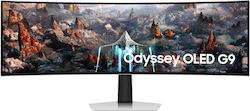
- Resolution: 5120x1440
- Size: 49"
- Panel Type: OLED
- Refresh Rate: 240Hz
- FreeSync Premium Pro, VESA Adaptive
The review we highlighted:
“very good monitor, it is glossy and oled which makes its image incredibly beautiful”
The Best for Video Editing
In this case, a large screen is necessary, as you will often have many windows open at the same time. Pay attention to color deviation when editing an image, because if your screen is not suitable, you might easily correct the colors of an image when it might not actually be needed. To ensure accurate screen performance, frequently adjust its brightness, contrast, and color.
Finally, make sure to choose a screen with a resolution of at least 2K.
Size 32"

- Resolution: 2560x1440
- Panel Type: IPS
- Refresh Rate: 180Hz
- FreeSync Premium Pro, VESA Adaptive
Highlighted user review:
"it's perfect, I play for 9 hours straight every day and it's the most wonderful thing I've seen in 2k and 180hz”
Size 39"

- Resolution: 3440x1440
- Panel Type: OLED
- Refresh Rate: 240 Hz
- FreeSync Premium Pro, G-Sync, HDR
Equipped with an OLED panel, it delivers perfect blacks, while having high contrast and good color performance. It is curved and wider compared to regular screens (ultrawide). This way, you have a more natural viewing experience and a wider field of view, while it facilitates tasks with multiple open windows and video editing. The QHD resolution allows you to have more windows open on the desktop and more detailed images in games and editing. It has a refresh rate of 240Hz, which offers a clear image and less motion blur in games.
If you want to learn even more information about monitors before making your decision, you can read the detailed guide to computer monitors!
Relevant Articles
Which computer monitor should you get? Choose the best one for your needs!
The best gaming keyboards on the market
Looking for a mouse? See what you need to consider before buying!
Be the first to leave a comment!