

Want to buy a UPS? See what you should pay attention to!
Do you want to protect your devices from sudden power outages?
Do you want to protect your devices from sudden power outages?
Do you live in an area that often has voltage fluctuations?
Then you need a UPS!
What exactly is a UPS?
It is a device that has a battery and provides electrical power to connected devices in the event of a power outage.
Come and see the main features of a UPS and which of them you should pay more attention to, based on the use you want to make of it.
1. UPS Types
There are three main types
The (VI) Line-Interactive, which continuously adjust the output voltage through the automatic voltage regulator. They offer adequate protection against voltage fluctuations as well as power outages.
The (VFI) On-Line/Double Conversion, which offer maximum protection against voltage fluctuations as well as power outages. They are recommended for sensitive devices and equipment.
Finally, the (VFD) Off-Line, which offer basic protection. They are designed to provide power in the event of an outage and not for voltage fluctuations. They are not recommended for sensitive equipment.
-
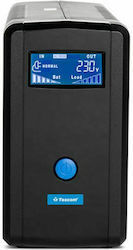 (VI) Line-Interactive,
-
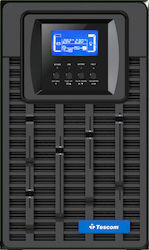 (VFI) On-Line/Double Conversion
-
 (VFD) Off-Line

2. Power
When choosing a UPS, one of the first things you should consider is its power, which is measured in Watts (W). Find a UPS that can handle the total consumption of the connected devices. To calculate the required capacity, add up the power (in watts) of all devices and, for greater safety, choose a UPS with +20% power capacity over the total you calculated.
3. Battery Life & Transfer Time
Battery life is important! For most devices, a 10-15 minute runtime is enough for a safe shutdown or to continue working until power is restored. Check the product specifications for the exact runtime of the device.
Transfer time is the time the UPS needs to switch from mains power to battery power. It is usually a few seconds or even milliseconds. The shorter the transfer time, the better!
4. Number & Type of Outlets
Make sure the UPS has enough outlets for the tasks you want to perform, and consider the types of outlets you need, standard or USB.
5. Output Waveform
The output waveform refers to the type of electrical current produced by a UPS during operation, especially when it is running from the built-in battery during a power outage.
Pure Sine Wave They are ideal for the efficient operation of sensitive and important equipment such as hospital equipment, servers, telecommunications, and laboratory equipment. It is recommended to use them with equipment that has Active PFC power supplies.
Modified Sine Wave They are ideal for everyday devices such as computers and audio/video systems.
What will you use it for? See the features you should pay the most attention to, based on the use you intend to make of it
1. Remote work
Do you work remotely and want to always have the peace of mind that, no matter what happens, you'll be able to save your work and shut down your computer safely? Then choose a (VI) Line-Interactive UPS, with at least 4 outlets, for the computer, monitor, and other essential devices.
2. Gaming
When you're playing a game, one thing matters most: having enough time to finish it. So choose either a (VI) Line-Interactive or a (VFD) Off-Line, since what you mainly need here is enough time, meaning a large battery, so you can finish it. Make sure it has at least 5 outlets, since here it is important that, besides the computer components, the router is also plugged in!
3. For small businesses
Choose (VFI) On-Line/Double Conversion UPS pure sine wave models, which offer maximum protection against voltage fluctuations as well as power outages and are the best choice for sensitive devices such as servers. Also, choose one with at least 4-5 outlets for all the necessary devices
Don't forget! Often there can be differences in a product, based on its overall features as well as its build quality. Before deciding, read other users' reviews too, to see their opinion!
Relevant Articles
The best UPS on the market
The Best Ceiling Fans for Every Use

The best laptop bags on the market
Be the first to leave a comment!