

The Best Motherboards for Every Use Case
For those building a new PC or upgrading their existing one, with AMD or Intel.
Find the ideal motherboard for your needs — whether you're upgrading an existing computer or building a system for demanding gaming and content creation.
For upgrading an AM4 PC
If your PC already has a Ryzen processor in an AM4 socket and DDR4 memory, the Gigabyte B550M Aorus Elite lets you replace the motherboard while keeping the rest of your components. It supports Zen 2 and Zen 3 processors, such as the Ryzen 7 5800X3D, and accommodates four DDR4 memory modules.
Its Micro ATX size also fits smaller cases. Two M.2 slots support fast SSDs, one with PCIe 4.0, while four SATA ports let you keep using your existing drives. It has remained a popular choice among users for a long time.
See all Gigabyte Micro ATX motherboards with a B550 chipset.
For an AM4 PC Upgrade

- Keep your processor: AM4 socket, Ryzen Zen 2 and Zen 3
- Keep your memory: 4 DDR4 slots
- Two slots for SSD drives (M.2)
- Four SATA ports for existing drives
- Fits in smaller cases: Micro ATX
Featured user review:
“This motherboard is an absolute beast and worth every penny. If you’re thinking of getting it, go for it without hesitation. It’s incredibly powerful. My AMD Ryzen 7 5800X3D processor runs as smoothly as possible on this board.”
For a new gaming PC
For a new PC with a Ryzen processor on the AM5 socket, the Gigabyte B850 Gaming WiFi6 supports Zen 4 and Zen 5 processors and four DDR5 memory modules. The PCIe 5.0 graphics card slot leaves room for a future upgrade.
Three M.2 slots, one of them PCIe 5.0, let you keep your system and game library on separate SSDs. Built-in Wi-Fi 6 and Bluetooth let you connect without a network cable, while three USB-C ports on the rear support the latest peripherals.
Browse all Gigabyte ATX B850 motherboards with Wi-Fi.
For a New Gaming PC

- For next-generation Ryzen: AM5 socket, Zen 4 and Zen 5
- Next-generation graphics card slot (PCIe 5.0)
- Three SSD slots (M.2)
- Wireless connectivity: Wi-Fi 6 and Bluetooth
- Three USB-C ports on the rear
Featured user review:
“Paired with a 9800X3D and 9060 XT. No problems after 4 months of use.”
For demanding gaming and content creation
In a system with a high-end Ryzen processor, multiple drives, and fast peripherals, the Gigabyte X870E Aorus Elite WiFi7 features four M.2 slots, three of which support PCIe 5.0. This lets you keep your system, projects, and video files on separate high-speed drives.
Two USB4 Type-C ports connect high-speed external drives and docks, while Wi-Fi 7 provides next-generation wireless connectivity. It supports Ryzen Zen 4 and Zen 5 processors and has a PCIe 5.0 slot for your graphics card.
For demanding gaming and content creation

- Four M.2 SSD slots, three of which support PCIe 5.0
- Two USB4 Type-C ports for high-speed peripherals
- Next-generation wireless connectivity: Wi-Fi 7
- Next-generation graphics card slot (PCIe 5.0)
- Optical audio output for speakers and amplifiers
Featured user review:
“I paired it with an R9 9900X3D, 64GB of DDR5 RAM, an RTX 3090, and two M.2 drives for storage, and I have to say it’s a beast. You’ll see it running major titles at 1440p with everything set to Ultra High at a minimum of 90 FPS. It’s a motherboard that’s truly worth it, and it will prove its value in the future.”
For small PCs
Mini ITX cases fit next to a TV or on a small desk. The ASRock B850I Lightning WiFi lets you build a complete AM5 system in one, with a PCIe 5.0 slot for a graphics card and support for Ryzen Zen 4 and Zen 5 processors.
Two M.2 slots, one of them PCIe 5.0, provide storage without SATA cables cluttering up the compact case. Built-in Wi-Fi 6 saves you from needing a separate network card, and BIOS Flashback lets you update the BIOS even without a processor installed. It supports two DDR5 memory modules.
See all Mini ITX motherboards for AM5.
For Small PCs
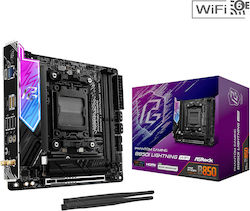
- For small cases: Mini ITX size
- Next-generation graphics card slot (PCIe 5.0)
- Two SSD slots (M.2)
- Wireless connectivity: Wi-Fi 6 and Bluetooth
- Update the BIOS without a processor (BIOS Flashback)
Featured user review:
“A motherboard with good build quality and flawless operation.”
For Intel Core Ultra processors
For a computer with an Intel Core Ultra 5, 7 or 9 processor in an 1851 socket, the ASRock B860 Pro-A offers what a modern system needs: four DDR5 slots and a PCIe 5.0 slot for a graphics card.
Three M.2 slots, one of them PCIe 5.0, and six USB 3.2 ports along with one USB-C port on the rear provide plenty of connectivity for drives and peripherals. It has HDMI and DisplayPort outputs for the processor’s integrated graphics. It doesn’t have Wi-Fi, so you’ll need to connect it to the network with an Ethernet cable.
For Intel Core Ultra processors

- For Intel Core Ultra 5, 7, and 9: Socket 1851
- Four DDR5 memory slots
- Next-generation graphics card slot (PCIe 5.0)
- Three SSD slots (M.2)
- HDMI and DisplayPort video outputs
The Pro-A series is designed for increased stability, durability, and efficiency, offering reliable performance, user-friendly features, and enhanced aesthetics, making it ideal for everyday computing needs.
Before choosing a motherboard, start with the processor: its socket determines which motherboards are compatible, and the motherboard determines whether you'll use DDR4 or DDR5 memory. Also check which sizes your case supports—ATX, Micro ATX, or Mini ITX—and how many SSDs you want to install.
This article was created with the help of AI and reviewed and edited by the Skroutz team.
Relevant Articles

The Best Graphics Cards for Every Use

The Best Processors for Every Use
Graphics Card Buying Guide
Be the first to leave a comment!