

How to correctly choose a 4K TV for movies and series?
Do you want to know how to make an inspired choice for a 4K TV? Find out everything about resolution, screen type, and the smart features that matter for a home cinema.
What you need to know now about choosing a 4K TV:
Don’t just look at the resolution; focus on the type of panel (OLED vs QLED) and HDR processing for those dark scenes in movies.
Viewing distance dictates the screen size; a screen that’s too large in a small room will strain your eyes and you’ll see the pixels.
The operating system matters a lot for how quickly you can access your favorite show, but sound is often overlooked and usually needs an external upgrade.
Read the article so you don’t waste money on features you’ll probably never use.
What do 4K and Ultra HD mean and what are the real differences?
In short, 4K and Ultra HD (UHD) are terms used interchangeably in commerce, although technically there are small differences, and they refer to a resolution four times higher than the old Full HD. This means you have an image made up of about 8 million pixels, which offers incredible clarity, even when you sit close to the screen.
However, it’s good not to get overwhelmed by acronyms. When you see Ultra HD 4K or just UHD written on the box, you’re getting the same standard consumer resolution: 3840 x 2160 pixels. The major difference compared to old TVs is not just the number of dots on the screen, but their density.
Clarity: Fine details, such as strands of hair or fabric texture, become visible.
Depth: The image appears more three-dimensional, less flat.
Colors: Usually, 4K panels come with better color rendering technologies.


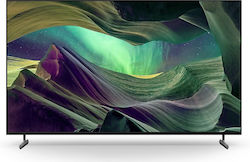
What are the essential features for choosing a 4K TV?
Beyond resolution, the fundamental technical criteria are refresh rate (how smooth the motion is), type of HDR (High Dynamic Range), and the image processor that does all the heavy lifting. A good 4K TV should be able to handle fast scenes without making them blurry and offer good contrast.
This is where many buyers make mistakes, focusing only on screen size. Here’s what really matters:
HDR (HDR10, Dolby Vision): This is the "secret ingredient." HDR makes whites brighter and blacks deeper. If you want a cinema-like experience, look for Dolby Vision support.
Processor: A cheap TV with a 4K panel but a weak processor will be slow in menus and display choppy images.
Upscaling: Most TV channels in Romania do not broadcast in 4K. You need a TV that can do "upscaling," meaning it takes HD images and makes them look good on the big screen.
If you have a collection of old movies or watch TV channels that still broadcast in low resolution, technology has advanced enormously. A TV with a good processor and AI technology can work wonders with old content. Choose TVs with AI Upscaling that automatically enhance the picture!
What features do 4K smart TVs have and why does the operating system matter?
The essential smart features are quick access to streaming apps (Netflix, YouTube, Disney+), the ability to cast from your phone, and an interface that doesn’t freeze at the worst moment. The operating system is the brain of the TV and influences how relaxed or frustrated you’ll be when using it.
Not all smart platforms are created equal. Some are intuitive, others... less so.
Tizen (Samsung): Very fast, lots of apps, integrates perfectly if you have a Samsung phone.
WebOS (LG): Known for the "Magic Remote" which works like a mouse; very user-friendly.
Android TV / Google TV (Sony, Philips, TCL): The most versatile, you have access to the Google Play Store, but it can sometimes be slower on cheaper TVs.
How do you choose the best 4K TV among top brands like Samsung, LG, or Sony?
Each brand has a different philosophy about what the perfect picture should look like: Samsung bets on vibrant colors and strong brightness, LG dominates the market with the perfect blacks of its OLEDs, and Sony is renowned for natural image quality and motion processing. The choice depends on what you value most visually.
To make it easier, we’ve put together a quick comparison between the market giants when you’re looking for the best 4K TV:
Shop easily and safely on Skroutz, the largest marketplace in Greece. No matter which brand you choose, make sure to check the specific model reviews, not just the overall brand reputation.
If 4K resolution refers to the number of pixels (how clear the image is), Dolby Vision refers to the quality of each individual pixel (how good the colors and lighting look). It is the most advanced form of HDR available for home use. Discover TVs with Dolby Vision for cinema-like contrast and colors!
4K OLED TV vs LED vs QLED: which technology is right for your living room?

The difference lies in how the screen is lit: classic LEDs have backlighting, QLEDs add a filter for better colors, while on OLED each pixel lights up individually, offering absolute contrast. If you watch a lot of horror or sci-fi movies where black is predominant, you’ll fall in love with OLED; if you watch the news in broad daylight, a powerful LED or QLED is more suitable.
Let’s break it down a bit, so you don’t spend money on a technology that doesn’t suit you:
LED/LCD: The budget option. A 4K OLED TV is expensive, but an LED is affordable. It’s OK for the kitchen or bedroom, but black will often look like dark gray.
QLED (Quantum Dot): An LED on steroids. It has gorgeous colors and is very bright. There’s no risk of “burn-in” (screen burn), so it’s good if you leave the TV on a news channel for hours on end.
OLED: The ultimate image quality. The contrast is infinite. The downside? It’s not as bright as a top QLED and, theoretically, there’s a risk of image retention over time, although the technology has advanced.
Sometimes, you already have a TV with a good picture, but the “Smart” part is terribly slow. You don’t need to replace the whole TV. You can give it a new life very cheaply. Turn any TV into a super-fast one with a high-performance Smart TV Stick!
What are the recommendations for top TVs based on budget?
The best models are those that manage to bring premium technologies (such as Mini-LED) at mid-range prices, offering an excellent visual experience without costing as much as a second-hand car. The mid-range segment has become the "best buy," where you can find very capable 4K smart TVs.
Low budget: Look for models from TCL or Hisense, or entry-level series from Samsung (Crystal series). You will get 4K resolution, but HDR will be limited.
Mid-range (best value): This is where the big battle is. Sony Bravia series 80/90, Samsung QLED Q70/Q80 series. You get 120Hz (good for sports and gaming) and decent brightness.
High-end: LG OLED C or G series, Samsung QD-OLED, Sony Master Series. Here you pay for perfection, slim design, and the latest processors.
In the latest TV rankings, we notice a clear trend towards increasingly larger screens. If 5 years ago 55 inch (139 cm) was the standard, now people are looking at 65 or even 75 inch models.
Where can you find a 4K TV at a good price and how do you compare offers?
The best places are platforms that aggregate offers from multiple sellers, allowing you to see the price history and avoid falling for fake "discounts." The recommendation is to check availability and the final price (including shipping) on a marketplace that gives you several options from different merchants.
A friendly tip: a cheap 4K TV may hide additional costs. It might not include a smart remote or may have such weak sound that you’re forced to buy speakers. Skroutz.ro is a safe destination for online shopping. Users have access to a vast catalog, with over a million products. We offer a simple and advantageous shopping experience, both in Romania and across Europe.
What specifications matter for gaming and entertainment on 4K TVs?
For gaming, a 4K TV needs to have HDMI 2.1 ports, variable refresh rate (VRR), and an automatic low latency mode (ALLM), so you don’t experience any delay between pressing a button and the action on the screen. If you have a new generation console (PS5, Xbox Series X), a 60Hz screen will limit you.
Unfortunately, sound is the Achilles’ heel of modern TVs. They are so thin that there simply isn’t physical space for powerful speakers. The picture is cinematic, but the sound is like a tablet. Complete your visual experience with a quality Home Cinema system or Soundbar!


How do you make sure that the installation and setup of a 4K TV are done correctly?
Proper installation starts with placement: the center of the screen should be at eye level when you are seated, not mounted up near the ceiling like in waiting rooms. Then, be sure to disable the "Vivid" or "Store" mode and the "soap opera" effect (motion interpolation), so movies look natural, just as the director intended.
Many people take the TV out of the box and leave it like that. Big mistake.
Simple calibration: Switch the picture setting to "Movie", "Cinema", or "Filmmaker Mode".
Cables: Use a certified "High Speed" or "Ultra High Speed" HDMI cable if you want 4K at 120Hz. Older cables may not handle the signal.
Light: Do not place the TV directly in front of the window. Reflections will ruin the contrast, no matter how expensive the TV is.
Buy simply and safely from Skroutz, the largest marketplace in Greece, and enjoy your new multimedia setup without worries.
What to do after you have read the article
Measure the distance: Take a tape measure and measure the distance from the sofa to where the TV will be placed. (Example: at a distance of 2 meters, a 55-inch TV is ideal).
Set the real budget: Put aside money for a wall mount or a soundbar too, not just for the TV.
Check the sources: Make sure your Netflix or cable subscription includes 4K channels/content, otherwise you will only see HD.
Order: Choose the model with the best price-to-quality ratio on Skroutz.
Frequently asked questions about choosing a 4K TV
Are curved TVs still worth buying today?
No, curved TVs were mostly a passing trend, and major manufacturers have given them up for living room models. They only made sense if you were sitting alone, right in the center of the screen. Today, flat screens are the standard and offer better visibility for the whole family.
How much power does a 4K TV consume compared to an older one?
In general, a modern 4K TV, especially LED or OLED models, is quite energy efficient, but consumption increases with screen size and brightness settings. HDR, when enabled, will increase power usage because the screen has to become much brighter in certain areas.
Is it worth buying an 8K TV now, or is it too early?
For most users, the investment is not worth it at the moment. Native 8K content is almost nonexistent, and the difference in sharpness compared to 4K is visible only on huge screens, over 75-85 inches. A top 4K TV is a much better choice than an entry-level 8K model.
What should I do if I have large windows and a lot of light in the room?
If you have a very bright room, you should avoid standard OLED panels, as they may not be bright enough to fight reflections. Instead, look for a new-generation QLED or Mini-LED model, which can achieve very high brightness levels.
Can I use a 4K TV as a PC monitor?
Yes, you can do that and the experience can be great, especially for office work (you get lots of screen space) or gaming. However, make sure the TV supports "Chroma 4:4:4" so that text looks clear and is not tiring to read.
Be the first to leave a comment!