

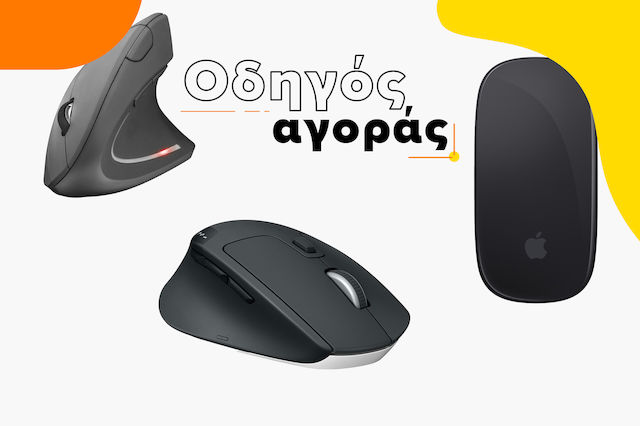
Οδηγός αγοράς για Ποντίκια
Όλα όσα χρειάζεται να ξέρεις πριν αγοράσεις ποντίκι για τον υπολογιστή σου!
Είσαι σε αναζήτηση για νέο ποντίκι για τον υπολογιστή σου; Έχεις μπερδευτεί με τις χιλιάδες επιλογές που υπάρχουν εκεί έξω και δεν ξέρεις πως και σε ποιο προϊόν να καταλήξεις; Πάμε να δούμε αναλυτικά τους διαφορετικούς τύπους και τις επιμέρους δυνατότητες και λειτουργίες των διάφορων συσκευών, που θα σε βοηθήσουν να τα διαχωρίσεις και να καταλήξεις στο κατάλληλο για τις ανάγκες και για τη χρήση που θέλεις να κάνεις.

Ασύρματο ή ενσύρματο;
Ένα από τα πιο βασικά ερωτήματα που τίθενται όταν έρχεται η στιγμή της αγοράς ποντικιού έχει να κάνει με τη σύνδεση με τη συσκευή για την οποία πρόκειται να χρησιμοποιηθεί. Τα τελευταία χρόνια η αγορά των ασύρματων ποντικιών έχει αυξηθεί, αλλά σε ποιες περιπτώσεις ενδείκνυται η χρήση τους και σε ποιες ένα ενσύρματο ποντίκι είναι πιο αποδοτικό;
Ενσύρματα ποντίκια
Πρόκειται για τον πρώτο και πολύ διαδεδομένο τρόπο σύνδεσης των ποντικιών με τη συσκευή ανάγνωσης, μέσω καλωδίου. Λόγω της αμεσότητας της σύνδεσης, υπάρχει καλύτερη και πιο σίγουρη ανταπόκριση, καθώς, επίσης, δεν χρειάζονται μπαταρία για να λειτουργήσουν, με αποτέλεσμα να μην υπάρχει κίνδυνος τερματισμού της λειτουργίας σε χρόνο που δεν πρέπει.
Ενδείκνυνται για εργασιακούς χώρους, όπου υπάρχουν σταθεροί υπολογιστές ή σταθερά setup για τους εργαζομένους και δεν απαιτείται συχνή μετακίνηση.
Παρόλα αυτά, υπάρχει περιορισμός ως προς το χώρο που μπορεί να κινηθεί το ποντίκι, ο οποίος εξαρτάται από το μήκος του καλωδίου. Επίσης, το καλώδιο με το πέρασμα του χρόνου μπορεί να υποστεί φθορές και να επηρεάσει αρχικά την απόδοση του ποντικιού, έως και να καταστραφεί εντελώς.
Ασύρματα ποντίκια
Από την άλλη πλευρά τα ασύρματα ποντίκια, όπως μαρτυρά και η ονομασία τους συνδέονται μέσω ασύρματης πηγής (συνήθως Bluetooth) με τον υπολογιστή. Έχουν μεγάλη εμβέλεια χρήσης, μπορούν να μεταφερθούν με μεγαλύτερη ευκολία και μπορούν να χρησιμοποιηθούν από οπουδήποτε θέλετε (εντός εμβέλειας) για να ελέγξετε μία απομακρυσμένη συσκευή.
Ενδείκνυνται για όσους ταξιδεύουν πολύ ή αλλάζουν συχνά εργασιακό χώρο λόγω της φύσης της δουλειάς τους. Επίσης, για οικιακή χρήση, σε περιπτώσεις που θέλετε να ελέγξετε τον browser σε μία έξυπνη τηλεόραση από τον καναπέ ή έχετε μεγάλο γραφείο και η εύκολη μετακίνηση από τη μία πλευρά στην άλλη είναι αυτό που ψάχνετε.
Παρόλο που ακούγονται ως η ιδανική λύση, αξίζει να σημειωθεί ότι έχουν την ανάγκη για αλλαγή της μπαταρίας ή φόρτιση μετά από κάποιο διάστημα χρήσης, κάτι που μπορεί να προκαλέσει ξαφνική διακοπή της λειτουργίας. Ενώ, υπάρχει και η πιθανότητα σε χώρο με πολλές ασύρματες συσκευές, να επηρεαστεί η αποδοτικότητά τους.
Ποιοι τύποι υπάρχουν;
Τα ποντίκια μπορούν να χωριστούν σε 3 διαφορετικούς βασικούς τύπους και ο διαχωρισμός γίνεται με βάση το μέγεθος και το σχήμα τους. Μπορείς να επιλέξεις το ιδανικό για ´σένα αναλόγως τη χρήση που πρόκειται να κάνεις, αλλά και την εργονομία που θέλεις να έχει, σε σχέση με το χέρι σου.
Vertical
Αυτός ο τύπος ποντικιού είναι ειδικά σχεδιασμένος ώστε το χέρι, που το χειρίζεται, να βρίσκεται σε κατακόρυφη θέση, όπως μαρτυρά και η ονομασία του. Σε αυτή τη θέση το χέρι καταπονείται λιγότερο και ο σχεδιασμός αυτός, καθιστά το ποντίκι πιο εργονομικό και φιλικό προς το χρήστη.
Ένα τέτοιο ποντίκι ενδείκνυται για όσους δουλεύουν αρκετές ώρες και θέλουν να το κάνουν ξεκούραστα, χωρίς να καταπονούν το χέρι τους ή για όσους έχουν κάποιο θέμα στο χέρι ή τον καρπό, από την πολυετή χρήση άλλων ποντικιών και προτιμούν να μεταβούν σε κάτι πιο εξειδικευμένο και κατάλληλο για την κατάστασή τους.
Mini (Notebook)
Σε αυτή την κατηγορία εμπίπτουν τα πιο μικρά σε μέγεθος ποντίκια. Είναι πιο απλά σε σχεδιασμό και είναι κατασκευασμένα για χρήση σε συνδυασμό με laptop, όπου η συχνή μετακίνηση και μεταφορά από ένα μέρος σε ένα άλλο είναι γεγονός.
Αυτός ο τύπος ποντικιού είναι ιδανικός για όσους ταξιδεύουν συχνά για επαγγελματικό σκοπό ή η εργασία τους επιβάλλει τη συχνή μετακίνηση από χώρο σε χώρο, αλλά και για τυπική οικιακή χρήση του laptop ή του tablet, για παράδειγμα.
Standard
Ενώ στην τελευταία κατηγορία ανήκουν όλα τα υπόλοιπα ποντίκια. Ο λόγος για τα κλασικά ποντίκια τόσο σε μέγεθος και σχήμα, όσο και στη χρήση. Δεν έχουν κάποια ιδιαιτερότητα και δεν προσφέρουν κάτι περισσότερο στον χρήστη.
Πρόκειται για την πλειοψηφία των ποντικιών, που χρησιμοποιεί ο μέσος άνθρωπος στο σπίτι ή στην δουλειά του.
-
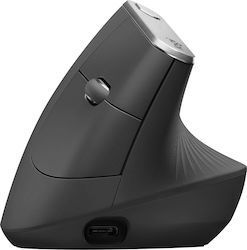 Vertical
-
 Mini (Notebook)
-
 Standard


Δεξιόχειρας ή αριστερόχειρας;
Μιας και πλέον δεν υπάρχει η προκατάληψη για τους αριστερόχειρες και η πεποίθηση ότι η δεξιοχειρία είναι η σωστή οδός, τα ποντίκια πλέον, στα οποία παίζει μεγάλο ρόλο ποιο χέρι χρησιμοποιεί ο καθένας για τις καθημερινές δραστηριότητες, στην πλειοψηφία τους προορίζονται για χρήση και με τα 2 χέρια. Μπορείς, φυσικά, να βρεις και μεμονωμένα για δεξιόχειρες ή αντίστοιχα -σε μικρότερο ποσοστό- για αριστερόχειρες, αν ψάχνεις κάτι πιο εξειδικευμένο.
Ο αισθητήρας παίζει ρόλο;
Η απάντηση είναι και φυσικά παίζει ρόλο, μιας και επηρεάζει την ευαισθησία στην ανταπόκριση, την ακρίβεια στη χρήση, καθώς και την απόδοση σε σχέση με την επιφάνεια στην οποία χρησιμοποιείται το ποντίκι κάθε φορά.
Υπάρχουν αρκετοί διαφορετικοί αισθητήρες, με διαφορετικές τεχνολογίες, που απευθύνονται και σε διαφορετικούς χρήστες. Οι αισθητήρες με τεχνολογίες optical, laser και bluetrack είναι οι 3 κατηγορίες που συναντάμε πιο συχνά.
Optical
Ο συγκεκριμένος αισθητήρας είναι μέτριας ευαισθησίας, ενώ διαθέτει καλή ακρίβεια. Τα ποντίκια με τέτοιου είδους αισθητήρα αντενδείκνυται να χρησιμοποιηθούν σε επιφάνειες που αντανακλούν το φως, ενώ μπορούμε να πούμε ότι είναι ιδανικά για καθημερινή χρήση. Αποτελούν την πλειοψηφία και είναι πιο εύκολα στη χρήση.
Laser
Οι αισθητήρες τύπου laser έχουν μεγάλη ευαισθησία και κατά συνέπεια υψηλότερη ακρίβεια. Τα ποντίκια με τέτοιου είδους αισθητήρες μπορούν να λειτουργήσουν στην πλειονότητα των επιφανειών και είναι ιδανικά για γραφίστες και επαγγελματίες.
BlueTrack
Σε αυτό τον τύπο αισθητήρα συναντάμε, επίσης, τόσο μεγάλη ευαισθησία όσο και μεγάλη ακρίβεια. Τα ποντίκια που διαθέτουν αισθητήρα bluetrack λειτουργούν σε οποιαδήποτε επιφάνεια.
Ακόμη, συναντάμε 3D αισθητήρες σε ποντίκια που προσφέρουν κίνηση σε 3 άξονες και απευθύνονται σε επαγγελματίες που χρησιμοποιούν ειδικές επαγγελματικές εφαρμογές, π.χ. σχεδιασμός τρισδιάστατων μοντέλων. Υπάρχουν και οι αισθητήρες υψηλής ακρίβειας BlueSpot που λειτουργούν σε όλες σχεδόν τις επιφάνειες όπως ξύλο, γρανίτη, χαλί κλπ. Τέλος, οι αισθητήρες με τεχνολογία V-Track η οποία επιτρέπει τη χρήση ακόμα και σε επιφάνειες από γυαλί ή μάρμαρο.

Επιπλέον δυνατότητες & λειτουργίες
Bluetooth
Η σύνδεση μέσω Bluetooth σε ένα ποντίκι δίνει τη δυνατότητα της ασύρματης χρήσης, χωρίς την ανάγκη καλωδίων. Μπορεί να επιτευχθεί είτε άμεσα με τον υπολογιστή, όπως laptop, που έχει ενσωματωμένο Bluetooth, είτε μέσω κάποιου στικ για χρήση σε σταθερούς υπολογιστές, για παράδειγμα, που δεν διαθέτουν αυτή τη λειτουργία.
Εργονομικό
Ένα ποντίκι θεωρείται εργονομικό όταν επιτρέπει στα χέρια, τους αγκώνες και τους καρπούς να διατηρούνται σε φυσική θέση, με αποτέλεσμα υψηλότερη παραγωγικότητα, μείωση κόπωσης και αποφυγή παθήσεων, όπως αυτή του συνδρόμου του καρπιαίου σωλήνα. Ενδείκνυται για όσους δουλεύουν αρκετές ώρες καθημερινά σε υπολογιστή και ψάχνουν για την κατάλληλη λύση, ώστε να δουλεύουν παραγωγικά, αλλά να μην ταλαιπωρούν το σώμα τους.
Trackball
Το ποντίκι με trackball, που διαθέτει μία μπίλια είτε στο κέντρο είτε στα πλάγια, η οποία είναι υπεύθυνη για την πιο ξεκούραστει χρήση, προκαλεί 20% λιγότερη κόπωση των μυών στο χέρι, τον καρπό και το αντιβράχιο σε σχέση με ένα συνηθισμένο ποντίκι.
Αθόρυβο
Ένα ποντίκι για να θεωρηθεί αθόρυβο, θα πρέπει να εξαλείφει τους περιττούς θορύβους, προστατεύοντας την υγεία και την παραγωγικότητα του χρήστη. Στην ουσία, ένα αθόρυβο ποντίκι προσφέρει την ίδια αίσθηση κλικ, χωρίς το χαρακτηριστικό ήχο του "κλικ", έχοντας τη δυνατότητα να προσφέρει μείωση θορύβου έως και πάνω από 90%.

Μην ξεχνάς! Λαμβάνοντας υπόψη τα παραπάνω επιμέρους χαρακτηριστικά και συνδυάζοντας εκείνα που ταιριάζουν στις ανάγκες και τη χρήση που κάνεις στο ποντίκι σου, μπορείς να καταλήξεις στην ιδανική επιλογή για εσένα. Πριν αποφασίσεις, μπορείς να ρίξεις μια ματιά και στις κριτικές άλλων χρηστών, ώστε να δεις και τη δική τους γνώμη και εμπειρία, που μπορεί να σε βοηθήσουν να καταλήξεις πολύ πιο εύκολα στην τελική απόφαση.
Αν είσαι -ή σκέφτεσαι να γίνεις- gamer και ενδιαφέρεσαι για ποντίκι, μπορείς να ρίξεις μια ματιά στον αναλυτικό οδηγό για gaming ποντίκια.
Σχετικά Άρθρα

Τα καλύτερα ποντίκια της αγοράς

Τα καλύτερα Πληκτρολόγια της αγοράς
Ψάχνεις ποντίκι; Δες τι πρέπει να προσέξεις πριν την αγορά!

Άφησε πρώτος το σχόλιό σου!